FS7: A million dumb basic questions about LUTs

I disagree that you "can't really even begin" to correct an image with Logarist. It is a perfectly acceptable tool for primary grading. Logarist is not limited to Adobe, but is a free plug-in that can be used in other NLEs. In other NLEs, you can use Channel Blend functionality as well as Curves that give you ample fine control over the RGB channels with using the RGB Parade as your guide. I have graded quite a few things with it and have no complaints at all. There are many roads to Rome with regard to color correction and Logarist is simply one of them. For secondary correction, where you are just focused on a part of the image, I do think Resolve with its power masks has an advantage, but if the overall image is fine, there's nothing wrong with Logarist, IMHO. Logarist is really a collection of LUTS that allow you to work inside the Logarist color space within your NLE, so saying that you can grade with it is like saying you can't grade with LUTS.

I was curious if it was possible to get a copy of the LUTs that Lenny made in LUTCalc. I would be interested in trying them, especially if they are giving good results.
 
Last edited:
I had a strange experience with Resolve 14 the new version out of Beta. I imported a bunch of shots and was experimenting with a couple of LUT's in one shot when all the sudden all my shots had the LUT installed in them. I cannot for the life of me figure out what I did or how to get the LUT out . Nothing shows that a LUT is installed anywhere and anything I click to remove the LUT's does nothing. Maybe I inadvertently hit a button that made a group or something but I can't figure it out. I tried a new timeline but the shots always show the LUT installed. I don't even know which LUT it is.

Help?
 
go to you project settings, color management tab, and then under look up tables make sure you have nothing loaded there. This section is where you can override all your clips to have a default LUT on them.
 
glad I could help you Lenny.


karma17, You can define color correction any way you want. If something looks good to you and you are happy with the end result no matter how you got there, then it is "color corrected". But to do accurate and precise work (even on a primary level) that is also quick and efficient requires the extra control from the tools. I'm not talking about masks, power windows, etc.. none of that. For primaries I can get the exact same result as Davinci by using the two filters I mentioned on a Premiere or After Effects timeline. I would not be able to do that by only using Logarist. So which makes sense to learn and use from a practical point of view going forward? The tool that can only do 80% of the job or the one that can do 100% even when at times you may only need less?
 
go to you project settings, color management tab, and then under look up tables make sure you have nothing loaded there. This section is where you can override all your clips to have a default LUT on them.

Aditionally in resolve there is a drop down in node - this clip or entire timeline.

I often use the latter for sharpening which I will now comment on..
 
I avoid sharpening and let the lensing determine that for me.

This is a typical response from a "dp" rather than someone who understands digital aquisition.

Unless you are shooting 3ccd or f35 the image exits your glass and then passes through an anti moire filter - which is a filter that blurs the optical image.

Meaning any glass is not the defining factor in image sharpness (yes soft glass may not hit the resolving power of the sensor/amf combo making it the defining factor)


This blurred optical image then hits a sensor whose surface is at least 2/3 not collecting a colour - Ie an rgb sensor the r and g pixels are not collecting b data (etc)

I'm not too technical but maybe this is called the nyquist limit.

So the designers of digital aquisition knows this flaw and then various tricks are performed to get around this known flaw and deliver a digital picture that is "believable". One of these tricks is called sharpening.

Therefore sharpening is "normal" as per my quote above.
 
Last edited:
Obviously some cameras don't have anti moire filters (note fs7 has one) and we know the fun that causes.

The way to deal with that is to diitally blur then sharpen the image.

---

If one was delivering to a really competent client one should not sharpen.

The reason for this is that a technician creating multiple deliverables (dcp, iPhone, YouTube file) will pick the appropriate level of sharpening for resolution of each specific deliverable. (The same would go for noise reduction)
 
Last edited:
What levels of sharpening are typical for your jobs Morgan, and which tools do you use for it. ( Resolve or Premiere).
 
I use resolve

46 or 47 .

If one is a really tricky chap one could consider sharpening via a qualified node and only sharpen the mid tones and leaving the shadows unsharpened which can excaserbate shadow noise.

If one is trying to replicate film bloom one could actually blur the highlights and then add a film grain filter. Blurring without use of subsequent grain tends to look crap.
 
without being able to adjust black, mid, and white points for R G B channels you can't really even begin to color correct an image. You'd be far better off adding curves filter and fast color corrector. For basic color correction those are the only 2 filters you really need if you want to keep it in Premiere. [...] You can define color correction any way you want. [...] But to do accurate and precise work (even on a primary level) that is also quick and efficient requires the extra control from the tools. I'm not talking about masks, power windows, etc.. none of that. For primaries I can get the exact same result as Davinci by using the two filters I mentioned on a Premiere or After Effects timeline. I would not be able to do that by only using Logarist. So which makes sense to learn and use from a practical point of view going forward? The tool that can only do 80% of the job or the one that can do 100% even when at times you may only need less?

To say that adjusting the black, mid, and white points of the red, green, and blue channels is the best form of basic color correction is to totally dismiss the value of color science, color management, and color processing of raw images. You are saying you can get better color with those old simple tools than by getting the gain and white balance right in your camera. You are saying that raw image processors need not bother with exposure or white balance sliders.

The argument is ridiculous on its face, and makes me think you've never really tried using color management or color science for color correction.

I have no doubt you are quite adept with the old simple tools, in large part because you have a lot of experience and you know how to get things almost perfect in the camera. I think you overestimate other people's abilities. I respect what you do and I think a lot of people here really value your opinions, but in this case I think this is not good advice for the average user.

For a guy with "a million dumb basic questions about LUTs", more advanced color correction is going to help him get better images with less effort. And after the basic color correction is done, you still have the option of adjusting the black, mid, and white points of the red, green, and blue channels, for example if you want to do different things to the shadows and highlights. But you shouldn't start with those adjustments. There's a reason every raw image processor has its exposure and white balance sliders way up at the top of the color correction controls. Logarist provides these basic controls with more ease and accuracy than the simple tools you're talking about. And it removes the complications of guessing which LUTs match your camera's color space, the difference between video levels and data levels, what to do with super-whites, and which color correction controls you should start with, because I've figured out all of that for you. And it's free, so why not try it? I made Logarist because I believe it's a better way of color correcting and a lot of people can benefit from it.
 
Last edited:
This is a typical response from a "dp" rather than someone who understands digital aquisition.

Unless you are shooting 3ccd or f35 the image exits your glass and then passes through an anti moire filter - which is a filter that blurs the optical image.

Meaning any glass is not the defining factor in image sharpness (yes soft glass may not hit the resolving power of the sensor/amf combo making it the defining factor)


This blurred optical image then hits a sensor whose surface is at least 2/3 not collecting a colour - Ie an rgb sensor the r and g pixels are not collecting b data (etc)

I'm not too technical but maybe this is called the nyquist limit.

So the designers of digital aquisition knows this flaw and then various tricks are performed to get around this known flaw and deliver a digital picture that is "believable". One of these tricks is called sharpening.

Therefore sharpening is "normal" as per my quote above.

Believe me, I deliver plenty of my own material and pipe it through Resolve. To my eye sharpening never makes the material I've shot look better.
There's only one exception and that was when I was blowing cars up for a series with the Amira at 200 fps. I wanted to draw attention to the detail in the explosion, the glass shattering, gas vapor burning, shrapnel from the dirt planted in our gas bomb, etc.

A better method to me is the use of contrast to create the illusion of sharpening. May not be your cup of tea. It's what works for me.
 
Chaps - I only defined what is "normal" - there are no rules. Don't sharpen, use promist, use ancient anamorphics do whatever floats your and your audiences boat :)
 
Now a personal note. I've shot with very sharp lenses - canon cine - my 50-300 - and also my "shi-tty old Nikons" a short with a character with facial hair similar to bills :)

The sharp lenses did indeed render an unpleasant over sharpened look. Simply you are feeding the AA filter with too much resolution data and relying on the AA filter actually doing its job*. My personal opinion is that finding glass with about 3.8k resolution and sharpening in post will render the finest (to my eye) results.

Additionally I add grain!

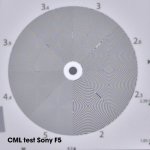
If you check CML tests most cameras do moiree at thier limit - best to avoid this with the source signal under resolving the AA filter :)

*subsequent images posted show the AA filter not to be doing its job.
 
Last edited:
My empirical guess above ws 3.8k

Looking at CML one might conclude best to feed the sensor with a lens that has a resolution about 3.2 K which would completely elliminat the problems seen at 3.4k?

F5.jpg
 
Last edited:
Back
Top