
I had a shoot this weekend and it went well. The 7Q images looked amazing. I'm so impressed.
But have any of you guys experienced this with the 7Q?
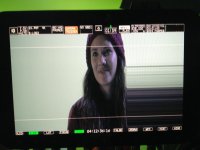
When using the "Zoom" button for focus assist / punch in, quite a few times the image would stretch / scale really badly. See attached image. The only way to get rid of it was to disconnect the battery and re-power the 7Q. This happened probably about 10 times throughout the day and it kind of freaked the director out. Most of the time, the zoom was fine but it did happen pretty regularly throughout the day.
Is there anyway to get rid of this without disconnecting the battery?
Thanks
But have any of you guys experienced this with the 7Q?
When using the "Zoom" button for focus assist / punch in, quite a few times the image would stretch / scale really badly. See attached image. The only way to get rid of it was to disconnect the battery and re-power the 7Q. This happened probably about 10 times throughout the day and it kind of freaked the director out. Most of the time, the zoom was fine but it did happen pretty regularly throughout the day.
Is there anyway to get rid of this without disconnecting the battery?
Thanks