7Q Alias / moire pixel peeping tests. Pro-Res file for download

Gene Sung

Veteran
So I had some time off and I wanted to spend the time pixel peeping the 7Q and learning about it. I was really curious about the aliasing and moire. So I went out and shot some tests. You can download the Pro-Res 4:2:2 LT files from the links provided below. They are not color corrected or altered in any way. I did not post on Vimeo because then people complain about the Vimeo artifacting, so i kept it as Pro-Res LT. Why LT instead of HQ? It’s because LT is about 1/3rd the size HQ, and on moderate grades, you cannot really tell the difference between LT and HQ (yes I pixel peep’d that as well).

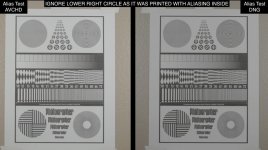
Before the 7Q came out, people were predicting gloom and doom for the 2K RAW. Many people were predicting Alias / Moire hell. This definitely got me worried. So for the aliasing / moire test, I picked 2 scenes that are notorious for aliasing and moire - phone lines and roof tops. I also shot a chart that I downloaded from the internet. The chart is probably not good for real pro use since I printed it on my crappy printer, but I think the fine lines worked decently for my little test.

Footage download. Just paste the URL and the .zip should start downloading. It’s about 180mb

www.builtbyugene.com/mov_tests/7q/7QTests_140122_0101Alias.mov.zip

BTW, ignore the lower right circle as it has some moire pattern pre-baked into it. The other stuff is fine though.

I kept the aperture at f5.6 to have a bit more deep focus and ISO at 2000 and at 24fps. I shot both shots simultaneously using the 7Q camera trigger so I could record the exact same shot to DNG and AVCHD.

Conclusion:

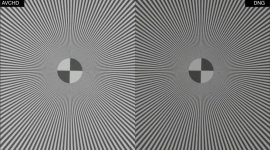
I was very SURPRISED by this. I was expecting the 7Q DNGs to have more aliasing / moire than the AVCHD because of the initial uproar. But in reality, they pretty much looked the same in-terms of aliasing / moire. The DNG was really no worse or no better. The AVCHD might hide the alias / moire very slightly better since the image is softer and less detailed, but really, there is no real difference for the most part. I reviewed about 10 different shots, both on identical AVCHD and DNG, and I never found the aliasing to be worse on the 7Q.

This makes me very happy with the 7Q because I was worried about this issue. With that said, the FS700 camera in general, definitely has some aliasing issues. Fortunately, the 7Q does not seem to exasperate the problem. I’m sure the 7Q 4K will fix the aliasing. I’m hoping the downres’d 7Q HD 4:2:2 10-bit derived from the 4K RAW stream will also have less aliasing than what the FS700 currently has.

I think CD did a great job with this issue. Hats off to them, especially since I was expecting the worst.

 
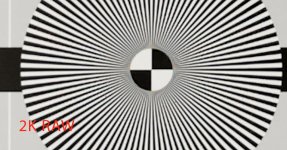
I've just been carrying out some testing today also but I've come across a bit of a worry. The 2K RAW is certainly sharper than the internal AVCHD, however I am getting some nasty colour artifacts with the RAW on a test chart. Have a look below. These are 400% zoomed images and although these are just jpegs, they represent what I'm seeing with the RAW DNG's. Anyone else getting this?

AVCHD.jpg

RAW2k.jpg
 
There is definitely something there Ro. On 2nd look at my tests, if I punch in 400% on my still, there is a bit of discoloration on the DNG on the lower right circle. I didn't really notice it at 100% though. Seems more like a moire issue. It seems like field use, this is less noticeable than a chart.

chart.jpg
 
Great tests Gene,

I can happily hold my hand up as one very concerned about aliasing in 2K, this was based on footage seen at the time. I do still see aliasing and also the coloured noise and coloured edging but it's not as bad as the earlier tests seemed to show. I don't know whether that's down to bad examples earlier on or whether things changed. It's certainly useable now.

I think some of the original artefacts were down to Resolve debayering and settings, perhaps even the 2K being incorrectly posted at 1080p in resolve. I think there might be compression noise visible at HFR. It would have been interesting to do a 240fps version of it as well.

I feel that the coloured noise is mainly an artefact of pixel binning when you have very fine noise, it's seems to be where you'd normally see noise. So in other words in 4K you've get normal noise, in 2K it would be magenta/green mostly.

Don't think for a second that i've given up banging the 4K down to 2K drum though! I'm sure once you get a chance to do your own downsample from 4K to 2K on the same test, you'll see what you *can* get... Looks hopefully over in the direction of Colorado Springs...

cheers
Paul
 
Thanks for this test Gene, thanks for sharing! Its very interesting and confirms what I realize in the shot I made up to now. It's moiré and not so much aliasing in general, it's visible but not that much as I was afraid of. If you look at the 3rd scene with the chart and add saturation you see that the color moiré is worse on DNG. As BMDPCC owner I am unfortunately use to this .. :-( If you treat your DNGs in Resolve anyway you can reduce chroma noise by chroma blur and luminance sharpening. I made a preset for this and it works pretty well.

edit: here's a tutorial for chroma blur and luminance sharpening

 
Great tutorial! Thanx for sharing. Very very useful.
Just FYI...the color channel is chroma, the desaturated (B&W) channel is luma....:happy:
 
Last edited:
Paul Curtis wrote:
"I do still see aliasing and also the coloured noise and coloured edging but it's not as bad as the earlier tests seemed to show. I don't know whether that's down to bad examples earlier on or whether things changed. It's certainly useable now."

Paul, I just wanted to send off a quick note to you. Yes, in our earlier tests of 2k, I had not established the correct Resolve workflow. Things are more refined now...just in time for CD to change the processing in the next firmware release....:undecided
 
Paul Curtis wrote:
"I do still see aliasing and also the coloured noise and coloured edging but it's not as bad as the earlier tests seemed to show. I don't know whether that's down to bad examples earlier on or whether things changed. It's certainly useable now."

Paul, I just wanted to send off a quick note to you. Yes, in our earlier tests of 2k, I had not established the correct Resolve workflow. Things are more refined now...just in time for CD to change the processing in the next firmware release....:undecided

Oh i meant very early tests! Not yours, but then it shows that i think an awful lot of us, myself included, initially took a few wrong approaches.

cheers
Paul
 
Great tutorial! Thanx for sharing. Very very useful.
Just FYI...the color channel is chroma, the desaturated (B&W) channel is luma....:happy:

you are welcome - I forgot to mention that the author mixed up chroma and luma. I found this tut by chance.
 
Gene spured me up to do my own moiré test. And well.... find your own opinion.
I have a university building opposite to my office and the blinds are a good (or even mean)
subject for moiré test. I did just quick and dirty settings in Resolve in a 2k 2048x1080
timeline, hence BMD Pocket has black bars. Direct render from Resolve to ProRes LT.

I dont still have a battery plate so I could not leave the office and had to stay at the balcony

https://dl.dropboxusercontent.com/u/8273739/BMDPCC_vs_7Q_2KRAW.zip (630 MB)

my conclusion: pls ProRes 10bit with low ISO and Cinegamma as fast as possible.
I have do do another test why the Tokina perfomed so bad. Both Canon and Tokina
with standard speedbooster
 
Clermond, that's pretty much what i'd expect. You're just not going to get a perfect image from a 4K sensor unless you're at 4K, the OLPF is afterall, designed for 4K, not 2K. However my concern with aliasing at 2K would be something like you see in the BMD around the tree - where it's so sharp that you see magenta and cyan fringes and noise. This seems better controlled on the O7Q.

It also shows that tests on static shots are one thing but the real world is much more trying!

Thanks for doing this,

cheers
Paul
 
I've just been carrying out some testing today also but I've come across a bit of a worry. The 2K RAW is certainly sharper than the internal AVCHD, however I am getting some nasty colour artifacts with the RAW on a test chart. Have a look below. These are 400% zoomed images and although these are just jpegs, they represent what I'm seeing with the RAW DNG's. Anyone else getting this?

Hey Rotierney,

I went back and pixel peeped some more to try and replicate the moire pattern you were getting with a different larger chart. On my test this morning, I shot it 4 times and not sure why, but the moire pattern did NOT come up this time on the DNG, which is obviously a good thing. In fact, the aliasing and moire on the DNG. once again, looked pretty similar to the AVCHD. There might be a very slight touch more artifacting on the DNG, but it might be because the image is better detailed, more contrast and just solid looking because of the bit-depth. But it’s very, very slight difference, if it’s even there at all on my tests.

Here’s a link to the 2nd aliasing / moire test I did if you want to download it and pixel peep till your eyes are crossed like mine. Yes, pixel peeping makes you go blind.

www.builtbyugene.com/mov_tests/7q/7QTests_140122_0101Alias02.mov.zip

But like I said in my other comment, I did notice a slight bit more color artifacting on my 1st tests after taking a 2nd look. But it’s very slightly different and it could be just because the DNG is such a better image that it might accentuate the flaws? But on Rotierney's tests they were obviously there so it must be an issue.

I posted a .jpg to check out also. For some reason, DVXuser resizes the .jpg to a smaller resolution. If that’s not big enough, here’s a link to a full res .jpg @ 100 quality.

www.builtbyugene.com/mov_tests/7q/moire02.jpg

moire02.jpg


Well, like Paul says, the 4K will probably fix the aliasing and moire issue once and for all, which really seems to be an FS700 down sample problem, and not a 7Q problem. Even if there is a slight bit, IF AT ALL, more aliasing, I still think the DNGs are light years better than the AVCHDs. There does seem to be a bit more Moire on the DNGs than the AVCHDS though, at least on one of my tests and Ro's test.
 
Last edited:
Hey, I have a question for you guys...
Back when 50 mbps sony mpeg2 ws released on the nanoflash, there was a distinct chroma noise problem for full frame motion, due to the bitrate reallocation during encoding a moving full frame. (This is because at a fixed overall bitrate, compression increases when there are more motion I-frames, or something like that.) So, now, I really am curious about the performance comparison between Prores( a variable bitrate codec) vs. DNxHD (a fixed rate codec) Is it possible that ProRes is better for high motion shots, as in horizontal full frame pans, and DNxHD is better for small motions within a frame, but not full frame motion?

I suppose the answer is partially visible in the unconverted dng footage, prior to re-encoding in a compression codec.
 
Back
Top