709 reference shots while shooting Slog?

Lenilenapi

Carbonite Member
I have a possible feature shoot coming up on the F3 with slog. Budget is minimal so i won't have access to any LUT viewing hardware other than tweaking a monitor and no way to send stills or color correction info to the editor or whoever is making dailies.
I've been thinking about shooting a "reference shot" at the beginning of each scene in 709 with approximate color and exposure intentions to show the editor what i was going for. Thus at the start of each scene I would set up a brief master shot with gamma in 709 and then switch to SLog for the actual shoot. I realize I would lose information DR at the top & bottom of the exposure of course and would set the sLog exposure properly for sLog not the 709 reference.
The editor could easily make a reference reel for CC at later stages also.

A lot of you guys have been shooting more sLog than I have. Does this make sense as a method when you won't be overseeing CC yourself? It will take a little time to color correct for each reference shot but shouldn't be a problem. Might even help with lighting.

I don't like the Sony LUTs for this because it sounds like a PITA for the editor to make use of 2 parallel recordings , and the Sony LUT's are very desaturated anyway.
 
It's a good idea, but one thing to note is that the grey levels are quite different between REC709 (grey = 50) and SLOG (grey = 38). It is a little over a stop difference so if you expose for REC709 then switch to SLOG you will need to stop down each time.

One trick I can suggest is when you are in REC709 mode engage +6db gain, setup your lighting and your shot, then once you switch to SLOG put gain back to 0db. This will let you toggle between the stop difference, without touching your iris and therefore changing your DOF on the shot. If you don't like the idea of this, you can throw on ND filter when switching to SLOG mode from REC709.
 
Thanks, that's a good idea Dennis. I know the exposure will be different. The danger is getting confused when switching.
 
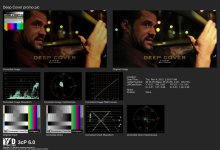
I just started using software from Gamma and Density called 3cP for this very reason. Along with the SLOG files I can send a preview of my intentions with a before and after shot of the image. Any changes I make to the image are sent along as well to make it easy to replicate.

In this image you can see I made quick adjustments to Lift/Gamma/Gain. If a colorist is working in the acepted Rec709 workspace all he needs to do is replicate these numbers, verify his scopes with the ones I supllied images of, and we should be pretty darn close.
 

Attachments

  • Deep Cover promo pic Report.jpg
    Deep Cover promo pic Report.jpg
    77.1 KB · Views: 0
Honestly, I'd just load shots quickly into Resolve and pass him CDLs that way. Resolve Lite is free, only limitation is if you have a laptop that can run it.

I don't think you're going to have enough ways to monkey with the image in-camera to tell the colorist anything meaningful about your intentions, other than simply "well, I want it normal looking. And I want it this warm or this cool". That's very little compared to what a simple primary grade (aka CDL; 3 color wheels, lift/gamma/gain levels, hue + sat) in Resolve or 3CP.

Short of doing something simple yourself in Resolve, I think even a cheap DSLR and doing simple corrections in iPhoto would be more useful and communicate more info that what you can do in-camera on the F3.
 
Nate and Bill,
what kind of time would either method take in the middle of a dense production schedule with small crew.Do you need to download your footage then make quick corrections after the day is done or is it done while shooting?
 
The version of 3cP that I'm using is called 3cP Stills. I can get a decent image up in minutes if I don't get too creative (I'll save that for the colorist).
 
3cp Stills looks pretty cool and fast. It's designed to do exactly what you're looking for Lenny. I didn't know about it, only knew about the regular version of 3cp that was likely beyond what you wanted to get into.

The only thing I'd say against it is that what it does is so simple, that any competent colorist can replicate what you're after very quickly no matter what program your looks are created in. 3cp makes some CDL files that the colorist can quickly load in and duplicate what you make in 3cp exactly...but primary grades are simple things and it might almost be quicker for him to look at a still created some other way and twiddle wheels for 10 seconds.

If you have $149 you can spend for it, it's prob the best way to achieve what you want.
 
It gives me some piece of mind even on a REC709 shoot with a baked in look, where the gig requires me to hand off files never to be seen again.
If someone tells me something was off I can dash off a jpeg with the scopes and images attached to let them see what I delivered.
 
Bill,
The 3Cp website seemed none to clear about the workflow. It only shows it with a full on Mac Tower on the set which I would never have. Can you use it with a Macbook Pro? I'm guessing you need some kind of SDI input device as well. Any ideas about the most cost effective of set-up.
Alternatively, Can you bypass the SDI input and make the stills after the fact with the footage after its been downloaded?
 
Thanks Nate, Post people need to have it also I assume?
is there a demo version available?
 
Last edited:
Don't think so. Pretty sure it outputs these "Report" references that show a grab of a frame plus pics of the scopes for the colorist. I'm sure Bill knows for sure.

If you pay more, it can output CDLs (Color Decision List) that most of the DI programs can import...a standardized way to xfer grades from set to CC.
 
Some more thoughts of mine if you do not want to spend money on new software or have the time to take to learn it:

If you plan to record 10-bit 422 (and not use 444 or LUTS) then you can toggle between the SLOG and REC709 via picture profile quite easily. Again you have to consider the small exposure difference bit it will be consistent.

Also if you decide you will simply create a frame after the fact, you can just use your editing software to de-SLOG a frame quite easily with Fast CC & RGB Curves in Adobe products, or in FCP there are tools for contrast and tones. I wrote about some of these techniques online and will send you some links.

Best part it is free and once you create the "filter" you can generally apply the same one to all your shots without a lot of tweaks..

Another alternative suggestion is just take some still photos with DSLR of the scene before you record video.
 
Bill,
The 3Cp website seemed none to clear about the workflow. It only shows it with a full on Mac Tower on the set which I would never have. Can you use it with a Macbook Pro? I'm guessing you need some kind of SDI input device as well. Any ideas about the most cost effective of set-up.
Alternatively, Can you bypass the SDI input and make the stills after the fact with the footage after its been downloaded?

You would just ingest files as normal. Some cameras can save a still image to an SD card. On the other hand you can capture a still frame with your NLE.
 
Thanks Nate, Post people need to have it also I assume?
is there a demo version available?

It is unnecessary for Post to have a copy as they will just be imitating the work you've already done. If you look closely under Lift/Gamma/Gain, you'll see the exact amount each slider has been manipulated. Same with Saturation. Then you can reference the scopes and charts to check your work.

For sure, there are other solutions, I'd like to play with Fuji's new app: IS-100, http://www.fujifilm.com/news/n120411.html, which is free. But I don't have an iPad yet, with which to use it. Essentially we're all looking for on-set color management solutions.

Another nice feature within 3cP is the ability to tune your monitor to RGB REC709 within the software, without effecting your other programs (such as Photoshop, etc). Once you close out 3cP your monitor reverts back to its original color profile, and your color settings are saved within 3cP so you don't have to re-tune your monitor the next time you open the software.

BTW, if I'm starting to sound like a salesperson for 3cP, I'm not, but I am well acquainted with its creator, Yuri Neyman, ASC.
 
Last edited:
Leni, I will not give up on an in-camera solution since that what's you've asked for. :happy:

An even better in-camera solution would be to use a modified REC709 picture profile with lower grey level to match that of the 38% grey level of SLOG. This way you don't have to mess around with the exposure difference and only remember to toggle between SLOG picture profile and MODIFIEDREC709 picture profile.

You would "light" for the modifiedREC709 profile, record a little, then stop and switch to SLOG picture profile.

You can create your own modifiedREC709 profile by using a grey card and modifying black levels, gamma and knee of a REC709 based picture profile until you get the same level you would when shooting SLOG.

I can make one for you if you like, in the meantime i've messaged Andy from Abelcine to see if he has one created already. I'm almost certain I read somewhere he had created one.
 
Last edited:
I finished my experiment. Caution to anyone using this, PLEASE TEST it yourself before using it. Results NOT guaranteed!

Tonight I was playing with a REC709 based picture profile and managed to push down grey point to same level as SLOG of 38%. This would allow you to select the modified REC709 picture profile and create your "look" in-camera then switch to SLOG mode for recording without having to adjust your iris, camera gain, or apply/remove ND filters to account for the difference in grey points. You can also pre-roll a few seconds of the modified REC709 profile for future reference when applying LUT to your SLOG footage.

CREATE NEW REC709 PICTURE PROFILE:
1- Using firmware v1.4 create two brand new picture profiles. ( I recommend you reset each picture profile so you are 100% sure there are no other influences. )
2- Create a picture profile and name it MOD REC709
3- Under white you can dial in your desired white balance setting (or use auto white balance if you prefer)
4- Under KNEE change setting to ON, auto knee OFF, point to 100, slope 0, knee sat level 50
5- Under GAMMA select STD5 REC709
6- Under BLACK select -2
7- Under BLACK GAMMA select +84

CREATE NEW SLOG PICTURE PROFILE:
(This SLOG picture profile can be used if you plan to record internally, or external via 10-bit 422, and don't need LUTs. It is 100% identical to RGB SLOG.)
1- Create a new picture profile and name it SLOG
2- Under white select your desired white balance for each scene (or use AWB if you prefer)
3- Under GAMMA select SLOG
4- Turn off matrix, turn off aperture, lower detail settings. (This is according to Andy from Abelcine)

To test this, use the F3 spot meter function and adjust your iris until you get 38% on a grey card and then compare the value between your new picture profiles (MOD REC709 & SLOG). You should see 38% on both profiles when aimed at the grey card. Now test with a scene and compare results.

A couple of notes:
- It is highly recommended not to allow white to exceed 68% in SLOG mode.
- In this new modified REC709 picture profile with lowered middle grey, I notice 68% white in SLOG is about 77% white in modified REC709. Therefore it means you should not let anything white go over 77% in modified REC709 but double check it is not over 68% in SLOG. It could be smart to use your zebras1 as an indicator.
- Blacks between these two profiles have a very small difference of 2%.

Lastly please report your results, I'd be curious to know how this worked out for you. I plan to do some more tests of my own and post results once I can get around to it.
 
Last edited:
Back
Top