5K iMac $2,499 !

I wonder how the GPU is going to perform pumping out all those pixels for the display alone. Looking forward to the Barefeats numbers. I've been waiting for an iMac that can best my 2009 Mac Pro with 2.93Ghz 8c and 5870 1GB. Last gen iMac bested in a few areas but lost ultimately. This one might be closer.
 
@ Kyle IMO current Imac's 7 loaded with ram perform better than my old 2009 Mac Pro in most areas.

@ Ryan editing in 4k, 5k, 6k does not make for efficient editing . Edit the project in HD/SD/DNxHD/Quicktime/proxies (far more manageable data load) makes more sense. Then on completion upgrade the timeline to your 4K, UHD, 2K, deliverable & output.

Originally my plan was to upgrade to a "dustbin" but after my original $12K Mac Pro died before the release of the "dustbin" I had to get a Imac7 as a short termer and it work fine with 4k & 5k dataloads. So given the release of this 5k Imac Im sort a thinking thats what the next one will be and not the "dustbin".
 
@ Ryan editing in 4k, 5k, 6k does not make for efficient editing . Edit the project in HD/SD/DNxHD/Quicktime/proxies (far more manageable data load) makes more sense. Then on completion upgrade the timeline to your 4K, UHD, 2K, deliverable & output.

I said cutting, but I'm referring more toward color correction, grading & After Effects, since it's easy these days to cut in 1/2 or 1/4 res on lower end systems. For someone working strictly with 4K+ (which is very quickly becoming the norm), those are seriously shitty specs for the money.
 
You'd be better of to buy a decent 4K monitor for grading next year for affordable money (I'm sure they'll be coming next year) and Mac Pro or hackintosh.
 
Use it as a 5K Thunderbolt 2 monitor for the 12 core Mac Pro with Dual AMD FirePro D700 GPUs with 6GB of GDDR5 VRAM each for Final Cut Pro X.

Apple dropped target display mode from the specs. No ability to be a 5K external monitor. It seems to require more bandwidth than a single Thunderbolt 2 port can provide. Thunderbolt 3, when it is implemented next year, will provide enough bandwidth. The reason they eliminated target display mode is the the new chip Apple developed writes to the entire screen as a single tile, so two inputs cannot be used to drive two tiles simultaneously.
 
Last edited:
editing in 4k, 5k, 6k does not make for efficient editing . Edit the project in HD/SD/DNxHD/Quicktime/proxies (far more manageable data load) makes more sense. Then on completion upgrade the timeline to your 4K, UHD, 2K, deliverable & output.


Then that defeats the whole purpose of editing on the 5k iMac. If your going to do that, might as well just use a regular iMac.


Unfortunately, even maxed out those are lousy specs for anyone cutting 4K+ projects.

Yeah, I tried editing on one of the new 4 Core, Dual D300 GPU MacPro's and it struggled pretty badly.
Then we upgraded to one of the 6 Core, Dual D700 GPU MacPro's and it's much better.

It wasn't so much the extra 2 cores, but the uped GPU's that really made all the difference, especially in FCPx.
 
I'm very interested in the iMac Retina 5K. Most of my work involves using Adobe CC Photoshop, Illustrator, Premiere Pro, After Effects, InDesign. I'm not planning on mastering in 4K any time soon, but I shoot 4K to deliver 1080. And the idea of all that screen real-estate in super-high resolution is very tempting. Given the new blue-font interface in Adobe's October 2014 update, I'm thinking that this Retina screen might make it easier to see the blue active hot text in programs like AE (that a number of people have had issues with).

Any thoughts on how Adobe CC programs like Premiere and AE would perform on a maxed out 5K iMac Retina (w 32 GB of RAM, 1TB flash drive, and upgraded graphics card)?
 
Last edited:
I just returned the 6 core MacPro. It had 32GB RAM + AMD D700. Although it was faster than my 2013 MacBook Pro w/ 16GB RAM, it wasn't $5000+ faster.

But I'm definitely interested in the 5K iMac. Not because I think it will be blazing fast, but for the retina display.

BTW - I mostly use After Effects, Premiere and Photoshop.
 
I have the 6-core Mac Pro with LaCie 1TB Little Big Disk Thunderbolt 2 SSD and like how compact the setup is compared to my old Mac Pro or PC with Coolermaster HAF full tower case on caster wheels. I use two 4K displays (28" & 39") with it. I think a 4K display would work better for viewing 4K videos than a smaller 5K display.
15166384266_99621a4455_c.jpg
14928668715_55c4874c38_c.jpg
 
I work with 6k ,5k or Pro Res 444, deliverables 2k/uhd/hd . This machine will be able to handle that, full spec'd with thunderbolt connections to HDs. For longform still cut on it, but then send it all to a post house. Sure this unit cannot do it all. But I don't want to do it all & sure "Hackingtosh" or some assembled PC can do it cheaper, but I couldn't care less. I am not a tech head spending my free time optimising performance hardware and never will be.


PS C.c on Ae always leavers me baffled?

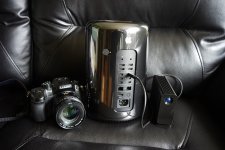
p.s.s Imo. the above Trashcan shot, reinforces a key benefit of the new Mac Pro ..portability.
 
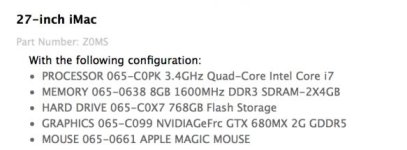
This was the iMac I ordered back in 2012 with max RAM of 32GB which I later purchased from OWC.

Screen Shot 2014-10-19 at 10.06.46 AM.jpg


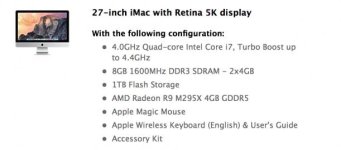
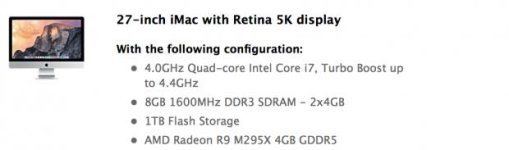
But if I were to order a maxed out iMac 5K Retina with these specs + upgrading the RAM to 32GB later:

Screen Shot 2014-10-19 at 10.04.03 AM.jpg

wouldn't it be at least as powerful if not more so than a 2012 maxed out 27" iMac i7?

You might wonder why I would want to jump to a 5K iMac if I intend to keep delivering in 1080p. It's because I also do a lot of work in Photoshop, Illustrator, InDesign, and the prospect of being able to see images that crisp on a big monitor without breaking the bank on a far more powerful Mac Pro is quite appealing. I can't afford even a mid-optioned MacPro + 4K monitor which would set me back over $8K, or more than twice the cost of a maxed out iMac Retina.

Maybe I'm wrong, but I'm seeing the iMac 5K Retina as an all in one solution for someone who is not doing any major special effects work and who has no plans to deliver in 4K any time soon. I enjoy very much editing on my Macbook Retina, but being able to see everything crisp on a much larger screen without also having to purchase a monitor seems very tempting.
 

Attachments

  • Screen Shot 2014-10-19 at 10.01.25 AM.jpg
    Screen Shot 2014-10-19 at 10.01.25 AM.jpg
    14.2 KB · Views: 0
Last edited:
One of the major questions regarding Apple’s 5K display is whether or not it would be a 30Hz or 60Hz panel. We’ve had an opportunity to see some demonstrations of gaming on the 27-inch iMac with 5K Retina display and can confirm that it’s a 30Hz panel when operating in 5K mode. Below 5K, the panel shifts to 60Hz, though we couldn’t confirm exactly when the 60/30 shift occurs. It’s a 60Hz panel up to at least 2560×1440.


Nonetheless, if you edit video above 30 fps, and wanted to create 5K content, this may impact your buying decision.
http://www.extremetech.com/gaming/1...y-how-do-you-squeeze-5k-out-of-a-last-gen-gpu
 
Back
Top