Geoff Gilson
Active member
Hi everyone,
I've got a lot of useful information from this forum, mostly passively so far, but this time I'd really appreciate some active advice on this particularly annoying problem:
I have been trying out 5DtoRGB (Windows version 1.5.4 Preview 32bit) to smooth the subsampled colour of 4:2:0 AVCHD - in the first case, from my GH1 (+firmware hack.) Good results.
I also have some footage shot on an AF101 which is low-key and contains mostly black and blue. As you can imagine, the blues show up blocky-looking. I have tried using the same version of 5DtoRGB; when I transcode some of these AF101 AVCHD files to any format, using any of the options, the encoder freezes at the final frame. I can press cancel, but the transcoded file is lost.
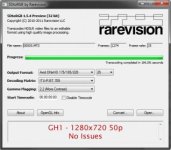
Here are example images from each transcode - GH1 and AF101:
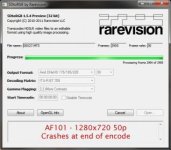
Here are also the MediaInfo reports for both files:
[TABLE="class: outer_border"]
[TR]
[TD]General
ID : 0 (0x0)
Complete name : V:\GH1\PRIVATE\AVCHD\BDMV\STREAM\00005.MTS
Format : BDAV
Format/Info : Blu-ray Video
File size : 93.0 MiB
Duration : 50s 920ms
Overall bit rate : 15.3 Mbps
Maximum Overall bit rate : 108 Mbps
Video
ID : 4113 (0x1011)
Menu ID : 1 (0x1)
Format : AVC
Format/Info : Advanced Video Codec
Format profile : High@L4.0
Format settings, CABAC : No
Format settings, ReFrames : 1 frame
Codec ID : 27
Duration : 50s 980ms
Bit rate mode : Variable
Bit rate : 14.5 Mbps
Maximum bit rate : 16.6 Mbps
Width : 1 920 pixels
Height : 1 080 pixels
Display aspect ratio : 16:9
Frame rate : 25.000 fps
Standard : NTSC
Color space : YUV
Chroma subsampling : 4:2:0
Bit depth : 8 bits
Scan type : Progressive
Bits/(Pixel*Frame) : 0.280
Stream size : 88.1 MiB (95%)
Audio
ID : 4352 (0x1100)
Menu ID : 1 (0x1)
Format : AC-3
Format/Info : Audio Coding 3
Mode extension : CM (complete main)
Codec ID : 129
Duration : 51s 8ms
Bit rate mode : Constant
Bit rate : 192 Kbps
Channel(s) : 2 channels
Channel positions : Front: L R
Sampling rate : 48.0 KHz
Bit depth : 16 bits
Compression mode : Lossy
Stream size : 1.17 MiB (1%)
[/TD]
[TD]General
ID : 1 (0x1)
Complete name : V:\AF101\PRIVATE\AVCHD\BDMV\STREAM\00027.MTS
Format : BDAV
Format/Info : Blu-ray Video
File size : 154 MiB
Duration : 58s 36ms
Overall bit rate : 22.3 Mbps
Maximum Overall bit rate : 24.0 Mbps
Video
ID : 4113 (0x1011)
Menu ID : 1 (0x1)
Format : AVC
Format/Info : Advanced Video Codec
Format profile : High@L4.0
Format settings, CABAC : Yes
Format settings, ReFrames : 4 frames
Format settings, GOP : M=4, N=24
Codec ID : 27
Duration : 58s 20ms
Bit rate mode : Variable
Bit rate : 19.9 Mbps
Maximum bit rate : 20.9 Mbps
Width : 1 280 pixels
Height : 720 pixels
Display aspect ratio : 16:9
Frame rate : 50.000 fps
Color space : YUV
Chroma subsampling : 4:2:0
Bit depth : 8 bits
Scan type : Progressive
Bits/(Pixel*Frame) : 0.431
Stream size : 137 MiB (89%)
Audio
ID : 4352 (0x1100)
Menu ID : 1 (0x1)
Format : PCM
Format settings, Endianness : Big
Format settings, Sign : Signed
Muxing mode : Blu-ray
Codec ID : 128
Duration : 58s 80ms
Bit rate mode : Constant
Bit rate : 1 536 Kbps
Channel(s) : 2 channels
Channel positions : Front: L R
Sampling rate : 48.0 KHz
Bit depth : 16 bits
Delay relative to video : -60ms
Stream size : 10.6 MiB (7%)
[/TD]
[/TR]
[/TABLE]
All of the GH1 files I've tried to transcode have worked, but many of the AF101 files fail. I have also noted that the longer files (~4 min or over) seem less likely to transcode sucessfully.
Resolution and frame rate don't seem to make any difference. Also I don't think the video content is making a difference, I rather suspect it's something in the codec details, or a software issue.
Can anybody lend some extra insight on how or why this is happening?
I've got a lot of useful information from this forum, mostly passively so far, but this time I'd really appreciate some active advice on this particularly annoying problem:
I have been trying out 5DtoRGB (Windows version 1.5.4 Preview 32bit) to smooth the subsampled colour of 4:2:0 AVCHD - in the first case, from my GH1 (+firmware hack.) Good results.
I also have some footage shot on an AF101 which is low-key and contains mostly black and blue. As you can imagine, the blues show up blocky-looking. I have tried using the same version of 5DtoRGB; when I transcode some of these AF101 AVCHD files to any format, using any of the options, the encoder freezes at the final frame. I can press cancel, but the transcoded file is lost.
Here are example images from each transcode - GH1 and AF101:
Here are also the MediaInfo reports for both files:
[TABLE="class: outer_border"]
[TR]
[TD]General
ID : 0 (0x0)
Complete name : V:\GH1\PRIVATE\AVCHD\BDMV\STREAM\00005.MTS
Format : BDAV
Format/Info : Blu-ray Video
File size : 93.0 MiB
Duration : 50s 920ms
Overall bit rate : 15.3 Mbps
Maximum Overall bit rate : 108 Mbps
Video
ID : 4113 (0x1011)
Menu ID : 1 (0x1)
Format : AVC
Format/Info : Advanced Video Codec
Format profile : High@L4.0
Format settings, CABAC : No
Format settings, ReFrames : 1 frame
Codec ID : 27
Duration : 50s 980ms
Bit rate mode : Variable
Bit rate : 14.5 Mbps
Maximum bit rate : 16.6 Mbps
Width : 1 920 pixels
Height : 1 080 pixels
Display aspect ratio : 16:9
Frame rate : 25.000 fps
Standard : NTSC
Color space : YUV
Chroma subsampling : 4:2:0
Bit depth : 8 bits
Scan type : Progressive
Bits/(Pixel*Frame) : 0.280
Stream size : 88.1 MiB (95%)
Audio
ID : 4352 (0x1100)
Menu ID : 1 (0x1)
Format : AC-3
Format/Info : Audio Coding 3
Mode extension : CM (complete main)
Codec ID : 129
Duration : 51s 8ms
Bit rate mode : Constant
Bit rate : 192 Kbps
Channel(s) : 2 channels
Channel positions : Front: L R
Sampling rate : 48.0 KHz
Bit depth : 16 bits
Compression mode : Lossy
Stream size : 1.17 MiB (1%)
[/TD]
[TD]General
ID : 1 (0x1)
Complete name : V:\AF101\PRIVATE\AVCHD\BDMV\STREAM\00027.MTS
Format : BDAV
Format/Info : Blu-ray Video
File size : 154 MiB
Duration : 58s 36ms
Overall bit rate : 22.3 Mbps
Maximum Overall bit rate : 24.0 Mbps
Video
ID : 4113 (0x1011)
Menu ID : 1 (0x1)
Format : AVC
Format/Info : Advanced Video Codec
Format profile : High@L4.0
Format settings, CABAC : Yes
Format settings, ReFrames : 4 frames
Format settings, GOP : M=4, N=24
Codec ID : 27
Duration : 58s 20ms
Bit rate mode : Variable
Bit rate : 19.9 Mbps
Maximum bit rate : 20.9 Mbps
Width : 1 280 pixels
Height : 720 pixels
Display aspect ratio : 16:9
Frame rate : 50.000 fps
Color space : YUV
Chroma subsampling : 4:2:0
Bit depth : 8 bits
Scan type : Progressive
Bits/(Pixel*Frame) : 0.431
Stream size : 137 MiB (89%)
Audio
ID : 4352 (0x1100)
Menu ID : 1 (0x1)
Format : PCM
Format settings, Endianness : Big
Format settings, Sign : Signed
Muxing mode : Blu-ray
Codec ID : 128
Duration : 58s 80ms
Bit rate mode : Constant
Bit rate : 1 536 Kbps
Channel(s) : 2 channels
Channel positions : Front: L R
Sampling rate : 48.0 KHz
Bit depth : 16 bits
Delay relative to video : -60ms
Stream size : 10.6 MiB (7%)
[/TD]
[/TR]
[/TABLE]
All of the GH1 files I've tried to transcode have worked, but many of the AF101 files fail. I have also noted that the longer files (~4 min or over) seem less likely to transcode sucessfully.
Resolution and frame rate don't seem to make any difference. Also I don't think the video content is making a difference, I rather suspect it's something in the codec details, or a software issue.
Can anybody lend some extra insight on how or why this is happening?