5DtoRGB new beta now FREE and UNLIMITED!

Looks great. No love for PCs. :( Hopefully you get a PC version going before you shut down the free beta. Be nice to have a convenient DPX converter that can preserve the Metadata.
 
or for older macs ?

Model Name: Power Mac G5
Model Identifier: PowerMac7,3
Processor Name: PowerPC G5 (2.2)

Mac OS X 10.5.8 (9L31a)
 
Most efficient ProRes Codec to use with 5DtoRGB for grading

Most efficient ProRes Codec to use with 5DtoRGB for grading

Hi there Thomas,
This looks really promising and I look forward to testing. Have read your readme and looked at the color channel comparisons.
In your tests have you found many benefits going to ProRes HQ rather than say ProRes or ProRes LT?
I guess what I'm really asking is which format will give me the greatest latitude in grading in post? What have you found in your testing to be the most productive workflow for this? (I'm not talking about keying/compositing and using DPX files or grading with DPX files but would be interested to know if you've gotten additional grading latitude after using your application.)
Looking forward to learning more about your app,
Ross
 
Valuable tool indeed. This is news! Already spread along my FB network too.

Thanks and kudos for your work,
E. :-)
 
I guess what I'm really asking is which format will give me the greatest latitude in grading in post? What have you found in your testing to be the most productive workflow for this? (I'm not talking about keying/compositing and using DPX files or grading with DPX files but would be interested to know if you've gotten additional grading latitude after using your application.)
For the best quality, nothing beats DPX. It's uncompressed RGB, so it's about as high quality as you can get. Unfortunately, Final Cut Pro doesn't work natively with DPX so the workaround is to work with a proxy or offline that can be re-linked to the DPX media in say, Apple Color.

If you'd rather stick with QuickTime, then ProRes 4444 or ProRes 422 HQ is a good compromise. Both should play back in realtime at 1080p/24 with a fast single hard disk. The only issue is disk space, but with drives as cheap as they are now it's not even really an issue.

In terms of latitude, I haven't done much testing compared to the other tools out there for transcoding. What I can say is that 5DtoRGB does the absolute minimum amount of processing to deliver a useable image, and gives you complete control over this. You can turn off chroma interpolation if you want, and you can completely customize the decoding matrix used to perform the YCbCr to RGB conversion using dMatrix. Bill Totolo on this forum has done primary grades on some of his projects using this feature, and as far as I know nobody offers direct access to the YCbCr decoder in this way.
 
Maybe i'm stupid, but i'm ending up with dozens of .dpx files. What do do with them?
The tool looks totally awesome, and it's also the first time i read i'm not the only one having gamma problems with this/quicktime.

EDIT: Yes i'm stupid, don't mind my post!

EDIT2: Okay, 'nother question then, why can i only export to DPX? Shouldn't i be able to export to ProRes also?
 
Thanks for sharing this Thomas! will test it and report!:thumbsup:

ok first quick tes: image quality is excellent and possibilities are various and ProRes 4.4.4.4 is awesome ....but why no audio ?
 
Last edited:
so far it seems way slower then mpeg streamclip....is anyone else feeling the same way? does it actually render a better image then streamclip?
 
okay so I tried out 5DtoRGB, when I rendered my footage to prores the colors were WAY washed out, way more then mpeg streamclip. I attached a photo so you guys could see.

The top left video: 5DtoRGB

The Bottom Middle video: Mpeg Streamclip

The Top Right video: Original H.264 video
 

Attachments

  • Picture 1.jpg
    Picture 1.jpg
    19.3 KB · Views: 0
okay so I tried out 5DtoRGB, when I rendered my footage to prores the colors were WAY washed out, way more then mpeg streamclip. I attached a photo so you guys could see.
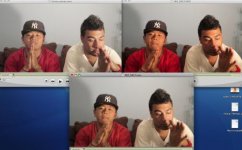
This looks right. 5DtoRGB's output files have less contrast because they have not undergone a gamma correction. The YCbCr data only goes through two steps: 1.) a chroma upsample, and 2.) a YCbCr to RBG conversion. This is the minimum amount of processing needed to get a usable image from the Canon files. Everything else is left up to the colorist, as 5DtoRGB is designed to generate files optimized for color correction. Gamma correction and other color operations can be performed during color correction just as easily, and I'd rather leave those decisions up to the colorist.
 
Back
Top