5D Mark II - Is it possible to remove the black transparent bars on the screen??

mikster

New member
The screen is small enough and having those transparent bars make it even harder for me. I doubt it possible cause I couldn't find anything in the settings but asking just in case I missed something. Thanks in advance. Here's a photo i've taken if you're not sure what I'm talking about. blackbar.jpg
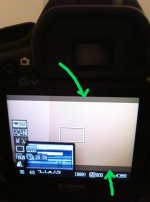
 
Right, there's no way (or reason) to get rid of them. It's the letterboxing to make a 16 X 9 image fit on a screen that doesn't have 16 X 9 dimensions.
 
Sorry to bring this back up from the grave. (2 months ago)

I was wondering if there were any tricks for me to guide me to get that perfect 2:35:1 aspect ratio on my 5D2?
I'm not sure if anyone has tried anything to have a guide on their screen to give that 2:35:1 aspect ratio..? If anyone knows a trick please share!

Thanks
 
Sorry to bring this back up from the grave. (2 months ago)

I was wondering if there were any tricks for me to guide me to get that perfect 2:35:1 aspect ratio on my 5D2?
I'm not sure if anyone has tried anything to have a guide on their screen to give that 2:35:1 aspect ratio..? If anyone knows a trick please share!

Thanks

Install Magic Lantern and you will have 2.35:1 cropmarks
 
Sorry to bring this back up from the grave. (2 months ago)

I was wondering if there were any tricks for me to guide me to get that perfect 2:35:1 aspect ratio on my 5D2?
I'm not sure if anyone has tried anything to have a guide on their screen to give that 2:35:1 aspect ratio..? If anyone knows a trick please share!

Thanks
Masking tape. Low tech but 100% effective.
 
Back
Top