Blackpeppers
Member
Hello,
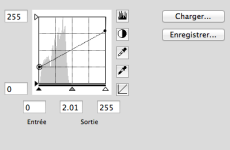
I'm a D7000 owner and I, for some time, search a flat Picture Control for video mode which enhance latitude in post-production (like Technicolor Cinestyle for Canon). But I didn't find any so I create my own.
We compared it to technicolor Cinestyle on a Canon 550D and finally made a video of these tests. We used JESDeinterlacer to convert files in Prores 4:2:2 and then we graded files with Color and edited it in FCP.
Settings for 550D (Tamron SP AF 17-50mm F/2.8 XR Di):
- Technicolor Cinestyle with Sharpness: 0, contrast: -4, saturation: 0, Tone: 0.
- Neutral with Sharpness/Contrast/Saturation/Tone to 0.
Settings for D7000 (Nikkor AF-D 20-35mm f/2.8):
- TassinFlat with Sharpness: 0, Saturation: +1 (except for the rose which was set to -1) and Tone: 0 using AdobeRGB as Color Space.
- Default Neutral with sharpness to 0 and AdobeRGB as Color Space.
(EDIT) => I recommend to use my curve with saturation to -1 (0 is too saturated and -2 not enough) and sRGB as ColorSpace. I just did some test again and, even if I use AdobeRGB for the video test (which I thought was better in my previous test), I now realize that it results in a little yellow/green hue. That's why I now recommend sRGB with -1 in saturation (AdobeRGB is less saturated). Sorry.
Settings for 550D (Tamron SP AF 17-50mm F/2.8 XR Di):
- Technicolor Cinestyle with Sharpness: 0, contrast: -4, saturation: 0, Tone: 0.
- Neutral with Sharpness/Contrast/Saturation/Tone to 0.
Settings for D7000 (Nikkor AF-D 20-35mm f/2.8):
- TassinFlat with Sharpness: 0, Saturation: 0 and Tone: 0 using AdobeRGB as Color Space.
- Default Neutral with sharpness to 0 and AdobeRGB as Color Space.
---------------------------
My curve is quite good for post-production (only use it with low ISO) and it may interest filmmakers who shoot with Nikon gears. If Nikon want it, the video mode could be much more powerful. Among other things, they could do the same that Canon with Technicolor and extend the dynamic range in Video with a specific curve for video. Indeed, I'm just applying a curve on the neutral picture control of Nikon. So it's basically a curve on a curve which results in a loss of dynamic/quality.
Here is a link to download the picture control with its LUT:
http://dl.dropbox.com/u/30153818/TassinFlat+LUT.zip.
Thanks for reading.
I'm a D7000 owner and I, for some time, search a flat Picture Control for video mode which enhance latitude in post-production (like Technicolor Cinestyle for Canon). But I didn't find any so I create my own.
We compared it to technicolor Cinestyle on a Canon 550D and finally made a video of these tests. We used JESDeinterlacer to convert files in Prores 4:2:2 and then we graded files with Color and edited it in FCP.
Settings for 550D (Tamron SP AF 17-50mm F/2.8 XR Di):
- Technicolor Cinestyle with Sharpness: 0, contrast: -4, saturation: 0, Tone: 0.
- Neutral with Sharpness/Contrast/Saturation/Tone to 0.
Settings for D7000 (Nikkor AF-D 20-35mm f/2.8):
- TassinFlat with Sharpness: 0, Saturation: +1 (except for the rose which was set to -1) and Tone: 0 using AdobeRGB as Color Space.
- Default Neutral with sharpness to 0 and AdobeRGB as Color Space.
(EDIT) => I recommend to use my curve with saturation to -1 (0 is too saturated and -2 not enough) and sRGB as ColorSpace. I just did some test again and, even if I use AdobeRGB for the video test (which I thought was better in my previous test), I now realize that it results in a little yellow/green hue. That's why I now recommend sRGB with -1 in saturation (AdobeRGB is less saturated). Sorry.
Settings for 550D (Tamron SP AF 17-50mm F/2.8 XR Di):
- Technicolor Cinestyle with Sharpness: 0, contrast: -4, saturation: 0, Tone: 0.
- Neutral with Sharpness/Contrast/Saturation/Tone to 0.
Settings for D7000 (Nikkor AF-D 20-35mm f/2.8):
- TassinFlat with Sharpness: 0, Saturation: 0 and Tone: 0 using AdobeRGB as Color Space.
- Default Neutral with sharpness to 0 and AdobeRGB as Color Space.
---------------------------
My curve is quite good for post-production (only use it with low ISO) and it may interest filmmakers who shoot with Nikon gears. If Nikon want it, the video mode could be much more powerful. Among other things, they could do the same that Canon with Technicolor and extend the dynamic range in Video with a specific curve for video. Indeed, I'm just applying a curve on the neutral picture control of Nikon. So it's basically a curve on a curve which results in a loss of dynamic/quality.
Here is a link to download the picture control with its LUT:
http://dl.dropbox.com/u/30153818/TassinFlat+LUT.zip.
Thanks for reading.
Last edited: