

Duke M.
Veteran
Five plus hours recording times. Seems to work just fine for over crank because the hard drive is much faster than even an SxS card.
I built one of these originally for my EX1. As a DIY project its cheap (about $130), fast and easy, but some people reported some media adapter problems so I wanted to test it on the F3. I tried it after the firmware update. IT WORKS! The Sony makes a recorder at several times the cost.
Since it uses a spinning hard drive I think its use should be restricted to something stable like a tripod. Small bumps don't affect it but a hard jolt could make the drive skip.
Here are all the parts for a working recorder:
USB 2.0 to ExpressCard 34 54 Express Card Adapter BC268
(http://www.trait-tech.com/product/T-PCA-5057/) = $7.99
*Ships from China so it takes awhile. For a few bucks more you can buy them on ebay in the US.
http://cgi.ebay.com/Notebook-Inside...668?pt=LH_DefaultDomain_0&hash=item2c59548274
USB 2.0 Device Cable (Left / Right Angle) RR-AR4TMBR1-12GL
(http://www.usbfirewire.com/Parts/rr-ar4tmbr1-xxg.html) = $13.50
* this cable while expensive, it has right–angle connectors to minimize snagging the cable. Not necessary though. As I recall the enclosure comes with a split cable that should work, but will leave one end flopping around.
320GB 2.5" Hitachi Travelstar 7K500 7200RPM SATA 9.5mm Notebook Drive with 16MB Cache (HIT0A72333)
(http://eshop.macsales.com/item/Hitachi/0A72333/) = $59.99
*Other drives should work.
Acomdata USB 2.0 2.5-Inch SATA Hard Disk Enclosure HDEXXUP-240-BLK (Black)
(http://www.amazon.com/gp/product/B00292BSFI)=$12.99
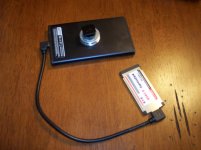
NOTES:
1. This nice enclosure is powered by the bus. It doesn't require a power cable.
2. I used JB weld to attach a friction nut (plastic side towards the enclosure) and washers to the bottom. That made the addition of a simple shoe mount work perfectly. I also painted the front and rear of the enclosure flat black because they were chrome.
3. I tried USB3, but it drew too much power and the drive wouldn't start. Stick with USB2.
4. When you format the drive prepare to see a HUGE number of minutes of recording time on the screen. Like over 1,000 minutes.
5. If you wanted to use an SSD drive for shock protection it would just slide into the case and connect.
6. The files are in ordinary XDCAM format as you normally get from the F3.
PS. It was not my original idea, that was by abereut. I'm just testing that it's a viable option for use on the F3 and added a few things.
I built one of these originally for my EX1. As a DIY project its cheap (about $130), fast and easy, but some people reported some media adapter problems so I wanted to test it on the F3. I tried it after the firmware update. IT WORKS! The Sony makes a recorder at several times the cost.
Since it uses a spinning hard drive I think its use should be restricted to something stable like a tripod. Small bumps don't affect it but a hard jolt could make the drive skip.
Here are all the parts for a working recorder:
USB 2.0 to ExpressCard 34 54 Express Card Adapter BC268
(http://www.trait-tech.com/product/T-PCA-5057/) = $7.99
*Ships from China so it takes awhile. For a few bucks more you can buy them on ebay in the US.
http://cgi.ebay.com/Notebook-Inside...668?pt=LH_DefaultDomain_0&hash=item2c59548274
USB 2.0 Device Cable (Left / Right Angle) RR-AR4TMBR1-12GL
(http://www.usbfirewire.com/Parts/rr-ar4tmbr1-xxg.html) = $13.50
* this cable while expensive, it has right–angle connectors to minimize snagging the cable. Not necessary though. As I recall the enclosure comes with a split cable that should work, but will leave one end flopping around.
320GB 2.5" Hitachi Travelstar 7K500 7200RPM SATA 9.5mm Notebook Drive with 16MB Cache (HIT0A72333)
(http://eshop.macsales.com/item/Hitachi/0A72333/) = $59.99
*Other drives should work.
Acomdata USB 2.0 2.5-Inch SATA Hard Disk Enclosure HDEXXUP-240-BLK (Black)
(http://www.amazon.com/gp/product/B00292BSFI)=$12.99
NOTES:
1. This nice enclosure is powered by the bus. It doesn't require a power cable.
2. I used JB weld to attach a friction nut (plastic side towards the enclosure) and washers to the bottom. That made the addition of a simple shoe mount work perfectly. I also painted the front and rear of the enclosure flat black because they were chrome.
3. I tried USB3, but it drew too much power and the drive wouldn't start. Stick with USB2.
4. When you format the drive prepare to see a HUGE number of minutes of recording time on the screen. Like over 1,000 minutes.
5. If you wanted to use an SSD drive for shock protection it would just slide into the case and connect.
6. The files are in ordinary XDCAM format as you normally get from the F3.
PS. It was not my original idea, that was by abereut. I'm just testing that it's a viable option for use on the F3 and added a few things.
Last edited:


 Anyone have old ones from their notebook?