Jonathan12uiz
Well-known member
I'm a noob and it took me a while to figure out just how to set up Final Cut Pro 6.0.6 to match the timeline with the captured footage. I thought I'd throw this up to help any other noobs.
Ok my first problem was that I didn't understand that when I originally set FCP to capture in "HDV - Apple Intermediate Codec" it was AIC format, not HDV...
So when I would drop it into an "HDV - 1080p24" timeline setting it would say:
I set it to capture AIC because I was under the impression that AIC captured files were smaller in size than ProResLT... which is in turn smaller than ProResHQ.
Anyhoo... I changed it to ProRes422 to have a great workflow setup and I took a snap shot of the 2 MAIN shooting modes that people like to shoot on the GH1.
To get to the Audio/Video settings look at the top FCP menu bar:
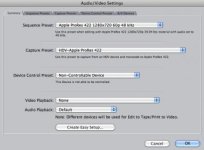
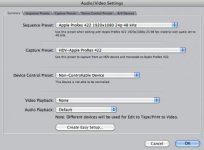
Then set it to the following:
1080p24

720p60

Hope this helps...
I did not make an Audio / Video setting screen capture pic, because there is no need to convert the MJPEG 30p files to get them into FCP, just choose the appropriate setting for your timeline.
Ok my first problem was that I didn't understand that when I originally set FCP to capture in "HDV - Apple Intermediate Codec" it was AIC format, not HDV...
So when I would drop it into an "HDV - 1080p24" timeline setting it would say:
Clip does not match timeline settings, would you like to set the timeline to match the clip settings?
I set it to capture AIC because I was under the impression that AIC captured files were smaller in size than ProResLT... which is in turn smaller than ProResHQ.
Anyhoo... I changed it to ProRes422 to have a great workflow setup and I took a snap shot of the 2 MAIN shooting modes that people like to shoot on the GH1.
To get to the Audio/Video settings look at the top FCP menu bar:
Code:
[B]Final Cut Pro > Audio/Video Settings...[/B]Then set it to the following:
1080p24
720p60
Hope this helps...
I did not make an Audio / Video setting screen capture pic, because there is no need to convert the MJPEG 30p files to get them into FCP, just choose the appropriate setting for your timeline.