4k2HD For Green Screen

We shoot alot of greenscreen with 4K2HD ProRes Slog2 with fantastic results! Before 4K2HD, it was an absolute nightmare...

Did the exact same thing for a short film one month ago - 4K2HD + Slog and it worked great. For the key, just make a simple contrast + saturation preset apply it across your edit (adds about an extra minute or so), then it keys as well as Rec 709.

the way we usually do it is pull a matte from the footage with the contrast/hue preset applied, then use the S-Log footage underneath referencing the matte, that way you still have the talent in S-Log to color correct which is really nice.

for me, I try to avoid any Rec 709 because I want as little baked in as possible on talent. Plus, making a preset is so easy and fast and adds a very minimal amount of time to post.
 
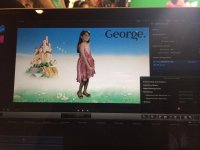
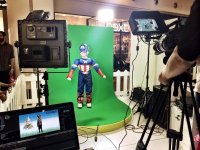
I used the 4K2HD not too long ago for some green screen work. It was a brand activation at a mall, and had to have a very quick turnaround, where we had to shoot and key out for kids that were dressed in customs, and then deliver within the hour. We were basically doing like 40 in a 3 hour span.

It worked out, and I was able to use the same keying settings in FCPX and garbage matte on all clips.

The only thing that was really slowing down was the time it took to transfer the clips, which wouldn't be an issue when you don't need such a fast turnaround.

I shot in Rec 709 800%.

IMG_0218 (1).jpgIMG_0219 (1).jpg
 
Did the exact same thing for a short film one month ago - 4K2HD + Slog and it worked great. For the key, just make a simple contrast + saturation preset apply it across your edit (adds about an extra minute or so), then it keys as well as Rec 709.

the way we usually do it is pull a matte from the footage with the contrast/hue preset applied, then use the S-Log footage underneath referencing the matte, that way you still have the talent in S-Log to color correct which is really nice.

for me, I try to avoid any Rec 709 because I want as little baked in as possible on talent. Plus, making a preset is so easy and fast and adds a very minimal amount of time to post.

Easier said than done.

I have errors on my newest project. I have long continuous clips of interview footage done in slog2. While editing, i cut the long files on my timeline into smaller increments which i can move around, but often i dont move them also. While i renamed some of them, they are still in their adjacent places and thus the "cut" is only visible on the timeline, not in the footage.

While applying a curve and a slight whitebalance correction, i copy pasted this across the lot. While playing back, i now have gamma shifts between the edits!

If i disable curves and just apply three-way color corrector, no such gamma shift is visible.

If i disable three-way color and just apply curves, no such gamma shift is visible.

If i disable both, no such shift is visible.

However, when they are both applied, the adjacent cuts shift between themselves. Such odd!
 
Back
Top