FS7: 2k crop pushing the limits, need better lenses?

Publimix have you tried testing any other lens on your camera? To isolate if it is possible camera or lens issue? Your images do seem on the soft side, even in the video you had posted.

HD is razor sharp but I'm not seeing that in your videos? :shocked:

Do you have a nikon prime lens you can stop down to f5.6 / f8 and give a whirl?
 
May be seeing loss of resolution due to diffraction.

f/11 is narrow for Super 16, & wouldn't be surprised if f/8 induced some softening.
 
Hi Dennis,

Thanks, I agree. It could be the 34 year old lens or the adapter (or me, bad eyed shaking old man). I will give it a try, with some prime Zuiko's a new sony 18-105 and a cheap rokinin 14mm.
 
This is it, tripod sachtler shutterspeed 1/300
lens 1 14mm rokinon f5.6 (2 stops)
lens 2 sony 18-105 f5.6
lens 3 vintage zuiko 1.8 50mm 5.6 (3 stops)
lens 4 vintage nikkor 400mm f8 (1 stop)


Focus with magnification. Not happy with the results.

No sun, much wind.
 
Publimix - get a nice large external monitor with decent resolution and 1:1: pixel punch in. Also if you are using peaking function with Sony provided 3.5" there are some settings deep in menu for getting better results with peaking.

For me though, nothing beats 2x magnification on my Sony DVF-EL100 OLED with my F55 (until subject starts moving). :p
 
Thanks,
How do you judge the sharpness between the lenses?

This more contrasty screencapture is 1/120 400mm f8 . Distance about 500 meter.

kraan.jpg
 
Last edited:
Hi Dennis,
Part of the problem is a monitor I used for viewing the footage. It is a 4K samsung TV but the Davinici Videocard does some strange things with it.

I think it has to do with some HD to 4k settings. Some images look very bad. When I changed the monitor for a dell ultrasharp the artifacts disapeared. (some footage of the 4K UHD TV looked like it was photoshopped (you know this semi-pointilism-filter or mosaik).

Anoher problem was the shutterspeed I used in combination with long lens and low light.

But thanks for the tip, I will dig deeper into the menu for peaking.
 
Last edited:
Hi Dennis I call it a videocard but it is also capture card. Blackmagic Intensity Pro 4K

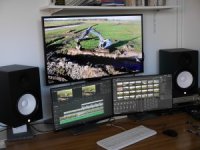
For the or third monitor used with Davinci Resolve and (the second with Catalyst Prepare) I have installed the Davinici Capture card which is also a video-card it is the Intensity Pro 4K. This monitor is a Samsung UHD TV.
I use the big 4K samsung as a viewing monitor. set.jpg

Switching between HD and 4K gives problems with this setup. The Dells are brilliant and the samsung is brilliant most of the time. But I think this is not an ideal setup untill I found all the right settings.
 
Last edited:
To test lens sharpness you need a chart or something with fine detail like a book or dollar bill and to shoot it indoors in a very controlled manner
 
Hi Dennis I call it a videocard but it is also capture card. Blackmagic Intensity Pro 4K

For the or third monitor used with Davinci Resolve and (the second with Catalyst Prepare) I have installed the Davinici Capture card which is also a video-card it is the Intensity Pro 4K. This monitor is a Samsung UHD TV.
I use the big 4K samsung as a viewing monitor. View attachment 111820

Switching between HD and 4K gives problems with this setup. The Dells are brilliant and the samsung is brilliant most of the time. But I think this is not an ideal setup untill I found all the right settings.

What sort of problems are you encountering between HD and 4K switching? Is this for client viewing or just yourself?

The big problem with using consumer TVs in a setup like this is the fact that they're being very clever behind the scenes and you cannot guarantee what processing is being applied. Obviously you're not using it as a calibrated device but still there's a lot of jiggery pokery going on especially in dynamic contrast and image processing. A large screen in that position should be a pukka calibrated screen as you'll be tempted to adjust to what you see on the big screen not on your, I assume, calibrated monitors. The large screen will also be blasting your eyes with colour that will alter what you are seeing on your grading screen and give you eye fatigue. I would suggest moving it out of direct view.
 
Hi Morgan,
I did that (at night in office with only studio lights) test card and some small objects. All lenses (except one oldy) were sharp. That's were I found out the monitor problem.
The images that I shot outside the house were just not very sharp (low shutter speed, long lens and cloudy weather, low contrast). And viewed on the 4K monitor it was even worse.

After sharpening in Resolve it looked bad on this monitor. (Looked like film grain). The problem is that I have to tweak and change the settings of the Blackmagic card, restart the computer to get the best images.

But for now I use the Dell monitors or I use the Samsung 4K monitor via the second hdmi port which is connected with the NVIDEA 970 videocard. (and then the colors do not match :-) ).
 
Hi Nirv,

The problems are for myself as far as I can see. I can imagine (but I don't know) that down- and upsizing 2K and 4K will give some problems elsewere too. But I don't know that.

The 4K monitor is just an affordable way to have a large third monitor with Davinci Resolve. I don't use a calibrated system because I do only rough cuts. My editor has all the right and expensive stuff and the knowledge I lack.
 
As far as I know now has the Intensity pro card to be set for 4K or for HD, this does not automatically happen but has to be done in a settings panel. Normally I don't have a problem, because I always shoot 4K. But when I tested the center crop modus and these lenses the image was HD. And then the problem occured.
 
Hi Dennis I call it a videocard but it is also capture card. Blackmagic Intensity Pro 4K

For the or third monitor used with Davinci Resolve and (the second with Catalyst Prepare) I have installed the Davinici Capture card which is also a video-card it is the Intensity Pro 4K. This monitor is a Samsung UHD TV.
I use the big 4K samsung as a viewing monitor. View attachment 111820

Switching between HD and 4K gives problems with this setup. The Dells are brilliant and the samsung is brilliant most of the time. But I think this is not an ideal setup untill I found all the right settings.

Almost sounds like some scaling issues somewhere along the lines perhaps but it seems like everything is UHD ie. footage, blackmagic card and monitor.

If you ever resolve this, I'd love to know the solution.
 
Publimix is the problem that you are having with the 3rd screen when the clips change from 4K to HD during playback in the timeline I.e you've got mixed resolutions on the timeline? Or just when you change project resolution settings?

Are you sure it's not just the Consumer TV doing crazy image processing on a crazy image you sent to it? It's impossible to second guess the problem and an image would be a valuable addition to the thread.

Go into the TV's settings and turn as much of the image 'enhancement' settings off or on their lowest settings.
 
Last edited:
Hi Nirv,

I do not use 'mixed' timelines. So I think that is not the problem. I think it is a problem with the card and/or Davinci. When I view footage via Catalyst Browse or Catalyst Prepare is is OK.

Problem is the sheer amount of possible settings that can interfere:
-TV
-PC
-PC-card
-and Davinci software

And problem is that the settings only seem to work after rebooting. So this will keep me off the street sometime.
 
Shooting video at long focal lengths is a specialist task. The quality of your tripod and head will need to many times better (expensive) than the one you can get away with up to 100mm.

agree 100%, I have a both the Nikon 400mm 2.8 AFS VR and 600mm f4 AFS (97% used for stills) for 4k video honestly can't see any difference to my used Tokina 200-500 I bought for $275 on Ebay.... obviously 2.8 and f4 let more light, and shooting at large apertures can be cool for a look but its not that useful if you plan of pulling focus. wide open the two new Nikons are sharper and more contrasty than the Tokina's wide open 5.6 aperture but like I said for video (low resolution vs still images) its really not that noticeable and the support is FAR FAR FAR more important, I would much rather use the Tokina on my Vinten 100 than either of the big Nikons on my smaller supports. Even with the big 100mm bowl Vinten a strong breeze can ruin shots if I don't weight down the tripod legs and make sure they are stuck down into the ground. I also have a Libec H85 fluid head that works extremely well, if you can find one used on eBay they go pretty reasonably (maybe $400-$600)


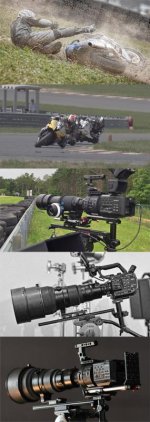
camsLongLensMount.jpg
 
Back
Top