
Navigation
Install the app
How to install the app on iOS
Follow along with the video below to see how to install our site as a web app on your home screen.
Note: This feature may not be available in some browsers.
More options
You are using an out of date browser. It may not display this or other websites correctly.
You should upgrade or use an alternative browser.
You should upgrade or use an alternative browser.
24 fps pan speed strobing
- Thread starter firehawk
- Start date

NorBro
Major Contributor
Yeah, good question...but I watched it again and I don't see any fast pans without objects being tracked (and there's some slow-motion which would imply overcranking, higher framerates).
However, if you're talking about the fast pan at 4 seconds...well, that's actually a whip pan and because our brains can't register any of the motion it doesn't have the same effect. It actually has an opposite effect because it's blurry and motion blur is what they recommend in post to cure some of that ugly strobbing during regular panning that's too fast for 24 frames per second.
However, if you're talking about the fast pan at 4 seconds...well, that's actually a whip pan and because our brains can't register any of the motion it doesn't have the same effect. It actually has an opposite effect because it's blurry and motion blur is what they recommend in post to cure some of that ugly strobbing during regular panning that's too fast for 24 frames per second.

Run&Gun
Veteran
They used to use charts and tables based on frame rate and focal focal length for panning speed and actually(usuallly) adhered to them. There is a calculator on RED that allows you to plug in your frame rate, focal length and total pan length(degrees) and it gives you the speed for the pan in seconds(total duration) and degrees per second.
https://www.red.com/panning-speed
https://www.red.com/panning-speed
Thanks guys. Yeah I knew about the pan speed charts but seems like when out in the field filming some of the action it would be easy to get caught up in and move a little too quick.
Guess the old hollywood guys were highly skilled masters.
https://youtu.be/59uHMm6IUhg?t=211 big pan in this , but it's tracking objects again
I've shot car chases and races before but I would never want to attempt it at 24P.
But I certainly see how focal length could be accounted for to help blur and reduce the strobing effect background
Guess the old hollywood guys were highly skilled masters.
https://youtu.be/59uHMm6IUhg?t=211 big pan in this , but it's tracking objects again
I've shot car chases and races before but I would never want to attempt it at 24P.
But I certainly see how focal length could be accounted for to help blur and reduce the strobing effect background
NorBro
Major Contributor
IMO, that's all still too fast to notice (even without tracking).
And I think it's actually, ironically, most pronounced during regular panning of slower action where you're just a tad too fast (like a long panning landscape establishing shot where you may find yourself moving too quick at certain times).
And I think it's actually, ironically, most pronounced during regular panning of slower action where you're just a tad too fast (like a long panning landscape establishing shot where you may find yourself moving too quick at certain times).
Yeah I can't seem to remember any scenes where they panned questionably a littele too fast on a landscape or slower action to look at and share here. I've seen some before that I wondered about but cannot recall them now. All the samples above were pretty fast.
Thanks for the input. Thought it might be a little break from the usual camera gear and virus discussions anyway
Thanks for the input. Thought it might be a little break from the usual camera gear and virus discussions anyway

CharlesPapert
Director of Photography
Definitely there was no "free ride" in the film days, in fact it was more challenging because you didn't really get to see it either in camera or via the video tap, you just had to instinctually know what the "no-fly zone (as I called it) was...and no, I never consulted one of those charts! Now of course you can see it on the monitor, which helps. I used to sometimes do a little speed-up in the middle of a dodgy pan to help get through the strobey bits, which took a bit of practice to get in and out of, especially on Steadicam.

cyvideo
Veteran
I've seen pans done many times in film that don't seem to have the annoying strobe effect that we have to guard against when shooting 24P video.
How do they accomplish it?
This was shot on 35mm about 1985
Way back when when I was training, film days, the old rule of thumb was if you had a lamp post on the left edge of your frame and you had to pan a full width, i.e get the lamp post to the right edge of the frame to get an acceptable looking pan that pan should take about seven seconds when shooting at 24/25 FPS with a standard lens. For TV in the UK we nearly always shot 25 FPS. The longer the lens gets though the slower the pan needs to be. These days I find work coming in where the shooter really hasn't understood this rough rule and we often have strobing choppy shots going on. Basically for PC and most modern TVs that run at 50/60Hz shooting at 24p is always going to introduce some nasty-looking movement on quicker pans. If you are actually following action the issue isn't so apparent as your subject movement to camera movement is relatively static. Like when driving a car at 60 mph and you look at the car in the next lane also doing 60 mph in effect to you the image of the car next to you is relatively static. In film when shooting 24/25FPS from cars we often sped up the motor to 36FPS to help smooth out motion when it was played back at 24/25FPS.
These days it depends on what you watch the footage on. If it is a PC monitor running at 60Hz it will judder. If it is a modern TV with 24p detection it can playback judder-free because a lot of them can detect the incoming 24p and then apply an interpolation algorithm to smooth out the motion. It's all to do with the 3:2 pull down conversion required.
TVs commonly have one of two refresh rates: 60Hz and 120Hz. 30Hz and 60Hz videos divide into those refresh rates evenly, which makes it easy for the TV panel to get the video to meet the panel refresh rate. For example, a 30Hz TV show would have each frame displayed four times on a 120Hz panel.
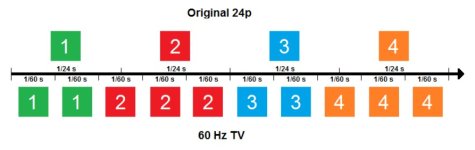
Most 120Hz panels can display 24Hz video without issue because 24 goes into 120 five times. But some 60Hz TVs have difficulty. Because 24 does not divide into 60 evenly, doubling the frame rate still leaves 12 frames missing from meeting the TV’s refresh rate. This is the problem with 60Hz monitors. To get to 60 fps, 60Hz TVs use a feature called ‘telecine,’ or 3:2 pulldown. This makes the video’s frames alternate displaying two and three times – hence 3:2 – which makes up the missing frames. The image below will illustrate this.
These days in post to overcome the problem to some degree I use RE: Vision Effects RSMB to make the motion much more acceptable if someone has given me 24/25p material to edit that has the 24p movement issue. Look specifically at clips #3 and #4 on this page. Clip #4 The Fighter clip is a good example of smoothing 24p for most practical human movement.
https://revisionfx.com/gallery/#rsmb
Chris Young
Last edited: