

Michael Carter
Veteran
I mentioned my stand mount in another forum and eventually got several messages about how to do it - here's what I came up with. I'm sure there are purpose-made solutions out there (maybe pricey though?), I tossed this together with items in my grip case. There's a pic below that makes some sense out of this.
I use a 22" Samsung 1080 TV on set sometimes, either for focus help or clients. It's not a broadcast monitor, but it is a nice huge screen compared to the camera LCD. I generally get it somewhat "matched" to my calibrated broadcast panel which is on the hot shoe but only 6". I use a cheap passive HDMI splitter, like $5 and no extra batteries needed. Works fine.
I started with a cheap articulating wall mount, like $15 - this one is similar but actually uses a better mounting plate on the TV.
I unscrewed the pin where the swing arm attached to the TV mount; leaving the TV side of the mount with a yoke that fit a 1/4" steel post - thus I needed a 1/4" steel post that would mount to a baby stand. So I used something like this, only the adapter i used didn't have the 1/4" thread on top, just a steel post.
Since the mounting plate from the VESA swing arm doesn't adjust the up-down viewing angle (the newer one in the link above does), I grabbed a matthews knuckle head and put the 5/8 to 1/4 adapter on it. This all goes on a wheeled light stand - which you'll want to sandbag.
Finally, I drilled a hole in the metal sleeve of the TV half of the wall mount, tapped it for 1/4-20 and found a Knob/bolt that fit, so I can firmly attach the TV to the knucklehead/adapter setup. Just a thumbscrew setup. (If you've never used a drill & tap, it's easy and really handy). See the pic below.
I mounted the wall portion of the mount over my edit bay, and I can drop the TV back on there when I use it for edits. No tools, pretty cool.
To transport it, I looked at all kinds of stuff and eventually settled on an iMac case. It was about $200 but works fine. One thing you should do with the case - put an extra power cord in it (so you don't have to snake the power cord for the TV out of your edit stuff), a long HDMI cable, and write "REMOTE" on a big piece of paper and leave it in the case... so you remember to pack the damn remote!
Gator cases makes a soft-style flatscreen case, which is really nice, but was about 2" too narrow for the screen I bought.
Here's a detail of the post & thumbscrew setup, hope that makes sense - NOTE THAT THIS IS THE TV ON THE WALL, with the full articulating arm. When it's on a stand, only the VESA mount & thumbscrew parts are taken from the wall, the arms stay put. The yellow outline in the pic shows the 1/4" steel post which is a pivot of the wall mount. Match that post on a stand and you're on the right track.
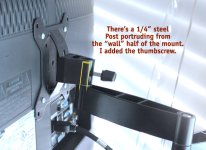
Basically, the wall mount has a 1/4" steel pin sticking up; all I had to do was get an articulating steel pin on a stand. Different wall mounts may require different solutions, but the main things to think of are:
I use a 22" Samsung 1080 TV on set sometimes, either for focus help or clients. It's not a broadcast monitor, but it is a nice huge screen compared to the camera LCD. I generally get it somewhat "matched" to my calibrated broadcast panel which is on the hot shoe but only 6". I use a cheap passive HDMI splitter, like $5 and no extra batteries needed. Works fine.
I started with a cheap articulating wall mount, like $15 - this one is similar but actually uses a better mounting plate on the TV.
I unscrewed the pin where the swing arm attached to the TV mount; leaving the TV side of the mount with a yoke that fit a 1/4" steel post - thus I needed a 1/4" steel post that would mount to a baby stand. So I used something like this, only the adapter i used didn't have the 1/4" thread on top, just a steel post.
Since the mounting plate from the VESA swing arm doesn't adjust the up-down viewing angle (the newer one in the link above does), I grabbed a matthews knuckle head and put the 5/8 to 1/4 adapter on it. This all goes on a wheeled light stand - which you'll want to sandbag.
Finally, I drilled a hole in the metal sleeve of the TV half of the wall mount, tapped it for 1/4-20 and found a Knob/bolt that fit, so I can firmly attach the TV to the knucklehead/adapter setup. Just a thumbscrew setup. (If you've never used a drill & tap, it's easy and really handy). See the pic below.
I mounted the wall portion of the mount over my edit bay, and I can drop the TV back on there when I use it for edits. No tools, pretty cool.
To transport it, I looked at all kinds of stuff and eventually settled on an iMac case. It was about $200 but works fine. One thing you should do with the case - put an extra power cord in it (so you don't have to snake the power cord for the TV out of your edit stuff), a long HDMI cable, and write "REMOTE" on a big piece of paper and leave it in the case... so you remember to pack the damn remote!
Gator cases makes a soft-style flatscreen case, which is really nice, but was about 2" too narrow for the screen I bought.
Here's a detail of the post & thumbscrew setup, hope that makes sense - NOTE THAT THIS IS THE TV ON THE WALL, with the full articulating arm. When it's on a stand, only the VESA mount & thumbscrew parts are taken from the wall, the arms stay put. The yellow outline in the pic shows the 1/4" steel post which is a pivot of the wall mount. Match that post on a stand and you're on the right track.
Basically, the wall mount has a 1/4" steel pin sticking up; all I had to do was get an articulating steel pin on a stand. Different wall mounts may require different solutions, but the main things to think of are:
- Keep the TV as close to the stand's center of gravity as possible;
- Find a way to articulate the angle of the screen without it hanging too far out in space (I used the knucklehead). As you can imagine, you can't angle the screen down very far without it hitting your light stand - unless the TV stands an inch or two proud of the stand;
- Use a wheeled stand to make it easier to move - sandbag it;
- Find a safe way to transport the TV;
- And (extra credit) make it all work so the TV can quickly hook back on the wall without tools.