GH4 10bit 444 gh4 help

I thought this technique was debunked when the GH4 first shipped?
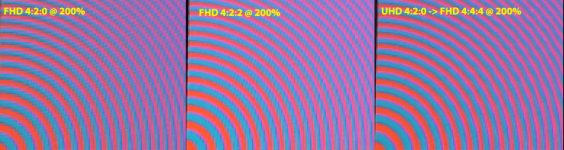
Here's an attempt to illustrate what's being talked about once and for all.

This is an extract from the DSC Labs' "Wringer" chart. It's a professional camera setup chart that is designed specifically to test a camera's chroma resolution and performance.

The part I'm showing is a series of concentric rings of opposite color. This is pretty much a worst-case scenario for chroma resolution.

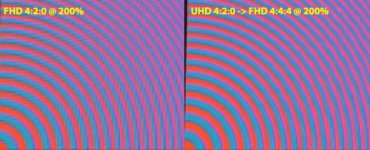
I shot this in 1080p 4:2:0, and also in UHD 4:2:0. I then downconverted the UHD 4:2:0 to 1080p, which, in the process, increases the chroma resolution to 4:4:4. I'm showing this at 200% magnification to illustrate the difference. The difference is rather stark and should show that the technique is quite valid: resizing UHD 4:2:0 to 1080p results in an increase in color resolution in the resulting 1080p file.
Wringer side-by-side.jpg

Note, that's the exact same chart, same camera, same position, same everything. I shot it on a DVX200 in "Dual Codec" mode, so it is actually the exact same image, just recorded at UHD 4:2:0 on one SDXC card, and recorded as FHD 4:2:0 on the other SDXC card. The images were otherwise identical.
 
In case anyone is wondering about the downconversion process:

I started a new project in Vegas, and imported both clips. Dropped them onto a 1080p timeline. Copied the frame to Photoshop (so whatever downconversion was already done by Vegas internally) and made the side-by-side picture. So there was no unique processing, no particular set of steps, I just dropped the 3840x2160 clip on the 1920x1080 timeline and that's how it looked.
 
Well that all depends on what you plan on doing with it. Not many NLEs will handle full-raster 3840x2160 in a long-GoP format at 60 frames per second at full speed, so you may want to render it down to an intermediate editing codec; you just may prefer to use one that retains 4:4:4 as most don't.
 
Okay, so let me throw a wrench in the works... In FCPX, I dropped in a UHD clip from the GH4 onto a 1080p timeline. I then dropped that same clip that I already downsampled to 1080p Cineform on that same timeline and the pre down sampled Cineform version looked better - more detailed and somewhat better on color. All this time I thought that just downsampling UHD inside a 1080p timeline would be sufficient but after that test it seems I am wrong, what gives?
 
- more detailed and somewhat better on color. All this time I thought that just downsampling UHD inside a 1080p timeline would be sufficient but after that test it seems I am wrong, what gives?

Each program would need to be tested to see how it performs. Some may do better than others.
 
Here's an attempt to illustrate what's being talked about once and for all. <SNIP> The difference is rather stark and should show that the technique is quite valid: resizing UHD 4:2:0 to 1080p results in an increase in color resolution in the resulting 1080p file.

Barry, thank you for this - this is very telling.

Okay, so let me throw a wrench in the works... In FCPX, I dropped in a UHD clip from the GH4 onto a 1080p timeline. I then dropped that same clip that I already downsampled to 1080p Cineform on that same timeline and the pre down sampled Cineform version looked better - more detailed and somewhat better on color. All this time I thought that just downsampling UHD inside a 1080p timeline would be sufficient but after that test it seems I am wrong, what gives?

Darn, as this is what I've been doing! Don't fancy adding yet another step in the import stage to down convert footage.... HMM
 
Not sure how to post this yet but I created an image in Photoshop to show how this works. Its 102MB in size so kind of hard to post on here. I started with a RAW photo from my GH3. I did this because its RAW with no image compression and starts off with 4:4:4. I then proceeded to convert that image to a 4:2:2, and 4:2:0 version. I also cropped the RAW photo to 4096x2160 to simulate what a frame of video would be like from the camera if it could shoot RAW video at 4k.

When I scaled down the image in Photoshop to 2048x1080 the 4:4:4, 4:2:2 and 4:2:0 layers all looked identical. This proves that starting with 4:2:2 4k or 4:4:4 4k would make little to no difference when down converting to 2k. The only slight difference I saw at 1600% zoom was a slight color shift of a few high color pixels along sharp edges. I'm talking a very slight color intensity shift of a few percent that nobody would ever notice.
 
Raw from a Bayer sensor is in no way 4:4:4. It's more like 4:2:0+; it's a little higher than 4:2:0 but not much. You'd need three sensors to get a true 4:4:4 at the sensor.

But yes, your findings are still correct -- when downconverting from 4K to 2K, it makes little to no difference whether you started with 4:2:0, 4:2:2, or 4:4:4. The end product is still going to be 4:4:4.
 
Raw from a Bayer sensor is in no way 4:4:4. It's more like 4:2:0+; it's a little higher than 4:2:0 but not much. You'd need three sensors to get a true 4:4:4 at the sensor.

But yes, your findings are still correct -- when downconverting from 4K to 2K, it makes little to no difference whether you started with 4:2:0, 4:2:2, or 4:4:4. The end product is still going to be 4:4:4.

Yeah I did it this way because thats the best we will ever get from a single sensor camera. While the sensor is not capable of true 4:4:4 I wanted the test to be fair in comparison with what most people expect from RAW 4:4:4 video. RED, Blackmagic or any other camera with a single sensor suffers from the same issue. I think thats why this works so well. The RAW image already has so much color interpolation going on that an averaging of the pixels in a down scale just pretty much cancels out.

I have said it before but the GH4 is one hell of a 2k camera that can hold its own compared to most Hollywood post 2k workflows. You basically get the same level of 2k chroma precision that most big VFX movies in Hollywood have.
 
If the camera shot in FHD 4:2:2, would it look close to the one on the right?

I still had the same setup in place, so I just rolled off another shot, this time recording to the Odyssey in 1080p ProRes 4:2:2. I then added a comparable crop to the existing two shots to come up with the following. This shows you what native 1080p 4:2:0, native 1080p 4:2:2, and resized UHD->1080p 4:4:4 look like.

Wringer-side-by-side.jpg
 

Attachments

  • Wringer side-by-side.jpg
    Wringer side-by-side.jpg
    260 KB · Views: 0
Barry, I know you are busy with the DVX, so thanks for this.

This is super telling of why we should use 4K for a 1080p output - its quite a big improvement.

Its such a shame the camera can't do this in camera for the 1080 it produces.
 
What method of downconverting from 4k to 2 k increases color resolution?
How does that work?
Simplest explanation: 3840 x 2160 source, at 4:2:0, consists of 3840 x 2160 brightness resolution and 1920 x 1080 color resolution. So scale the brightness but don't change the color resolution, and you end up with 1920 x 1080 in brightness and color, and a separate color sample for every pixel, which means 4:4:4.
 
What method of downconverting from 4k to 2 k increases color resolution?
How does that work?

its actually not increasing the color resolution. Whats happening is you are throwing out the extra luma resolution from the 4k so the chroma and luma now match at HD resolution. Its a lossy process because you are sacrificing the 4k to gain 4:4:4 HD. If a production has a HD or 2k workflow this is totally acceptable and the actual workflow of many Hollywood movies.

Think of it like having three video cameras. One camera is 4k and the other 2 are HD. The 4k camera represents how the luma channel looks with 4k video. The 2 HD cameras represent what the chroma looks like in 4k video if you blew up the video from the HD cameras to 4k. Since the 2 HD cameras are already at HD resolution you can down convert the 4k camera to HD so it now matches the exact same format of the 2 HD cameras. This in essence is what happens when you down convert 4k to HD. The luma and two chroma channels are now the exact same HD size so you have 4:4:4.

The process to do this is super simple. Just convert 4k video on your computer to HD and save to a high quality format like ProRes4444. The other method is to setup a 1080p or 2k project in your edit software and place the 4k footage in the timeline and scale to fit. Playback performance may be affected but this gives you 4:4:4 without having to worry about what format to convert to.
 
Back
Top