Shawn Storm
Active member
While testing the differences between quality of video at 1080p modes and 720p modes, I noticed something that seems odd to me. All the 1080p footage seems slightly stretched vertically. I noticed this because I was comparing identical scenes and jumping back and forth to inspect image quality. At first I thought it was my imagination, but I did some tests to confirm what I was seeing.
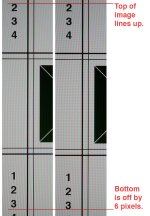
From my tests, it appears that 1080p footage gets stretched roughly 6-7 pixels vertically (downwards). I also took some still photos at 16:9 ration and normal 4:3 and cropped them to confirm that it is just the 1080p video that is acting this way. So for example, if a square box is filmed, it will be square when filmed at 720p (or photographed), but becomes a rectangle when filmed at 1080p (being roughly 6-7 pixels taller than wide if the square was filling the frame).
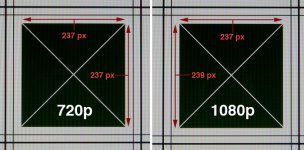
Here is an image that illustrates what I am talking about (it is cropped to the center of the frame). As you can see the box in the 1080 footage (which I scaled down to 720p for comparison) is roughly 2 pixels longer up and down. The difference is only 2 pixels because the box is only taking less than half the frame. If it was taking up the whole frame it would show an approximate 6 pixel difference.
Anyways, I thought this is strange and find it slightly annoying. Does anyone know the reason why this would be? Is there some logical explanation that I am unaware of?
Thanks,
Shawn
From my tests, it appears that 1080p footage gets stretched roughly 6-7 pixels vertically (downwards). I also took some still photos at 16:9 ration and normal 4:3 and cropped them to confirm that it is just the 1080p video that is acting this way. So for example, if a square box is filmed, it will be square when filmed at 720p (or photographed), but becomes a rectangle when filmed at 1080p (being roughly 6-7 pixels taller than wide if the square was filling the frame).
Here is an image that illustrates what I am talking about (it is cropped to the center of the frame). As you can see the box in the 1080 footage (which I scaled down to 720p for comparison) is roughly 2 pixels longer up and down. The difference is only 2 pixels because the box is only taking less than half the frame. If it was taking up the whole frame it would show an approximate 6 pixel difference.
Anyways, I thought this is strange and find it slightly annoying. Does anyone know the reason why this would be? Is there some logical explanation that I am unaware of?
Thanks,
Shawn