0db Gain, plenty of noise

Bipedal

Member
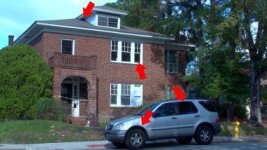
I have too much noise in my video, even in full light. Check out this frame export.

noise.png


Is this about average for everyone else? This is using the 'sharp saturated' scene file that I've found somewhere else on this forum. This noise is driving me insane, I can deal with the bad low light performance, I just want a clean image for god's sake.

Does anyone have a link to that whitepaper on the hmc40 scene files that panasonic put out? I can't for the life of me find it anywhere here, and their awful website is no help.
 

Attachments

  • noise.jpg
    noise.jpg
    20.7 KB · Views: 0
Did you have DRS turned on? I normally find the HMC40 to be quite clean at 0dB with adequate light (and an exterior daylight shot would qualify as enough light!)
 
More info please.

What is your frame rate?

What was the actual scene file? Increasing detail will create extra noise. Using a saturated filmic scene file will also increase noise. A few settings on this cam can make a huge difference, so a more conservative file may help you. I worked through a compromise scene file which works really well outdoors. I'll post it up if you are interested.

In daylight, if your aperture is stopped down excessively, you will get that fuzzed out of focus look on the shingles. This is due to the lens not performing well past about f5.6. I have seen a very similar effect on the green needles of a cedar tree; all the same color and they look undefined. This cam doesn't have enough built in ND ability, so external ND filters are a fact of life on this cam in bright daylight. A polarizer (1.5 stops) is a good place to start, and in my experience will take care of it. It will also improve your outdoor work.

Grant
 
More info please.

What is your frame rate?

What was the actual scene file? Increasing detail will create extra noise. Using a saturated filmic scene file will also increase noise. A few settings on this cam can make a huge difference, so a more conservative file may help you. I worked through a compromise scene file which works really well outdoors. I'll post it up if you are interested.

In daylight, if your aperture is stopped down excessively, you will get that fuzzed out of focus look on the shingles. This is due to the lens not performing well past about f5.6. I have seen a very similar effect on the green needles of a cedar tree; all the same color and they look undefined. This cam doesn't have enough built in ND ability, so external ND filters are a fact of life on this cam in bright daylight. A polarizer (1.5 stops) is a good place to start, and in my experience will take care of it. It will also improve your outdoor work.

Grant

Framerate was 24p. Good to know about the detail sliders, all the scene files I found told me to clock them up. Please do post yours, it'd be very helpful.

I had my suspicions about the aperture, but not enough theoretical knowledge to back up why it would do that. Thanks.
 
Bipedal,

Try this. This looks good outdoors in either 720 or 1080. I haven't tested this indoors. 720 will look a little more organic, and 1080 will give the best IQ.

Anything I didn't list is off or zero.

Detail +2
Detail level +1
Detail Coring +2
Chroma +2
Color temp +1
Master Ped -5
Gamma = B.Press
Knee = Mid
Matrix = Cine-Like

Rule 1 is moderation in your settings unless you have a purpose.
Detail coring will help reduce the noise from elevating the detail level
Increased chroma will saturate the B-Press gamma
B-Press has less noise than either of the Cine-Gammas and I prefer the contrast level
I find a little warming of the color temp is good with this, your mileage may vary.
If you don't like the whites with this recipe, try turning knee to low, but you will have to be more careful with exposure of the high end.

I spent the better part of a day fooling around with this and as I mentioned in a previous post, if you stop this lens down much past f5.6, the results deteriorate quickly. The problems you highlighted are symptomatic of this issue. A polarizer or ND filter is IMO a must for bright days..

Any recipe like this can be tweaked to suit and you should experiment. But as a rule of thumb, if you want the least amount of noise, stay away from the higher saturation gammas and if you increase detail levels, increase detail coring at the same time. If you have Barrys HMC series book, it explains all of this better than I can. You might also look at the Panna white papers on scene files. I don't know if there is one for the HMC40, but the mojo is pretty similar to the HPX170 and HMC150.

Also, you didn't mention how you were viewing your footage. Even if you don't have a production monitor, try looking at your footage direct from cam to 1080 TV via HDMI. Viewing within an editor can be pretty misleading depending on the software and your computer system.

Have fun,
Grant
 
Bipedal,

Try this. This looks good outdoors in either 720 or 1080. I haven't tested this indoors. 720 will look a little more organic, and 1080 will give the best IQ.

Anything I didn't list is off or zero.

Detail +2
Detail level +1
Detail Coring +2
Chroma +2
Color temp +1
Master Ped -5
Gamma = B.Press
Knee = Mid
Matrix = Cine-Like

Rule 1 is moderation in your settings unless you have a purpose.
Detail coring will help reduce the noise from elevating the detail level
Increased chroma will saturate the B-Press gamma
B-Press has less noise than either of the Cine-Gammas and I prefer the contrast level
I find a little warming of the color temp is good with this, your mileage may vary.
If you don't like the whites with this recipe, try turning knee to low, but you will have to be more careful with exposure of the high end.

I spent the better part of a day fooling around with this and as I mentioned in a previous post, if you stop this lens down much past f5.6, the results deteriorate quickly. The problems you highlighted are symptomatic of this issue. A polarizer or ND filter is IMO a must for bright days..

Any recipe like this can be tweaked to suit and you should experiment. But as a rule of thumb, if you want the least amount of noise, stay away from the higher saturation gammas and if you increase detail levels, increase detail coring at the same time. If you have Barrys HMC series book, it explains all of this better than I can. You might also look at the Panna white papers on scene files. I don't know if there is one for the HMC40, but the mojo is pretty similar to the HPX170 and HMC150.

Also, you didn't mention how you were viewing your footage. Even if you don't have a production monitor, try looking at your footage direct from cam to 1080 TV via HDMI. Viewing within an editor can be pretty misleading depending on the software and your computer system.

Have fun,
Grant

Thanks, I'll mess around with this.
 
Quote: if you stop this lens down much past f5.6

I'm not sure that's even possible - is it? I thought the f-stops below 2.8 were pseudo f-stops.

Edit: OK I just checked and I guess I thought wrong. From Wikipedia: The AG-HMC40 includes an automatic built-in neutral density (ND) filter. When the iris closes down from fully open position — either manually or automatically — it closes to F2.8, then the ND filter activates to absorb light while keeping iris at F2.8. After filter is fully engaged, the iris continues to close. Unlike Canon camcorders, which report constant aperture value when the ND filter is being engaged, the HMC40 reports virtual aperture values. That is, F2.8 means "F2.8, no ND filter", F3.0 means "F2.8, 1/6-stop ND", F3.2 means "F2.8, 1/3-stop ND", etc. With the ND filter fully engaged the camera displays F6.4, which in reality means "F2.8, 2 and 1/2-stop ND". [7] The operation of the automatic ND filter is fully transparent for a user, does not require use of an external ND filter, and allows achieving shallow depth of field.
 
Graham,

I can't tell you for sure exactly how the semi auto aperture - ND feature works...it seems like some mystery Panna vodoo. All I know is that once you get past the limited ND and the indicated f-stop goes up, the IQ deteriorates. Thus the recommendation for external ND. I just park a circular polarizer on the cam when outside. The polarizer is a good thing outside on most days anyway. You can always increase the shutter speed if more light reduction is needed.

The loss of IQ when stopped down is not just a feature of the HMC40 lens, most video lenses do the same. It is just the slightly strange unified ND aperture wheel thingy that makes it a gotcha if your not paying attention. Once I figured out how to live with it, it's really no big deal. In fact, for run & gun, or auto shooting, it's faster, though I would prefer a standard implementation with a separate ND switch. There is just isn't enough room on this cam for all manual switches.

Grant
 
Honest to goodness, I just don't see the problem. IMHO, that frame grab looks pretty respectable to me, especially coming from a camcorder costing less than $2000. It's a frame grab from a video camera, not a still photo shot with a DSLR.
 
I guess I'm just expecting more than it can give? Dunno. Do you guys have any frame grabs you could throw up? I've really got nothing to compare it to. Just thought that an HD cam would be sharper and less grainy.
 
This little cam can give a lot. Until you get to the HPX370, this is the sharpest cam Panna makes. (time will tell on the AF100) It is sharper than my HPX170 in good light. Did you test it with a more open aperture?

Grant
 
I had the same issue recently and if you search on this forum you will find my post. I think this is just the way it is with this camera. I suspect you have used other cameras in the past which is why you notice this a bit more just like I did. For the most part I am ok with it but I still think it is a small issue. I tried many different settings and while I can reduce it a bit it always seems to be there. My one area of concern was seeing a lot of noise in very dark situations even with the gain at 0db. I have used many other cameras in the past and usually 0db is 0db with little to no noise regardless of how dark the picture is. You should be able to shoot black and keep it black. I will keep searching for a solution but it doesn't really bother me as much as it did before. As long as I know this is normal for this camera I am ok with it. Other then this one issue I feel the camera blows away a lot of other cameras out there.
 
Back
Top