Zaxcom DCiRX

One slightly new wrinkle with the new Zaxcom system is the ability to sync both my TRXLA2.5 transmitter and the DCiRX via timecode directly in those units.

I've always had a tentacle sync on all of my cameras when I'm rolling, but now I can ALSO sync those two things (transmitter/receiver) independently.

Now, when the transmission is working well, no dropouts, etc. it has't really mattered. I'm already pulling audio direct into camera. But the ability to have the "backup" track recorded in both transmitter and receiver and synced up via timecode is kind of amazing.

I know some people have been on this workflow for years now, but it's new to me. It's already got me wishing I had the ability to send commands via Zaxnet and sync all of those things wirelessly, but maybe that's the next step down the line.

I had to pickup a new sync cable for the Tentacle to the LA2 transmitter though. Should be here tomorrow. I already had one that works with the DCiRX.

Further reporting to come...
 
I ran a quick walk and talk test a couple days ago just to see how everything might sync up.


I was recording into the DCiRX's micro SD a mix of the on-camera shotgun (Sennheiser MKH8060 with a dead cat), and the TRXLA2.5 with a Deity W.Lav Pro with a Bubblebee fur lav cover. You can assign things how you want, but in this case I had the 4 channels assigned as follows:

Channels 1 and 2 - Auto Mix of the Shotgun and Transmitter
Channel 3 - Transmitter
Channel 4 - Shotgun

The camera was the Alexa Mini and it was receiving 2 channels of the Auto Mix from the DCiRX. And the transmitter was recording the Lav to its internal micro SD card. Took them all into post and did a little switching just to see how things would go.

There were some dropouts that started occurring as I got pretty small in the frame. I'm not sure exactly how many feet that would have been, roughly a half a block or further when the first ones started.

Both the transmitter and the DCiRX were just on whips. Transmitter was on my belt, in the small of my back, so there were definitely times where I was in-between it and the receiver. Overall the range seems fine for my normal usage. And I'm sure you could get better range depending on a bunch of circumstances and how you set things up.

The Auto Mix on the DCiRX seemed to do a pretty good job of minimizing the shotgun in a windy situation and prioritizing the transmitter/lav combo. Just enough ambient brought in from the MKH8060, IMO.

Having the on-board recording on the Transmitter made for a pretty great option in post. As soon as dropouts started I could switch over and everything was right there.

Again, this type of workflow has been going on for years and years now for full-time sound recordists, but it's new to me and I'm pretty excited about it.
 
Here's an interesting side effect of being on the "bleeding edge" of tech with the DCiRX. I say "bleeding edge" because I was actually advised by the guys over at Gotham Sound when I bought it that there may be quite a few firmware updates rolling out in the first few weeks, which I mentioned I was fine with.

When I was doing my testing with the DCiRX, Alexa Mini, and TRXLA2.5 transmitter recently I noticed that the timecode metadata from the DCiRX kept reading at 23.98 in Resolve, even though I had checked and double-checked that they were 24 in the DCiRX.

Lo and behold, I see a recent update from Zaxcom just the other day:

"1.53-v076 June 13
Fixed swapped left/right headphone outputs
Fixed WAV timecode frame rate metadata to match the receiver frame rate setting"

Looks like I wasn't going crazy after all!
 
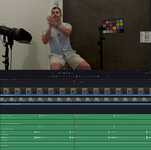
Interesting bug I've "discovered" when working with all of these files in Davinci. It looks like although we have matching timecode on all tracks, things still aren't 100% aligned.

synctest.jpg

You can see above that although we've got all of our timecode lined up, matching 100% in Resolve, but obviously the sound is off by a few frames.

What's interesting is that the audio that appears to be lagging is the DCiRX tracks, which look to be about 3 frames late or so. But the DCiRX is also feeding the Alexa Mini its audio...and that audio is synced perfectly.

Anyway, this gets beyond a DCiRX issue and really more into Davinci Resolve timecode issues, Alexa Mini timecode issues and more.

Just thought I'd share this quirk in case anyone had seen similar things.
 
Interesting bug I've "discovered" when working with all of these files in Davinci. It looks like although we have matching timecode on all tracks, things still aren't 100% aligned.

View attachment 5713255

You can see above that although we've got all of our timecode lined up, matching 100% in Resolve, but obviously the sound is off by a few frames.

What's interesting is that the audio that appears to be lagging is the DCiRX tracks, which look to be about 3 frames late or so. But the DCiRX is also feeding the Alexa Mini its audio...and that audio is synced perfectly.

Anyway, this gets beyond a DCiRX issue and really more into Davinci Resolve timecode issues, Alexa Mini timecode issues and more.

Just thought I'd share this quirk in case anyone had seen similar things.
I don’t think it’s a bug. I find this to be common with equipment I use (Canon cameras, Sound Devices and Lectrosonics recorders with Betso lockit boxes). Timecode gets you close but waveforms are more precise (if your camera has an onboard mic that you can sync to). Ultimately this is why gen lock and word clock are used on many high end productions, sub frame accuracy.

For your setup, I wonder about what processing your audio must go through to be recorded in the DCiRX versus just being passed through to the Alexa?

The other thing I’d be curious about is what is your timecode workflow (sorry if you mentioned earlier)? And are you keeping a lockit box on camera to continually jam it? Or are you jamming it once and letting the internal clock take it from there? Is the Zaxcom transmitter the master clock?

I see the DViRX can only receive timecode embedded from a wireless transmission. Just curious, does the zaxcom transmitter recordings and the DViRX stay in perfect sync?
 
Last edited:
I don’t think it’s a bug. I find this to be common with equipment I use (Canon cameras, Sound Devices and Lectrosonics recorders with Betso lockit boxes). Timecode gets you close but waveforms are more precise (if your camera has an onboard mic that you can sync to). Ultimately this is why gen lock and word clock are used on many high end productions, sub frame accuracy.

For your setup, I wonder about what processing your audio must go through to be recorded in the DCiRX versus just being passed through to the Alexa?

The other thing I’d be curious about is what is your timecode workflow (sorry if you mentioned earlier)? And are you keeping a lockit box on camera to continually jam it? Or are you jamming it once and letting the internal clock take it from there? Is the Zaxcom transmitter the master clock?

I see the DViRX can only receive timecode embedded from a wireless transmission. Just curious, does the zaxcom transmitter recordings and the DViRX stay in perfect sync?
Thanks for the feedback. I was hoping some other, more sound-savvy people, would jump in with their own experiences.

Yeah, I don't think it's necessarily a "bug" either, I should have been a bit more clear there. I've read a lot of other accounts of timecode being off just a bit in post, so I figured it's a combo of camera/sound/post-production.

I've also read that the Alexa cameras in particular can have issues with timecode and certain sync boxes. It's a bit of a rabbit hole to go down in some sound forums.

I actually tested probably 5-6 different setups just to see what all may be affecting things. Tentacle Sync boxes attached to both the camera and the DCiRX, different orders of syncing things, sending timecode wirelessly from the transmitter to receiver, etc.

The DCiRX actually has quite a bit of options in regards to timecode. It can accept a wireless signal from the TRXLA transmitter, it can be jammed via the TC port on the unit, it can accept TC via Zaxnet, it can also generate it's own LTC timecode signal, it can be a master, etc.

The method that I actually found to be the easiest/most reliable is to use my Tentacle Sync boxes as the master. Then I'll sync those up via the iPhone app for XX number of cameras in use.

From there I'll jam the TRXLA2.5 via it's audio input with a Tentacle to Lemo cable then send wireless TC to the DCiRX from the TRXLA2.5 transmitter. This saves me from jamming the DCiRX separately.

I also experimented with jamming the DCiRX directly via its TC port, but the wireless vs. direct jamming didn't appear to make any difference, so I figured I'd just save a step.

What's interesting is that I was running a Tentacle direct into the Mini via the Mini's TC input. But I also tried taking it off to see if I could jam the Mini from the DCiRX directly. Again, to save from having an extra step and save from needing to put a Tentacle on the Mini. The DCiRX already has TC in and out so I figured it could be an all-purpose solution for both sound and TC. And when running the DCiRX on the Mini and sending audio to the Mini, along with LTC timecode on one of the DCiRX tracks, the Mini syncs up as well.

We're definitely starting to get into the weeds on all of this. But I have managed to get stuff working up to the specs I need.

Also, Davinci syncs all of this stuff up just fine via waveform. Lol. So I'm making it a bit more complicated than needed. But I don't want to depend on that if anything goes wrong.
 
TC offsets of one or two frames, I'm used to (and tolerate). But three frames seems to be the edge of "shut up and accept it, you post person."

Since waveform syncing is working for you, looks like you're good to go. Alternatively, I guess in Resolve you could do a batch offset to a media pool with the Clip Attributes window. That assumes that everything in the pool is offset by the same amount. And IIRC you can only adjust things to a frame, not to milliseconds (perhaps that's changed in versions of Resolve newer than I've used).

Or perhaps for more precision you could use ZaxConvert. That lets you control timecode offset by milliseconds (I'm not a regular Zax user, but backup files from their TX come in from time to time). I think ZaxConvert mainly works with their proprietary MARF .zax format; that's all I've used it for...and it's been a while. Not sure if ZaxConvert will work with WAV files from your DCiRX.

But three-ish frames is something worth investigating.

If no one else here chimes in, maybe ask Zax tech support, or better a Zaxcom user group on Facebook; there's one good one where Glenn and some other Zax people participate: https://www.facebook.com/groups/682199065139938/


Maybe I'm just not seeing the cause...
 
TC offsets of one or two frames, I'm used to (and tolerate). But three frames seems to be the edge of "shut up and accept it, you post person."

Since waveform syncing is working for you, looks like you're good to go. Alternatively, I guess in Resolve you could do a batch offset to a media pool with the Clip Attributes window. That assumes that everything in the pool is offset by the same amount. And IIRC you can only adjust things to a frame, not to milliseconds (perhaps that's changed in versions of Resolve newer than I've used).

Or perhaps for more precision you could use ZaxConvert. That lets you control timecode offset by milliseconds (I'm not a regular Zax user, but backup files from their TX come in from time to time). I think ZaxConvert mainly works with their proprietary MARF .zax format; that's all I've used it for...and it's been a while. Not sure if ZaxConvert will work with WAV files from your DCiRX.

But three-ish frames is something worth investigating.

If no one else here chimes in, maybe ask Zax tech support, or better a Zaxcom user group on Facebook; there's one good one where Glenn and some other Zax people participate: https://www.facebook.com/groups/682199065139938/


Maybe I'm just not seeing the cause...
Thanks Jim, appreciate the info!

I'm currently using ZaxConvert to convert all the files recorded on the TRXLA transmitter. It only records in the MARF format so I have to do the conversion before bringing all those files into post, as you noted. I have not looked into its capabilities beyond the basic conversion though, so I may have to do some more digging to see what it can do.

It's certainly possible I'm setting some things up wrong or someone has a better methodology, so I'll see what info I can get from maybe Zaxcom tech support. Thanks!
 
Back
Top