Atomos Sumo SE

I use live video into my work setup with Scopebox (running into either a Mac Mini for my big cart, or a MBP for my small one) and I can't remember the actual latency at all. Next time I set it up I can test it.

I guess I'm still trying to understand what the actual benefit is of using a MBP as a monitor, other than it's something you are already buying presumably for other purposes. It sounds like you are using it for fairly run-and-gun situations so again, I just think--isn't it a bit weird to have that keyboard hanging out there? Maybe not. I guess with using Resolve like that, you can add whatever LUT is required to true the monitor right there, so not LUT box needed, and you can just toggle between full-screen for monitoring and whatever you need on the interface for setup. If you do this, and you like scopes, you could always add a little inexpensive USB monitor that could swing out to the side that can display the scopes (I wish Resolve offered a bit more flexibility in customizing the position of them, but you can easily dedicate them to the second monitor). I have a setup like that with my lightweight cart: IMG_0294small.jpg
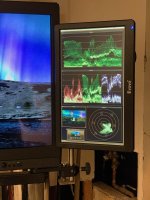
 
I don't know how I feel about the keyboard but I understand the concern and it would be weird especially if it's 99% not needed. Stills photography digi stations always look way more precarious than film and tv production monitors. I think I'm delaying the inevitable, which is buying a dedicated larger monitor.

Perhaps the only actual benefit is the built-in battery of the MBP, where it looks like it would last for a full day of shooting, but you'd still need to power the receiver.

If anything it'll be good to know the MBP can get you out of jail as a backup, or fill in until another monitor arrives anytime I add more receivers. I've got a fusion rx now and it'd be good to eventually max out the system with 2 more receivers.

I like the dedicated scopes monitor, that's a great idea. Resolve is amazing for lots of things but then leaves you scratching your head for certain tasks which seem like they'd be easy fixes.
 
Rob,
This may or may not be off topic... at least from your original post ... and If I remember correctly, you're in Australia... so this may or may not be something that works in your part of the world. But if you are looking for a monitor for a run and gun type situation, and think an iPad will suffice for your needs, then I'd recommend one of the wireless systems that can also output to several iOS devices while also going to receiver.
I bought this around the time Covid was getting serious in the States:
https://www.bhphotovideo.com/c/prod...00s_mars_400s_sdi_hdmi_wireless.html/overview

It has come in handy and easily paid for itself many times over already. There is just a tiny bit of latency... and the fan on that older model is pretty loud... but they have newer model and other mfg's have similar units.
But my 400s works great for industrial / Pharma type shoots - where instead of one video village... now with social distancing... you can have one monitor... and then 4 people can view on their phones, or even better, on an iPad.
Also bought this around the same time to let producers or directors carry it around set to help them feel even more important:
https://www.bhphotovideo.com/c/product/1409777-REG/iographer_852744005588_mobile_media_case_for.html
 
Thanks for the suggestion Mark, it sounds like it's been great for you. I can always add something like this to the existing wireless set up if the need arises.

The handheld rig you linked looks better to me than the hand through the strap solutions some people prefer.
 
UPDATE

Resolve live can't enter fullscreen on a single screen, for example when using a laptop. I spoke with someone at BM and they submitted a request but said this feature would be a very low priority.

I only bought a BM UltraStudio Recorder 3G, not the full inovativ digiplate pro that's been discussed. Don't hate me Charles, I'm still committed to the Sumo, this set up is more of an experiment to get me by if needed in the meantime and to test out resolve live.

Anyway if anyone else is trying the same thing with M1 computers, you need to make sure you have the latest version of Desktop Video Setup, as well as "allowing" the software in system preferences.

Another extremely strange issue, which I haven't got to the bottom of, is the cable needed to connect the BM UltraStudiop to the laptop. I bought the expensive Thunderbolt 4 Pro cable and no devices were detected in the software. I swapped it out for a TB 3 cable (Comsol brand) and everything worked! Either the TB4 cable didn't work out of the box (don't have other devices around to check), or TB3 works while TB4 doesn't (shouldn't be the case), or something different between the brands lets this particular TB3 cable work.

No.. the M1 won't be replacing a dedicated production monitor but it's good to know how easily live grading can be set up.
 
Last edited:
Current atoms SE reviews aren't great. Once the Osee megamon 15 is in stock, I might try it.

There's no question a good version of the atomos is a better monitor (and recorder/switcher) but here are the sub $4k 13" - 19" options with at least 800 cd/m[SUP]2[/SUP] brightness - not a huge list. Doug's lillypad was a contender but too big for my needs.

I initially thought the bag/stand mount/sun shade was a bit of a gimmick but it seems fine from YouTube videos. 90% of the time I shoot interiors, so the 800 nits/reflective screen shouldn't be too much of a problem. Conversely, a power draw of 29.3W means only 2-3x 150Wh batteries for an entire day powering the monitor and wireless RX.

Using it with the expectation of flexible mage controls would drive you nuts (Amazon reviews) but I plan to use this for clients where I'd only need it to display a LUT and screen markers.

I'm not expecting to be blown away and understand it's a risky buy in terms of quality and probably non existent customer service, but a sumo SE isn't a sure thing either (availability, supposedly declining customer service, hassle of returning).
 
That surprises me because my 15" Lillypad seems pretty small and fits in a much smaller Pelican than I use with my 17" Sony. How much smaller is ithe Osee?

My mistake - when looking on B&H, I thought you had one of their 21.5” monitors not a 15”, I should have double checked this thread.
 
No problem. I'm glad I asked because it had me wondering just how much smaller a 15" monitor could be from another 15" monitor.
 
Yeah, it’s worth thinking about. I’m probably just as interested in moving it around as much as the person’s viewing experience. While large monitors are great once on a stand, the smaller the better to keep things moving. When clients ask “can I carry anything?”, a briefcase style bag/small hard case is one of the rare items that gets handed over.
 
Not 20 pounds of sand bags and a few c-stands?

Just don't ever let them try to close a grip head. Producers always misalign the pin and jam the whole thing, and it damn near takes a miracle to un-jam it. But handing them a reflector to fold up is entertaining as hell and worth the price of admission.
 
Just don't ever let them try to close a grip head. Producers always misalign the pin and jam the whole thing, and it damn near takes a miracle to un-jam it. But handing them a reflector to fold up is entertaining as hell and worth the price of admission.

Sounds grim. What about the dreaded elbow wrapped cable?
 
I really like it when someone folds up a light stand while there's still a light on the stand. That's always a real time saver for me.
 
Thought I'd dig up this old thread after mentioning being interested in using a MBP as a monitor.


Looks like we're a step closer. I still can't believe BM don't just let resolve live be fullscreen, there would be WAY more people interested in it than they think.

I went down the sumo path and it's been great. But I have a studio recorder 3g (to get HDMI into MBP) and would still like to be able to provide it as an option, e.g. someone sitting at a table all day.

In short, the cinemon app looks cool!
 
I scanned through this thread to try remember why you wanted to use Resolve Live on a single screen, what your setup was hoping to be, and I can't quite figure it out. Given that the point of working in Live is to have constant ability to alter the image while it is playing, I can kind of see why they haven't focused on single screen fullscreen--you can't make any adjustments if the controls are blocked out by the image.

Since we were all talking about that in 2022, I had my first experience working with Resolve Live on that Billie Eilish video earlier this year (discussed in this link). I used an Ultrastudio to port the live image out to various monitors on set and to a Shogun 7, from which I sent her playback after takes. I did find Live a little buggy and had to reboot a few times over the day, it really seems like Blackmagic hasn't put any effort into revising and improving it in a few years which is sort of strange, since it falls well within their wheelhouse and dovetails with their hardware such as the Ultrastudio.
 
It was only because I was being cheap, seeing if I could use my already owned MBP for monitoring rather than buying a dedicated monitor. There wasn't any computer specific application that made a production monitor inappropriate.

Since buying and using the sumo, it's hard to imagine the MBP for monitoring instead. It wouldn't have been a nightmare, but still a jankfest on a stand.

Fair enough re intended use of resolve live, but surely fullscreen would still come in handy? It's sort of neither here nor there being resolve though. It was the program that came closest to going fullscreen when I was looking into it. I guess I shouldn't have targeted BM, almost like thinking negatively of them for not going all the way when they're the only ones even in the conversation.

But it seems crazy that we can't just add a studio recorder 3g/HDMI cable and monitor fullscreen, (in resolve or any other 3rd party apps or something built into the MBP). If this has been a thing all this time I'll be embarrassed.

At this point I don't really care since the sumo is ideal, but it'd still be nice to have laptops as an option. Either just handing a Director some type of neatly paired studio recorder/RX/cable for desk use when a stand (along with the more clunky rigging) is removed from the equation.

I've been in DR since version 12 and while it happens much less frequently these days, you still come across certain things in the software that don't make much sense! I can see what resolve live is promising as being highly appealing to someone like Billie after all you've told us about the way she works. The reboots must have been frustrating with the stakes as high as they were.
 
Back
Top