Qtime Pro Res 4444

New_Zealand

Veteran
I have Vegas Pro 14, 17 and 19 but for some reason I can find Qtime Pro Res 4444? My CGI guy wants the footage at that settings. Any thoughts? Thanks
 
I just did an un-stall Vegas Pro 19 (installed Vegas Pro 19 in September) and re installed and still no Pro Res 4444 . I went to Apple Pro Res (Rendering) and it only shows 422.
 
I *think* Apple ProRes 4444 on Windows is only available through Adobe applications (Premiere Pro, After Effects, and Adobe Media Encoder). Like, it was a specific licensing agreement between Adobe and Apple. But I don't know for sure. Maybe ask MAGIX directly?

Do you have access to DNxHR 444, perhaps via Resolve? Would your CGI guy be OK with that? Or after asking your CGI guy, maybe one of the "fake/emulated/etc" ProRes-like codecs that run under ffmpeg and shells for it? Any other codecs that will work for him?

Uhg. Good luck!
 
You may recall that MAGIX took over VEGAS PRO from Sony just as version 14 was about to be released. MAGIX then released v14 very quickly after the takeover. This was basically a quickly reworked Sony v14 rebranded under MAGIX. What MAGIX integrated into v14 and what MAGIX called in its render presets was a new codec listing called MAGIX ProRes. This indeed did have up to 444XQ listed as a render preset. I don't ever recall 4444. I believe MAGIX got into a bit of drama by calling these render presets "Prores". I think it started in v15 and definitely in v16 and v17 and v18 when these "Prores" presets were renamed to MAGIX "Intermediate". Though these Intermediates still carried all the LT, 422, HQ and XQ designations. When rendered out using any of these "Intermediate" presets you would find when the files were interrogated that they were defined as Apple ProRes files. Then came v19 with the news that it "officially" supported ProRes output. Again I've uninstalled v19 for the time being so can't confirm exactly what they have done regarding the official ProRes implementation.

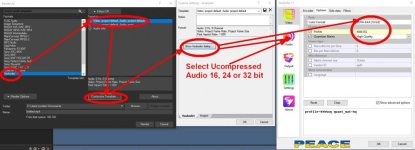
If you want full 4444 up to XQ level in Vegas Pro you can install the "VOUKODER" plugin for Vegas with its appropriate "Connector". There are two Connectors. One for Vegas v12 to v17 and one for v18 and v19. On a decent performing machine, Voukoder ProRes works well. YOU MUST CONFIGURE IT CORRECTLY to work properly, see pix below.

I also use Vokoder for ProRes output on Windows using Voukoder's Davinci Resolve plugin. Also very good. As an aside if you want x264 and HEVC x265 out of either Vegas or Resolve Voukoder can deliver these as well.

Chris Young

https://www.voukoder.org/forum/thread/783-downloads-instructions/

Vegas Voukoder 4444 XQ + txt.jpg - Click image for larger version  Name:	Vegas Voukoder 4444 XQ + txt.jpg Views:	0 Size:	52.1 KB ID:	5689992
 
Last edited:
If you're going to try one of the ffmpeg ProRes emulations (ie- not from Apple) that Voukoder gives you access to, definitely do a round-trip test with your animator/vfx guy. Find a couple tricky and different shots, have him work with them, and then bring those back into your project and put out a master (or will he be finishing?), and make sure everything looks good. I'm not trying to create FUD, but this could be a tricky procedure... if it works, Fantastic!
 
If you're going to try one of the ffmpeg ProRes emulations (ie- not from Apple) that Voukoder gives you access to, definitely do a round-trip test with your animator/vfx guy. Find a couple tricky and different shots, have him work with them, and then bring those back into your project and put out a master (or will he be finishing?), and make sure everything looks good. I'm not trying to create FUD, but this could be a tricky procedure... if it works, Fantastic!

Understand where you are coming from. Always good advice to follow. This problem of non-compliant ProRes files was a very valid point a while back, but today... not such an issue. Although Apple will go out of its way to spread the FUD on that.

The reverse engineering of ProRes these days is so comprehensively done in the latest ProRes KS implementation that the files produced can be QC'd and not detected as not having been written by an Apple QT encoder. The vendor string. Override the 4-byte vendor ID. A custom vendor ID like apl0 would claim the stream was produced by the Apple encoder. The rest of the FFMPEG KS implementation follows QT's ProRes encoder down to its code. No color space gamma conversion issues any longer in FFMPEG... or not that I have come across to date. Something that the genuine Apple QT coder suffers from so genuine QT whilst it is 'genuine' still has its faults on both the Mac and Windows OS's. One only has to check out what Drastic Technologies have to say regarding QC issues with genuine ProRes encoding on both Mac and PC. Drastic Technologies are one of the broadcast industry's premier suppliers of quality control monitoring software. Their "videoQC" is almost a gold standard for monitoring video and audio compliance.

Chris Young

ProRes Color Shifts In Post Production
https://www.drastic.tv/support-59/supporttipstechnical/89-prores-color-shifts-in-post-production

videoQC - Automated and Visual Video QC Tools
https://www.drastic.tv/productsmenu-56/videoiosoftwarelist/videoqc
 
I use this string. I once got a challenge that it would cause a color or gamma shift. It didn't, and the challenger stood down. The challenger had been using prores_k.

ffmpeg -i "input.mp4" -c:v prores_ks -profile:v 3 -qscale:v 9 -vendor ap10 -pix_fmt yuv422p10le -c:a copy "output.mov"

You can change qscale to balance quality versus file size.
 
I use this string. I once got a challenge that it would cause a color or gamma shift. It didn't, and the challenger stood down.

You can change qscale to balance quality versus file size.

Yes, I've had a similar experience so far.
I'm finding qscale:v 9 seems to be the most common setting. I guess because it's probably the best trade ratio between good quality and reasonable file sizes. IMHO I think most of the negative mindset over non-Apple ProRes seems to have dissipated to a large degree as third party implementations have now pretty well matched the "original".

Chris Young
 
Back
Top