Removal of NOISE and MACRO BLOCKS from HVX and DVX footage solved!!!!!!!

Anyone think this program would be useful to remove the GG from adapter footage?

This program is the SH!T. And yes it removes adapter grain very well. You have to play with settings a little bit to keep it from becoming soft. But I have been messing around with the demo version for a few hours now and it works extremely well. I'm buying the full version tonight. as soon as motion box is done uploading I will post some video so you can see for yourself.
 
thanks! looking forward to your post...

I downloaded it too, but i don't have more than a few seconds of freetime to check the forums right now, so i can't try it out...
 
thanks! looking forward to your post...

I downloaded it too, but i don't have more than a few seconds of freetime to check the forums right now, so i can't try it out...

I really did not even notice that the footage was that noisy until it was gone. Some of the shots looked almost too clean. When you try it out you will see what I mean. Motionbox is taking forever.
 
This program is the SH!T. And yes it removes adapter grain very well. You have to play with settings a little bit to keep it from becoming soft. But I have been messing around with the demo version for a few hours now and it works extremely well. I'm buying the full version tonight. as soon as motion box is done uploading I will post some video so you can see for yourself.


Could you give me some of the settings you used in the program? I'm not good with after fx at all so I'll just mess around with the demo version tonite.
 
You don't have many options with demo. I was just sliding the faders to see what they did. I did export a QT movie and put into my project timeline to compare footage. The difference is astounding.

The render time is atrociuos on my computer though

My brakes just went up on the car and my front headlight went out. so I'm on my to MB to drop it off. when get back home I will post.
 
[MOVIEHD]http://www.motionbox.com/filings?folder_id=38309367[/MOVIEHD]

http://www.vimeo.com/3164714

Here is some test footage from my mac. Neat video is applied to a square in the center of the footage. if you look to outside of the image you can see where the noise is and how the center has none.

note that on my powerpc G5 just that small clip took 7 minutes to render in AECS3.

Hope it helps.
 
Last edited:
I e-mailed them and they said that they have been and still are working on an FCP version along with this. However, they said it will be another month or three! :crybaby: What else is new... Oh well at least they are making progress.
 
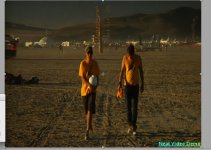
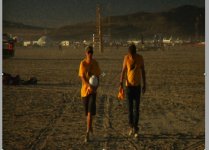
Well I played around with the demo and tried to remove the adapter ground glass from our worst offender of footage, and it worked pretty great! All in all there's still something there, its not perfect, but it actually will make the shot usable!
 

Attachments

  • AFTER.jpg
    AFTER.jpg
    107 KB · Views: 0
  • BEFORE.jpg
    BEFORE.jpg
    100.2 KB · Views: 0
So yeah it looks like I will probably buy this plugin....however if they come out with one for FCP I wonder if I can get it at a discount since Id rather not have to go into AE.
 
I bought this pluggin and already using it and now realise can't live without it, I also realised that for some reason after applying neat video skin tones look very nice, as if they were photoshoped and it gets rid of all the facial imperfection, maybe its a by product of the sofening of the image, I will post some grabs to show what I mean. Now my clients want neat video on all their footages weather noise is available or not due to the improvement of the image particular the skin tones.
 
Well I played around with the demo and tried to remove the adapter ground glass from our worst offender of footage, and it worked pretty great! All in all there's still something there, its not perfect, but it actually will make the shot usable!
Wow, that's a big improvement. The picture actually looks sharper, too.
 
Well I played around with the demo and tried to remove the adapter ground glass from our worst offender of footage, and it worked pretty great! All in all there's still something there, its not perfect, but it actually will make the shot usable!

was that footage HD or SD? My test footage was HD and I was not able to clean up the entire screen, Just a square area in the middle.
 
Yea the square area in the middle means either u have the home version or the demo version, but if uhave the pro version it should cover all formats
 
I tried the demo of neat video six months ago and didn't have much luck with it. It softened the image in a way I didn't like, or created odd moving mushy areas where the noise used to be. I may try it again now that I have more time to mess with the settings.

I'm curious, is there any way to just run this on the blue channel? I'd be interested to see if I could clear up noise on just that channel and possibly get a cleaner but more natural looking result.
 
I'm running my whole movie thorugh Neat Video right now. I wasn't going to post until I saw the results on the big screen. But I saw the thread and figured I'd chime in.

Neat Video is worth every penny. My two favorite plug ins are Neat Video and Colorista. Both a worth the money. Neat Video works best in AE on an adjustment layer. I load up the files and create an Adjustment Layer. Then I select the noise profile in Neat Video. I then get something close to what I want with just a tiny bit of noise in it. Save it and return back to AE (you'll understand if you use it). Then I cut the adjustment layer's opacity down generally from 30 to 75% where 75% is for heavy grain. I had at least 2 scenes shot on HDV where I had to increase the exposure by 2 stops. This added lots of noise. I used Neat Video and it was like I had no noise at all - Like I shot at perfect exposure, or at least only a half a stop too dark.

If used properly, it can fix about 80% of your noise problems. And truly it can fix more if you're good with Masking and other effects that you can combine with it.

The worst situation I had as in a scene that we shot with a dirty lens. We didn't know the lens had gotten a huge amount of dust to fall on it until after the scene was over. The problem was my actors had to go, so I couldn't reshoot. After the edit, watching the scene in HD was killer because I could see the noise (dust) sitting on the screen. I bought Neat Video for that scene. And it fixed it! And left the details of the face intact. In fact, one girl had a yellow sweater and you can still see the small loops in her sweater, yet the noise in the scene is gone! The product works!
 
I wrote to Neat Video, and they said they "hope" to have the FCP version out within 1-3 months. They haven't really been accurate with their schedules in the past, so I'm "hoping" maybe by the end of the year.
 
Neat Video is worth every penny. My two favorite plug ins are Neat Video and Colorista. Both a worth the money. Neat Video works best in AE on an adjustment layer. I load up the files and create an Adjustment Layer. Then I select the noise profile in Neat Video. I then get something close to what I want with just a tiny bit of noise in it. Save it and return back to AE (you'll understand if you use it). Then I cut the adjustment layer's opacity down generally from 30 to 75% where 75% is for heavy grain. I had at least 2 scenes shot on HDV where I had to increase the exposure by 2 stops. This added lots of noise. I used Neat Video and it was like I had no noise at all - Like I shot at perfect exposure, or at least only a half a stop too dark.

If used properly, it can fix about 80% of your noise problems. And truly it can fix more if you're good with Masking and other effects that you can combine with it.

I did not think of using it this way. It makes sense. Taking every bit of noise from the image makes it look plastic-like. Making an adjustment layer then dialing in the opacity until it's right seems like a really good balance. Thanks for sharing the info.
 
Back
Top