OFFICIAL A1 Custom Presets thread

You know what they say about your first impression being the best, I think there is something to that. I just started using the Panalook preset. It's been around for a long time and modified a lot, but it really stands out. On Vimeo under I think I typed "A1 custom presets" I veiwed all the differnt presets of a house and a barn landscape shot, I would highly reccomend taking a look if you want to compare the presets instantly. True Color, HCDday something, and Panalook2 also stood out as well. The film emulation presets like 5298 Film seemed very blurry and lacked detail, but that's just my opinion.
 
I suggest simply to try VISION04. You will be pleased with a photo like contrast, less magenta, full scale dynamics, and vivid colors. All this without the need for CC
 
How are the blues/purples Giovanni? I've noticed a darker tint to them then what you see with your eyes. Haven't been able to load it on my camera yet...tonight though.
 
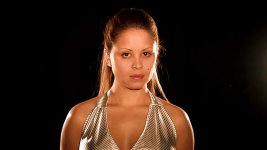
Here is a quick test comparing Truecolor, Vision 2, Vision 3, Vision 4 and Panalook 2 under the same lighting conditions, same lens, etc...

I bounced 1000 W worklights off of the wall and used 500 watts as a backlight. So 1500 watts in total.

Shot on the XH A1 , with Letus Elite, 35mm lens at F2.8

Let me know if this works. And i know, you're all jealous of my untamed hair... That's what happens on days off :)

COMPRESSION KILLS CONTRAST

Right click - Save as
http://www.tassweb.om/papa/presets.mov

Vision 2 3 and 4 are all a bit soft in comparison. i wonder if this has to do with the noise reduction and HDF?
Vision 4 is very nice, but the colors are a bit too washed out compared to film.
Truecolor, in comparison is quite green, while Vision 3 is quite blue.

If i could mate vision 2 and 4, then use that offspring to mate with panalook2, i think it would be the ultimate preset :)


stills:

tcxe1.jpg


v2dh7.jpg


v3yw3.jpg


v4hc8.jpg


pl2cu6.jpg


Could someone explain what exactly the HDF does to the image?
 
Last edited:
Also, what i see here which is nice about cine 2 gamma, is it's transition from dark to pure black is less extreme than cine 1. I guess it's part of the tradeoff with lower sensitivity in the darks.

Does anyone have a representational graph of the canon gamma curve setings?
 
your link: Right click - Save as
http://www.tassweb.om/papa/presets.mov

doesn't seem to work... :(

I like Vision 4 and Panaloook2 although I think the latter has a slight green tinge. What's interesting here is that, except for vision3, the gama only slightly affects the brightness of the image. So that combined with super sensitive canons.... lol.

I'm sure the softness, and it is only slight, is the NR2 set to high. but it really does help with the noise in the dark areas.
 
LOL yeah, I guess it is. But probably not as drastic as expected. Did you fix the link? I'd like to see the moving pictures.

Time to go to the lab and see if we can do some gene splicing with those three presets as you suggested. Thanks, by the way, for doing the test and posting the results.
 
I like the skin tone of Vision01 the best. Just tried Vision04 and still prefer the look of Vision01. The only thing that is bugging the crap out of me is the incorrect purple/dark blue/pink colors. Everything else is great. I've been trying to get the color right but it's a pain.


*sigh*
 
Very interesting test.
Thank you very much!

Despite i prefere anything but VISION04 in this test, i think that VISION04, once the white balance is tweaked to correct for reddish colors, it will sport the most photographic contrast.
And if you just lower very slightly the blacks in CC it rocks even more:
Here an example of a VISON04 shot, with a very slight black crushing in CC
 

Attachments

  • 3057534474_e302807105_o.jpg
    3057534474_e302807105_o.jpg
    61.8 KB · Views: 1
It's a good grab, but from what i've seen, even film doesn't support blacks that crushed. Looking at a waveform, the blacks get crushed far below 0 IRE.
Does your model have dark skin? It seems like she might, as Caucasian skin has a much more magenta hue to it in general and would really allow us to see this magenta bias the camera delivers.

I'm going to go back and have a look at Vision 1 and see what happens.
 
I wonder if someone could please explain to me a few things about presets:

What exactly is the difference, between the following preset items, and how do they effect the image differently?

Black
Ped
Setup

all of these three seem to adjust black levels, but are they different, and what do they do differently?

and also
HDF ?
 
Straight from Canon:


Black:
​
​
Adjusts the dynamic range in the black area of the image. STRETCH, MIDDLE and PRESS are selectable. When STRETCH is set, the dynamic range in the black areas is expanded, emphasizing contrast in the dark area, so that the grayscale for black can be expressed. When PRESS is set, the dynamic range in the black areas is narrowed – the darkness is enhanced or deepened – so the grayscale for black is reduced. This is adjusted to suit the user’s personal preference.​


Master pedestal: ​
This adjusts the bottom portion of the Gamma curve without affecting the
white portion of the Gamma curve. When the cursor is moved in the [+] direction, the dark areas of the image become brighter, and the contrast is reduced. Conversely, when it is moved in the [–] direction, these areas become darker, and the contrast is increased. This is user-adjustable to suit the user’s personal preference. Adjustment is possible in the –9 to +9 range, only in Camera mode.​


Setup level: ​
For adjusting the overall Gamma curve up or down. When the cursor is moved in the [+] direction, the shadow areas become brighter; conversely, when it is moved in the [–] direction, the screen darkens. Adjustment is possible in the –9 to +9 range. Depending on the value set for the master pedestal, the setup level may not be able to take a negative value. In this case, adjusting the setup value within a certain value range will have no effect.
 
I guess what would be more helpful then, would be having a visual reference of Canon's Gamma Curves in cinegamma.

Tried to find that online, but with no success.
 
found it

manual_adjustment_img01.gif


manual_adjustment_img02.gif


After seeing this, im going to see how skin tones appear using cine gamma normal and maybe this will make the skin tones have that softer flatter look that video has trouble doing.
 
Last edited:
hmmmm sounds interesting.

Thinking about this (and playing with presets), and how everyone seems to be looking for skin tones that film produces, it dawned on me that there is one variable that some making comparisons may not have considered. If you're watching a movie, film, etc., and looking at skin tones, besides the obvious lighting tricks, the actors have all had professional make-up applied that can give a flatter, softer look than the film would normally show had they not had the make-up. How many of us have had the same professional make-up applied to our subjects that we are shooting in our backyards to use a reference as to whether or not we are achieving that" film skin tone"? Seems to me we are comparing apples to oranges and would be difficult to achieve that look unless we tweaked the presets under the same conditions - i.e., professionaly made-up subjects. :huh:
 
I'm not talking the color as much as I'm talking about the texture and softness of the skin.

without question, makeup does a HUGE deal of this, but regardless, i have shot stuff in studio on film without makeup applied and one can still see the aesthetic of skin on emulsion as opposed to how video renders it. It's a question of how close can we get really, not how to match it exactly. :)
 
Back
Top