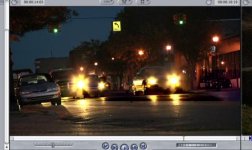
HMC150 questions answered...

Darren, the high shutter speed helped show off what the codec is capable of. For example, examining the sprinkler shots frame by frame, I am surprised how well the detail holds out, that should be hell on any long GOP codec. A side by side torture test on shots like that would really show off the advantages of avchd over hdv.

Looking at the new documentation for MainConcept's Transcoder, they have 1080p24 listed for PH, HA, and HG modes. I thought it was 1080i60 in all modes other than PH. Can anyone verify if this is a misprint or a real feature? 1080p24 at 13Mbps (HG) might be a great setting for doing long time lapses when your card isn't big enough for a single shot.

I also just noticed there is 1440x1080 for 13 and 9 Mbps (and standard at 6Mbps). Since this camera's chips will not be any sharper at 1920, those modes might help you get a little more out of the codec at lower data rates.
 
Luster...
Thanks for your post. If I were a betting man I'd wager that either the camera Darren is using has an intermittent issue when encoding to the flash card OR the Transcend Flash cards are not functioning optimally. My understanding of Transcend products is limited to the fact that they are (or were when I last looked into them) manufactured in India. In the event that this issue is directly related to the flash cards themselves, it might warrant a second look into spending the extra $$$ and purchasing Panasonic class 6 flash cards. Just a thought. Looking forward to further feedback on this issue. It is important to get to the bottom of this issue.

dan
 
Certainly.
Go to Clip #5 (sprinkler wide shot scene)
Distortion begins at 1 sec 22 frames
Distortion ends at 4 sec 12 frames.

It is evident so if it's on the origination clips, you will definitely see it. Let me know what you
find out.
The original clips were provided so you should be able to tell with any player. I'm guessing you don't have a way to view the native clips? I am not seeing any banding, and certainly not anything like what luster posted. At the point you mention, the brightness jumps up and gently drops back down (I assume because the ND filter is switched followed by the auto iris negotiating). Sounds like this is causing your transcoder to clip or some other weirdness.
 
Looking at the new documentation for MainConcept's Transcoder, they have 1080p24 listed for PH, HA, and HG modes. I thought it was 1080i60 in all modes other than PH. Can anyone verify if this is a misprint or a real feature?
The AVC-HD *format* supports those frame rates. But the HMC150 doesn't. Every camera can choose what portions (or all) of the spec they support. The HMC150 supports 1080/24p and 720/24p, but only in PH mode @ ~21mbps.
 
I'm seeing some serious errors in a lot of the clips too.
This is clip #5 at around 2 sec - the error lasts for a few seconds.

I used log and transfer to import the clips into final cut 6.0.4

Wow, it sure didn't do that for me! Can you provide specifics on your hardware specs and system/software versions? What did you transcode to, ProRes 422 or AIC?

Have you tried the Toast 9 transcoding method?
 
The original clips were provided so you should be able to tell with any player. I'm guessing you don't have a way to view the native clips? I am not seeing any banding, and certainly not anything like what luster posted. At the point you mention, the brightness jumps up and gently drops back down (I assume because the ND filter is switched followed by the auto iris negotiating). Sounds like this is causing your transcoder to clip or some other weirdness.


Yes that was the ND filter and the auto iris. I never saw banding either. I viewed the footage on a Sony HD CRT (PHM14M8U) and every shot looked amazing!

The Cinema 30", while a beautiful monitor, is not intended for crititcal viewing, nor are most computer LCD's. Unless you are running a Matrox MXO or something similar to get true monitoring...
 
The AVC-HD *format* supports those frame rates. But the HMC150 doesn't. Every camera can choose what portions (or all) of the spec they support. The HMC150 supports 1080/24p and 720/24p, but only in PH mode @ ~21mbps.
Good point, they also list 5.1 audio which is not a feature on this cam. I was thinking that PH, HA, HG, etc and that conversion table were 150 specific... really they are Panasonic specific and the table is listing modes from all of their cameras.

Yes that was the ND filter and the auto iris. I never saw banding either. I viewed the footage on a Sony HD CRT (PHM14M8U) and every shot looked amazing!

The Cinema 30", while a beautiful monitor, is not intended for crititcal viewing, nor are most computer LCD's. Unless you are running a Matrox MXO or something similar to get true monitoring...
True, most of the desktop based LCDs out there still aren't the best in terms of color accuracy, but most graphics people would have already known if their monitor had banding issues. Most all video looks sharp although somewhat dull on my desktop LCD, but all the 150 footage thus far looks great on the big TV. Just like the DVX does but with that extra rez you always dreamed for :thumbup:
 
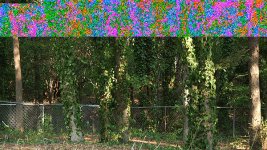
Bars and Glitches

Bars and Glitches

Yeah, I am getting those banding issues too. Using the Prorez setting. Weird. I got them on a bunch of clips. The first one here is a screen grab of a Pro Rez Quick Time file just open and playing on my desktop.
Picture 2.jpg

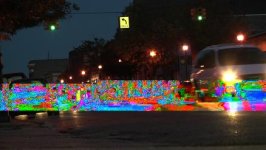
And this is what is looks like in FCP. Weird. Its more of a dark blob looking thing right under the car lights.
Picture 3.jpg


The only trouble shooting I tried to re capture the clips and do a restart but same problem. Actually FCP didn't even let me capture like 5 of the clips. I got a little red X in my Log and Transfer window near the clip name.

Weird.. I have a smoken Mac Pro with 7GB of memory and a new graphix card. Hey maybe it's my new card. It's a new Radeon 3870 HD card. Hummm... At least the issue is not with the camera.. Any other FCP users successfully got all these to work? or not work?

Weird things have been know to happen to me from time to time.

Other than the banding stuff, the footage looks awesome?

Coolness,

b.p.
 
Last edited:
I too am getting those banding issues. Also some clips are playing weird, like its been sped up or something. I'm using FCP 6.04 on my macbook pro. And I too was not able to import about 5 clips of the 31 or wahtever.
 
I didn't get banding, but I did see some weird back and forward with the 60p clips (maybe is me tht don't know how to handle it). I'll try to post it in vimeo so that you can see what i'm saying.

EDIT: I only see it in some of the 60p clips, not in all.

EDIT2: link to video (is heavily compressed)
This were the original files directly imported in vegas 8c trial version.
 
Last edited:
I got some really bad distortion on two clips out of about twenty minutes of footage shot today. The two clips were shot one after another and with the same framing / subject; one was 30p, one was 24p. The rest of the shots today seem fine as far as the distortion goes, but I've only skimmed over them as of now. Aside from the distortion visible in the frame grab I've attached, there's lots of banding as well, with horizontal sections of the image flickering lighter and darker.


The distortion appears both in the preview of the Log and Transfer window in Final Cut and in the converted Quicktime files, whether they be ProRes 422 or Apple Intermediate Codec. Strangely enough, the MTS files seem to play pretty much fine in VLC player; there may be some slight abnormalities, but it's hard to say.

Also, for some reason, all my 30p clips are showing up as 59.94 fps and playing at 2x speed in Final Cut (and Quicktime Player after Final Cut conversion). The data rate is 17.2 MB / sec once Final Cut converts to ProRes 422, so there's clearly something wrong here. The 24P clips show the proper framerate, play properly, and read 6.8 MB / sec, though. Clips I actually shot in 60p show identical properties to my 30p clips. The 30p clips play at the proper speed in VLC, so I'm assuming it's a Final Cut issue.

I'm on Final Cut 6.0.4, MacBook Pro, using a Crucial 8gb SDHC card.

Thoughts?
 

Attachments

  • hmc150_error.jpg
    hmc150_error.jpg
    154.2 KB · Views: 0
I didn't get banding, but I did see some weird back and forward with the 60p clips (maybe is me tht don't know how to handle it).

I've downloaded the same clips. They transcode nicely to proRes as well as to AIC (did not try transcoding them to DVCProHS, tough).
And they play smoothly in VLC 0.9.3 on my MacBookPro.

What was your exact workflow and what is your hardware config?

pe.
 
I've downloaded the same clips. They transcode nicely to proRes as well as to AIC (did not try transcoding them to DVCProHS, tough).
And they play smoothly in VLC 0.9.3 on my MacBookPro.

What was your exact workflow and what is your hardware config?

pe.

I downloaded the vegas 8c trial to see how the files worked importing them directly into vegas without transcoding. Only two of the 60p files act like that. Others work fine (and are gorgeous).
I've not yet tried transcoding them.
hardware:

3gb ram
amd athlon core duo 3800+
2ghz
nvidia geforce 7300 LE

EDIT: those files acting weird play well witout any problem in VLC. Just guessing, but it can be something related to the way vegas or FCP import those files.....New codec.....
 
Last edited:
Wait....I see which is the problem. The first time I use the import avch folder option.
that was when those two clips failed.
But now I've tried drag and dropping the files directly to vegas and none of them did that akward thing.

Thought?
 
Hi all,

I went at 4 ways, Vegas 8.0c and 8.1, native on different machines, Premiere CS3 DVCPro transcoded using the Panasonic utility, Vegas 8.0c transcoded to HDV via TMPGEnc Xpress 4.0.

For some folks, converting the footage to easy-to-edit HDV might be a way to go. HDV from TMPGEnc Xpress 4.0 is as good as it gets. Cheap encoding at quality output.

No problems, beautiful footage, no banding, no artifacts, everything was quid pro quo coming into the NLEs although there was some noodling on the settings in TMPGEnc.

Personally, I think there's some features I'm still jonesing for in the HPX170, but there's some bona fides in this machine that could turn me to it, not the least of which is economy.

Tip of the hat to Shrigg and, as always, to Mr Green.
 
Great feedback everyone. Seems like Windows offers more reliable handling of the footage at this moment. I'm not surprised we are seeing a few glitches with some workflows. Remember this is all extremely early adopter stuff, I believe my footage was the very first from a production model HMC150. I suspect we will see an incremental FCP update that will fix the transcoding inconsistencies, followed by native AVCHD editing in FCS 3.
 
Good Day Barry Green,
Would you kindly weigh in on all the observations made by us who have experienced this distortion/color banding issue when capturing the file footage from Shrigg. It is interesting to note that I have converted the footage you posted of a rainy day from your doorstep and all 12 clips play perfectly, with proper frame rates and metadata.
I am using a MacPro, 10gb ram, Apple Cinema 30" display and NVIDIA GeForce 8800 GT. I also downloaded green screen footage from another dvxuser and it works perfectly as well, both in clarity and framerate.
You have mentioned in prior posts that you are planning on making the AVC contents of an 8gb card available to us for downloading. It would be nice to have access to this footage for further testing on our end.
Outside of the apparent issues, any advice, insights, research you can provide into this troubling issue of banding/distortion would be most appreciated. Many of us are a breath away from buying this camera, but this is a serious issue that needs to be resolved in my mind before I invest in the 150. Thank you in advance BG.
 
From the footage I've seen, i am hoping that the transcoding process that iv'e been doing has not done this camera justice. I'm using a g5 quad using first voltaic and now toast 9. and to my eye the video although there is a nice color to the footage, it just looks coarser when I compare it to hvx200 footage that i've shot. I really want this camera to work for me and I'm hoping that I just haven't seen the footage transcoded in it's full potential. I'm wondering if it were transcoded using mainconcepts tool first to p2 on a windows machine and then imported into a mac would it look any different than toast or voltaic transcoded footage.
 
psts, it is not crucial pimarily which app you use but into which codec you transcode.

AfaIk, voltaic does only transcodes into AIC which is inferior compared to Apple ProRes or DVCproHD.
Go to "Options" in Toast and adjust accordingly. You sure will be surprised by the outcome.
 
Back
Top