HMC150 questions answered...

I see other people have answered your question and they have correctly. Glad I ordered a memory card with it cause it didnt come with one and I think the battery isn't very long lasting.

(refering to the guy who asked what it came with... i quoted him wrong oops new to this lol)


Question of my own though.. I'm using final cut pro 6.0.4 and have absolutely no idea how to capture the avchd clips.... help? =X

Also what's a uv filter for this camera? Is it necessary?

Just open up Log & Transfer in FCP 6.04, then drag the folder in to the Log & Transfer window. It should see the clips then you get to transcode to either ProRes 422 or AIC (apple intermediate codec)

The UV filter is a 72mm filter that you screw in front of your lens so you don't scratch it in use. Conventional wisdom says you want to protect the lens at all costs! Does anyone have a favorite 72mm UV filter they recommend as "HD ready"? I was going with Nikon L37C's (the coated version) on all my Nikon primes
 
NEVERMIND about the capturing. I figured it out. It's super super easy you just use the log and transfer and find the folder with the mts files in it. (I think it was mts it started with m at least...) With the pro res 422 codec the files come out looking great. Doesn't matter if you can't edit natively imo.

I see other people have answered your question and they have correctly. Glad I ordered a memory card with it cause it didnt come with one and I think the battery isn't very long lasting.

(refering to the guy who asked what it came with... i quoted him wrong oops new to this lol)


Question of my own though.. I'm using final cut pro 6.0.4 and have absolutely no idea how to capture the avchd clips.... help? =X

Also what's a uv filter for this camera? Is it necessary?
 
Just open up Log & Transfer in FCP 6.04, then drag the folder in to the Log & Transfer window. It should see the clips then you get to transcode to either ProRes 422 or AIC (apple intermediate codec)

This worked. Footage looks amazing! Makes me wanna go sell my DVX and get one!!!
 
Shrigg. All I can say is Wow! The footage looks great. I am running FCP6.0.4 on a PPC G5 so I can't get the files straight up. I had to do the AVCHD transcoder on my laptop PC then L&T back on the MAC... regardless of the workflow... DAMN.... it looked good.

The 1080i60 looked really sharp, although I definitely liked the 30p more.

Thanks for that posting. I have been bouncing around regarding what pro-level cam I wanted to get and I think the answer just came up for me.
 
Do it =D It's awesome I'm in love

Shrigg. All I can say is Wow! The footage looks great. I am running FCP6.0.4 on a PPC G5 so I can't get the files straight up. I had to do the AVCHD transcoder on my laptop PC then L&T back on the MAC... regardless of the workflow... DAMN.... it looked good.

The 1080i60 looked really sharp, although I definitely liked the 30p more.

Thanks for that posting. I have been bouncing around regarding what pro-level cam I wanted to get and I think the answer just came up for me.
 
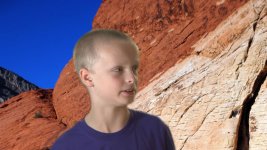
I've uploaded three clips for those who are interested in the ability to key footage from an HMC150. The setup was just slapped together in my basement and I told my son to go stand in front of the screen.

So go on, key for yourself!

HMC-Key-Footage


Here's what I got when I rendered natively from Vegas to Lagarath then dropped the clip in AE and applied keylight with 1-2 quick tweaks. Let me know how it works for you!

1222484202.jpg
 
Shrigg,

Well it almost took 12 hours to download all the file. I guess that your file is the biggest single download I've ever done. :beer:

I'm using the VoltaicHD converter for the MAC to see the footage, which is not the best way to see it, but even with its problems, the footage is amazing and very good.

WOW!!!!!!!!!!!!!!

Bob Diaz
 
Here's what I got when I rendered natively from Vegas to Lagarath then dropped the clip in AE and applied keylight with 1-2 quick tweaks. Let me know how it works for you!

Kurt, thanks for the keyed footage. I could not send your son to India, but since we both use Vegas, how about Red Rock state park in Las Vegas?

I have never keyed in Vegas - I used to use Serious Magic Ultra (does not work anymore because of Adobe problems) I assume that your workflow was driven by the need to get the footage to AE, correct?

I could not test clip 13 because there's no template in Vegas for 1280x720 @ 60

Great that you've got willing talent at home!
 

Attachments

  • key01.jpg
    key01.jpg
    80.7 KB · Views: 0
I also played a bit (in vegas) with your clips and shrigg's ones, this is the result....

1222500498.jpg


He was moving at that moment so it's a bit blurry.....
BTW..... this is my first time keying something that doesn't need to have blurred edges......

I'll upload the video to vimeo....

EDIT:
video uploaded (if I can't post it for wahtever reason tell me and I'll take it out).

http://vimeo.com/1824111
 
Last edited:
When are they going to release the european version? I couldn't find an exact date.

Those who allready got the camera, how is the focusing working from the LCD?
 
I have never keyed in Vegas - I used to use Serious Magic Ultra (does not work anymore because of Adobe problems) I assume that your workflow was driven by the need to get the footage to AE, correct?

I could not test clip 13 because there's no template in Vegas for 1280x720 @ 60

Great that you've got willing talent at home!

Just change the framerate in the project settings to 59.94 (double ntsc) and do the same for changing your output renders and you are good to go in Vegas.

And yes, I do my keying in AE because it has keylight with is a more advanced keyer.
 
From a future buyer...Thanks Shrigg for your hard work on the footage...Now I'll have to try some of Kurt's keys....
 
Just change the framerate in the project settings to 59.94 (double ntsc) and do the same for changing your output renders and you are good to go in Vegas.

1. Ah, now I see that in the project settings. BUT, while in preview, I get a very Max Hedroom effect. Something's not right.

2. I thought maybe I should just output and see what I get, but I'm not even sure what format to render out to. I tried a few (mpeg1, mpeg2, Sony AVC & AVI) and the frame rate on the video tab does not go that high. I poked around the tabs and options for the output, but could not figure it out.

*maybe I'll just not use that frame rate * :-) Thanks for your help Kurt!

I'm in a little over my head here. I'm used to simple SD DV projects. I don't care, I'm still gonna buy one - TAPE BE GONE!
 
@ Scott in Vegas
I dont use vegas but I would try rendering to quicktime if that's possible.You should be able to set the framerate to 60fps .

And yes Im still downloading my connection is down :(
Will be able to see Kurtmo's greenfooty soon though :dankk2:
 
File Structure

File Structure

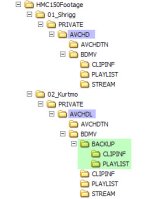
Folks, I have the footage shot by both Shrigg & Kurtmo.

Has anyone noticed:
- the difference in folder naming - AVCHD / AVCHDL
- lack of BACKUP folder w/Kurtmo's structure

Might this be due to a difference in camera settings? If I remember correctly, I think this camera can share/load shooting profiles. Not sure if you guys have the time, but once I get mine I would be happy to load your profiles to my camera and compare the results.

I assume that it's not a camera version thing. Shrigg's pics showed AG-HMC150PJ.
 

Attachments

  • HMC150_dirstr.jpg
    HMC150_dirstr.jpg
    31.9 KB · Views: 0
Back
Top