Skin softening:Britney Spears, J. LO, etc.

Ok here are my screen grabs

Ok here are my screen grabs

Do you guys know how I could get the same sharp texture as the J. lo video screen grab you see here? I did the 2 layer, key off the skin on top and blur thge bottom layer. Now I would like some extra sharpness.

Any ideas? (Unsharp mask did not give me what I want)

 

Attachments

  • after.jpg
    after.jpg
    120.4 KB · Views: 0
  • Jlo.jpg
    Jlo.jpg
    104.8 KB · Views: 0
Do you guys know how I could get the same sharp texture as the J. lo video screen grab you see here? I did the 2 layer, key off the skin on top and blur thge bottom layer. Now I would like some extra sharpness.

Any ideas? (Unsharp mask did not give me what I want)
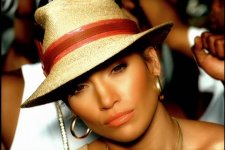
your footage is much softer to begin with than the j-lo footage. the way she is lit helps this a lot. then i'm sure they shot 35mm with expensive glass. you should be able to get some sharpness out of unsharp mask provided you do it pre-blur...

try reshooting with more light and you will get better results.
 
one more thing that may help. crank all of your detail levels on the hvx to max. some people will preach never to do this because of noise. however i shoot this way every time and as long as you are well lit, noise will not be a problem. i even shoot greenscreen this way and get perfect keys every time.

my hip hop clients love the look because they too want to see that ultra sharp mtv look.
 
here ya go. i did this just now by keying and blurring.

orig.
picture4.png


blurred.
picture3.png


WOW that looks really nice !!

would you mind sharing with us on how to make that using keylight and blur within after effects ? maybe step by step will be nice,

thanks a million
 
here ya go...

1. duplicate your footage layer twice for a total of 3. hide the bottom two.

2. on the top layer, set up your key with keylight, keying out all the skintones you want to blur. adjust your black/white levels like you normally would. then change the view to "combined matte". this will give you a grayscale image with the skintone areas in black. leave it set to this, not "final result" as you normally would.

3. turn on the middle layer and set the trackmatte for this layer to "luma inverted". now the grayscale image goes away and you should see only skin tones and everything else keyed out.

4. add a blur filter of choice. i like the compound blur.

5. turn on the bottom layer and the image should be complete. tweak blur as needed. to reduce the overall effect, add brightness and reduce contrast of the top layer. this makes the blur layer more transparent.

you can also play with shrinking and blurring the matte to retain your sharp edges.

FYI, i actually did the above shot in FCP as i had it open and working at the time. same basic concept there but much simpler. make one copy, use the standard fcp chroma keyer. set the key for skintone, reverse the key within the plugin (something i wish keylight did), and apply compound blur. easier to do this effect in FCP if the shot doesn't require any roto or garbage mattes (which suck in fcp).
 
If you really want to see some mind blowing beauty work, check out the beauty reel at http://room.tv/

Wow, that guy is earning his money. But didn't directors used to accomplish most of these same things using trickery on set? Are music video makers deciding to forgoe make-up and corrective lighting in favor of solving blemishes and wrinkles in post? If so is there a reason for this? Is it cheaper, easier?

Or are people opting for this because it allows you to use hard lighting, which is normally rather unflattering, while still making the talent look good?
 
What would be the advantage of hard lighting? (me noob:Drogar-BigGrin(DBG))


Couldn't they do all three to make a better effect? Good lighting, good makeup and post work?
 
With hard lighting you can get cool looking shadows that make the shot look edgier and grungier. But it's a double edged sword since it'll also create shadows on the person's face and highlight it's imperfections. I'm wondering if the reason for alll this post softening is a way for directors to use hard light while keeping people looking pretty.

davide
 
Are music video makers deciding to forgoe make-up and corrective lighting in favor of solving blemishes and wrinkles in post?


Definitely NOT forgoing the makeup, possibly the corrective lighting.
 
Cheezweezl,

I am not an expert in Keylight. Where do I set the trackmatte for the second layer to "luma inverted"?

Arco
 
trackmattes are set in the layers palette. hit f4 to bring up the blend modes and trackmatte pulldown menus. in the plugin window, make sure keylight's view option is set to show the matte, not the final image. then set the layer below to luma inverted.
 
Anyone know how to achieve this level of blemish removal? For example Id love to know how to remove the bags under the eyes.

I do similar stuff but instead of getting rid of wrinkles I get rid of lights, rigs, buildings, anything thats not suppose to be in the shot. its basically called rig removal and most of the time there is no cleanplates to work from so I basically have to paint those areas back in.
But for wrinkle removal the same process would work. Looks like just photoshopping out the wrinkles on a seperate layer. Then bring that layer into AE and track it in. The scenes don't look like they have much movement so tracking would be simple. You could maybe get away with the clone tool with tracking in AE if you want to do it in one program but I prefer using a brush in photoshop and sampling the colors that are around the area. You'd need a wacom tablet for airbrushing though. Same principle for still photos I guess but with tracking.
 
Back
Top