

FREUDENBERG_FILMS
Well-known member
Hi DVXers,
It shows up in the blacks! It can detrack from the footage and if your pulling a key it shows up in the foreground footage!!!!
So how do we get rid of it?
The answer!
We'll lets have a look at the proof first....
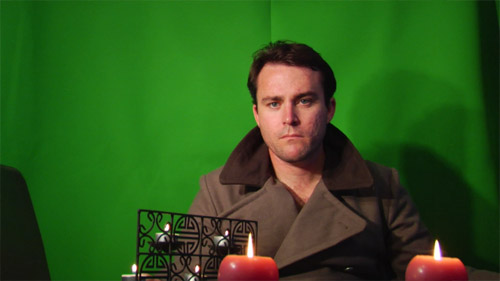
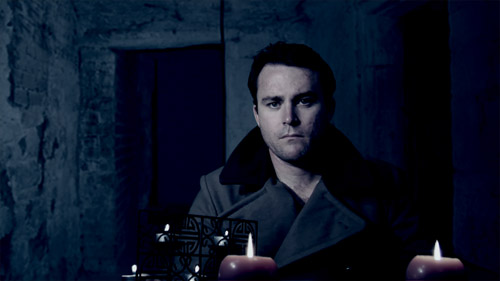
Above is a screen shot from a test I ran using a Green screen ( from EEFX.com )
I placed candles, shadows on the green screen put on an old East German guard jacket (because it has fine detail on it)and lit the green screen in a bad way....
I did this for one reason. To show you all that even a bad lit scene with fine detail can be cleaned.
No this method isn't just for chroma keying either. Its just for getting rid of noise and macro blocks. Ill add a few demos at the bottom of this post.
Ok lets have a look at a matte of the above image.
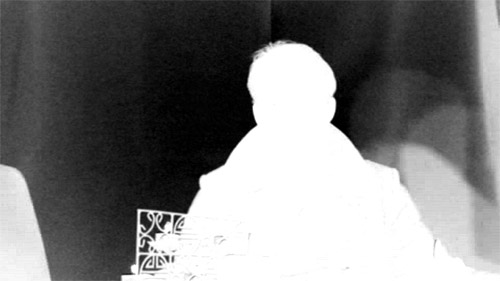
Good GOD I can hear you say! It looks like my footage. Yep mine too from time to time.
Now image is pretty noisy and is full of macro blocks. I could remove this by pulling the whites and and blacks up in a chroma key program however I'll lose a lot of detail. Like my hair for e.g. I want to keep as much fine detail as possible.
Ok lets look at the clean footage. Take a deep breath...
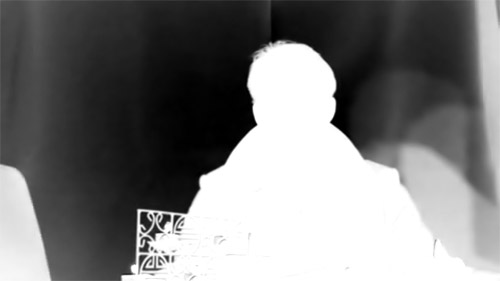
Ummmm you can close your mouth now.
Now what you are looking at is a key that has been pulled from the same image. No Macro blocks!!!
No Noise!!!
What you can see though is very fine detail where the noise was.
Look at the before and after matte, look at the hair, the candles flame. and the detailed candle holder?
Ok lets look at the keyed image.
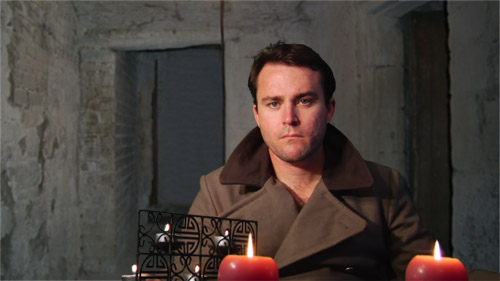
and final output
So how was it done?
Its a program I stumbled upon called Neat Video and boy is it neat!
It can be used in the following programs as a plugin as this software is not stand alone.
After Effects
Premiere
Pinnacle Studio
VirtualDub
Sony Vegas
Now some noise removers simply blur the footage. This one doesn't. It removed the noise in my test footage and then resharpened the image.
There website is http://www.neatvideo.com/
Its easy to use and id say removes about 95% of the noise. Leaving you with clean and crisp footage.
Now I shot my tests using the HVX202en ( Australian version ) on P2 card.
I used Raylight so I could import the MXF files.
No I don't work for this company, nor do I make money from them but I am so impressed that I think there worth a mention.
The images speak for them selves.
Heres a bit more from stock footage I have.
Now the grabs below are from video also.
Below image is a dim lit room. You can just see the noise.
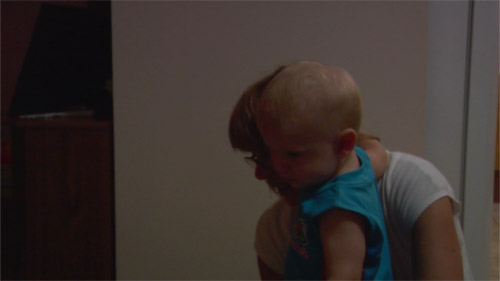
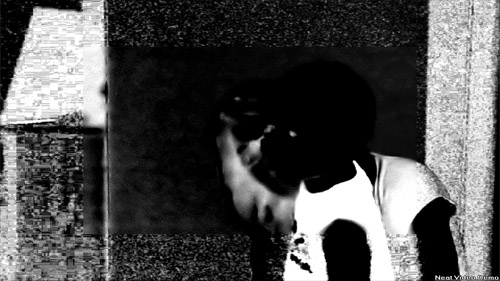
Now you can see the noise in the Matte. If you look to the center of the grab you'll see a square pattern which is the clean video on neat videos basic settings. the outer of course is not treated.
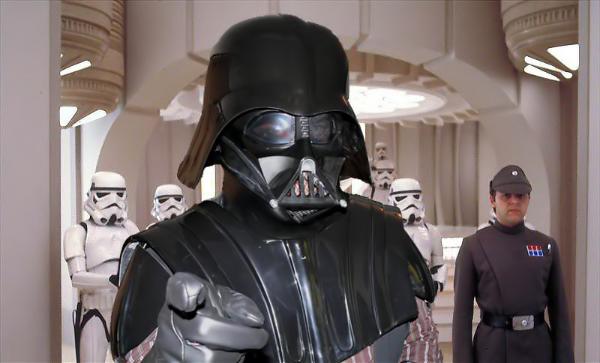
The plugin is great for removing compression artifacts in compressed footage also. The foreground (me in my almost complete vader suite ) was a quick shoot from my Panasonic Fz20 still camera..
The background was a small picture that was compressed. You can see the noise and compression artifacts.
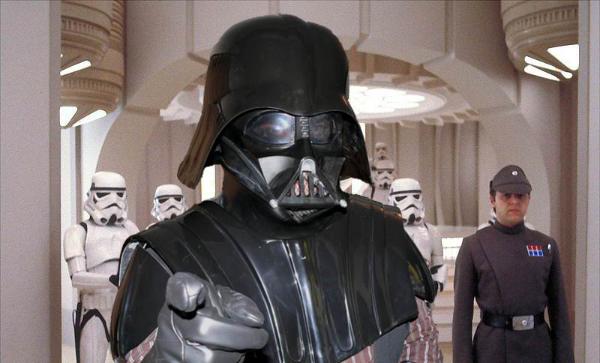
And look how much cleaner the walls look.
Anyhow hope you enjoyed my write up.
If you would like to check out my site feel free to visit or email me at admin@freudenbergfilms.com
Cheers
Michael Freudenberg
NOISE!!!!!!!!!
It shows up in the blacks! It can detrack from the footage and if your pulling a key it shows up in the foreground footage!!!!
So how do we get rid of it?
The answer!
We'll lets have a look at the proof first....
Above is a screen shot from a test I ran using a Green screen ( from EEFX.com )
I placed candles, shadows on the green screen put on an old East German guard jacket (because it has fine detail on it)and lit the green screen in a bad way....
I did this for one reason. To show you all that even a bad lit scene with fine detail can be cleaned.
No this method isn't just for chroma keying either. Its just for getting rid of noise and macro blocks. Ill add a few demos at the bottom of this post.
Ok lets have a look at a matte of the above image.
Good GOD I can hear you say! It looks like my footage. Yep mine too from time to time.
Now image is pretty noisy and is full of macro blocks. I could remove this by pulling the whites and and blacks up in a chroma key program however I'll lose a lot of detail. Like my hair for e.g. I want to keep as much fine detail as possible.
Ok lets look at the clean footage. Take a deep breath...
Ummmm you can close your mouth now.
Now what you are looking at is a key that has been pulled from the same image. No Macro blocks!!!
No Noise!!!
What you can see though is very fine detail where the noise was.
Look at the before and after matte, look at the hair, the candles flame. and the detailed candle holder?
Ok lets look at the keyed image.
and final output
So how was it done?
Its a program I stumbled upon called Neat Video and boy is it neat!
It can be used in the following programs as a plugin as this software is not stand alone.
After Effects
Premiere
Pinnacle Studio
VirtualDub
Sony Vegas
Now some noise removers simply blur the footage. This one doesn't. It removed the noise in my test footage and then resharpened the image.
There website is http://www.neatvideo.com/
Its easy to use and id say removes about 95% of the noise. Leaving you with clean and crisp footage.
Now I shot my tests using the HVX202en ( Australian version ) on P2 card.
I used Raylight so I could import the MXF files.
No I don't work for this company, nor do I make money from them but I am so impressed that I think there worth a mention.
The images speak for them selves.
Heres a bit more from stock footage I have.
Now the grabs below are from video also.
Below image is a dim lit room. You can just see the noise.
Now you can see the noise in the Matte. If you look to the center of the grab you'll see a square pattern which is the clean video on neat videos basic settings. the outer of course is not treated.
The plugin is great for removing compression artifacts in compressed footage also. The foreground (me in my almost complete vader suite ) was a quick shoot from my Panasonic Fz20 still camera..
The background was a small picture that was compressed. You can see the noise and compression artifacts.
And look how much cleaner the walls look.
Anyhow hope you enjoyed my write up.
If you would like to check out my site feel free to visit or email me at admin@freudenbergfilms.com
Cheers
Michael Freudenberg


