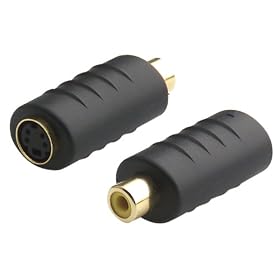
set dvx100b to dual monitors

Hi,

I am able to connect the dvx100b to a tv monitor via the audio video rca. I am however only able to connect 1 monitor at a time.

I would like to connect the camera to a color monitor and a black & white at the same time.

I tried looking for something like a "rca spliter" but I wasn´t able to find anything like that. Maybe the camera or rca cables weren´t meant to work this way.

Would anyone be able to tell me how to setup mulitple monitors this way?
 
Splitting a video signal with a "Y" cable will cause double termination and will seriously hurt your video signal.

To split properly, you need an active Distribution Amplifier (DA).

However there's allready one built into your DVX! one output is The Composite (RCA) video, the other is the S-video!

Get a S-video to Composite adapter and use that to turn the S-video output on the camera to a second RCA output. These adapters are about $5 and look like this:
417A37T7YPL._AA280_.jpg


- Mikko
 
ok so from this I see an S-video output from the camera right

then in the picture I see a single rca connection (yellow for video)

the monitors will also have a 1 channel audio (ch 1 white) rca in as well as the video (yellow) in

how could I also pass the audio to the televisions therefore?
 
Hi and thanks for the assistance,

I am using an external shotgun xlr mic which is attached to the camera (powered by AA battery).
 
I presume you are recording mono then?
(The XLR into input 2, and both Channel select switches set to "input 2")

If this is the case, then pull audio to each monitor from each audio output directly.

Monitor 1:
Video: Composite (Yellow RCA)
Audio: Left (White RCA)

Monitor 2:
Video: S-video
Audio: Right (Red RCA)

As you are recording mono audio to both channels, you will get the same audio out of each output.

Of course your levels can still be indipendantly adjusted for each channel.

- Mikko
 
when you say "is it stereo or mono" would I be able to say that it´s stereo if the mic is a "stereo" mic or does i depend on how the cables are connected or is there an audio setting with the camera that lets you change from stereo to mono?

I still learning the basics.

and thks again for the help :)
 
The DVX records 2 channels of audio: Channel 1 and Channel 2. These can be used in a number of ways:
They can be used as 2 independent (mono) audio tracks - for example with one mic on each person at an interview.
They can be used as a "Stereo pair" using 2 identical mics to capture a stereo signal.
They can also be used to record "dual mono" which is where one microphone is recorded identically to both tracks. If you only have one microphone and are recording mono anyway, then this is the best way to do it. - Often when recording this way, once track will be recorded at a slightly quieter level to the other to provide for a "backup" in case there is a loud noise that peaks out one channel.

If you are recoding 2-channels, or stereo, then you of course need to monitor both channels at each monitoring point, however if you are recoding "dual mono" then you only need to monitor either of the channels. In your case this is handy as you can send one channel to each TV for monitoring.

- Mikko
 
Back
Top