
Navigation
Install the app
How to install the app on iOS
Follow along with the video below to see how to install our site as a web app on your home screen.
Note: This feature may not be available in some browsers.
More options
You are using an out of date browser. It may not display this or other websites correctly.
You should upgrade or use an alternative browser.
You should upgrade or use an alternative browser.
16gb P2 Card to Powerbook PCMCIA
- Thread starter imseth
- Start date
Barry_Green
Moderator
Make sure you have the very latest driver... if you installed one a month or so ago that won't work with the 16's.
andersonphotographic
Member
Hello I also can't get the 16gb card to show up in my Mac G4 powerbook. I downloaded the latest driver from Panasonic p2pccard and nothing happens except a little black rectangle shows up in the menu bar. When I click on it it gives me the option to power off.
Any suggestions? Does anyone know of a PCMCIA to Firewire adapter put there?
Any suggestions? Does anyone know of a PCMCIA to Firewire adapter put there?

Make certain you are not using the Intel drivers.
Second, there is no PC Card to FW adapter.
Use the FW mode with the cam.
Second, there is no PC Card to FW adapter.
Use the FW mode with the cam.
Last edited:

Jason Ramsey
Admin
If you downloaded the proper driver, it should also automatically uninstall your current p2 driver from your computer.
Other things to make sure of:
You format any p2 card in camera first and then stick it into your pcmcia slot before attempting to install the drivers. (I used an 8 gig card not my 16 when doing this).
Other than that, the process is pretty straight forward. Just install, and then the computer will want to restart....
Also, if a 16 gig card happens to be your only p2 card, you will need to make sure you camera's firmware is current enough to recognize it before going and formatting it in camera to prepare for the p2 driver installation on your computer.
Other things to make sure of:
You format any p2 card in camera first and then stick it into your pcmcia slot before attempting to install the drivers. (I used an 8 gig card not my 16 when doing this).
Other than that, the process is pretty straight forward. Just install, and then the computer will want to restart....
Also, if a 16 gig card happens to be your only p2 card, you will need to make sure you camera's firmware is current enough to recognize it before going and formatting it in camera to prepare for the p2 driver installation on your computer.
Brian_Broz
Active member
Please keep in mind there are seperate updated 16GB drivers for both the camera and for the computer (the included CD drivers with the camera will not read 16gb cards)...you need to install 16GB drivers from the Panasonic website.
I for one didn't realize you had to install both...till I was on set and the supplied powerbook wouldn't read 16GB cards, despite the camera being updated.
Hope that helps.
I for one didn't realize you had to install both...till I was on set and the supplied powerbook wouldn't read 16GB cards, despite the camera being updated.
Hope that helps.
andersonphotographic
Member
I'm still trying to get the 16gb cards to show up in my G4 Powerbook. The only new Panasonic driver I can find says Intel on it. Does anyone have a link to the new 16gb driver I need for the computer? Thanks.
https://eww.pavc.panasonic.co.jp/pro-av/support/desk/e/download.htm#p2driver
This is the one we used to update a G4 laptop. 16 gig cards work fine.
P2 Driver software for PC and Mac
The driver software is required for PC or Mac to recognize the P2 Card.
Links
Software Information
Topics
2007.5.
Suppoted with 16GB P2 Card
2007.4.
Supported with WindowsVista
Supported with Intel Mac
This is the one we used to update a G4 laptop. 16 gig cards work fine.
P2 Driver software for PC and Mac
The driver software is required for PC or Mac to recognize the P2 Card.
Links
Software Information
Topics
2007.5.
Suppoted with 16GB P2 Card
2007.4.
Supported with WindowsVista
Supported with Intel Mac

cheezweezl
Veteran
i have had no problems with the 16gb cards and the PB. latest drivers should do it.
new p2 driver for nonIntel mac g4 powerbook
new p2 driver for nonIntel mac g4 powerbook
So what is the final word on the intel driver? is there another one?
i am afraid to download the intel one in case it erases my old one and
then i won't be able to see any of my cards.
shooting tonight and i have 4 cards, 2 4g, 1 8g, and a 16g.
love to be able to use that 16g card more than once.
new p2 driver for nonIntel mac g4 powerbook
So what is the final word on the intel driver? is there another one?
i am afraid to download the intel one in case it erases my old one and
then i won't be able to see any of my cards.
shooting tonight and i have 4 cards, 2 4g, 1 8g, and a 16g.
love to be able to use that 16g card more than once.
where can i find the latest non intel driver to download for my mac g4 ????????Make certain you are not using the Intel drivers.
Second, there is no PC Card to FW adapter.
Use the FW mode with the cam.
is your pb an intel ?https://eww.pavc.panasonic.co.jp/pro-av/support/desk/e/download.htm#p2driver
This is the one we used to update a G4 laptop. 16 gig cards work fine.
P2 Driver software for PC and Mac
The driver software is required for PC or Mac to recognize the P2 Card.
Links
Software Information
Topics
2007.5.
Suppoted with 16GB P2 Card
2007.4.
Supported with WindowsVista
Supported with Intel Mac
PowerBooks are PPC.
MacBooks and MacBook Pros are Intel
MacBooks and MacBook Pros are Intel
Did you click STEP 3 and then "I accept"
For Mac * * AJ-PCD20(IEEE1394b)
CardBusDriver
AJ-PCS060(Include P2StoreManager)
Driver Software P2 STORE / Card BusDriver / IEEE1394b Download
DuelAdaptor™ need installing the driver software of DuelAdaptor™ in Mac.
This driver works for any MAC.
I used this one for my G4 PowerBook and it works fine.
I can read 4,8 & 16 gig cards.
And there are different downloads for different things
on that same page....
Download the .pdf guides for installation instructions.
For Mac * * AJ-PCD20(IEEE1394b)
CardBusDriver
AJ-PCS060(Include P2StoreManager)
Driver Software P2 STORE / Card BusDriver / IEEE1394b Download
DuelAdaptor™ need installing the driver software of DuelAdaptor™ in Mac.
This driver works for any MAC.
I used this one for my G4 PowerBook and it works fine.
I can read 4,8 & 16 gig cards.
And there are different downloads for different things
on that same page....
Download the .pdf guides for installation instructions.
Last edited:
The names that Panasonic used are confusing.
When they came out with P2 drivers and a P2 Viewer that worked on Vista, they added "Vista" to the name of the download to signify that it was compatible with Vista, but it will also work on earlier versions of Windows.
The Mac driver download with "Intel" in the name is causing the same confusion. It would be nice if Panasonic explained on the download page that these drivers work with earlier versions of the hardware/OS regardless of what the name seems to suggest.
When they came out with P2 drivers and a P2 Viewer that worked on Vista, they added "Vista" to the name of the download to signify that it was compatible with Vista, but it will also work on earlier versions of Windows.
The Mac driver download with "Intel" in the name is causing the same confusion. It would be nice if Panasonic explained on the download page that these drivers work with earlier versions of the hardware/OS regardless of what the name seems to suggest.

shorelinedigital
Active member
Did you click STEP 3 and then "I accept"
For Mac * * AJ-PCD20(IEEE1394b)
CardBusDriver
AJ-PCS060(Include P2StoreManager)
Driver Software P2 STORE / Card BusDriver / IEEE1394b Download
DuelAdaptor™ need installing the driver software of DuelAdaptor™ in Mac.
This driver works for any MAC.
I used this one for my G4 PowerBook and it works fine.
I can read 4,8 & 16 gig cards.
And there are different downloads for different things
on that same page....
Download the .pdf guides for installation instructions.
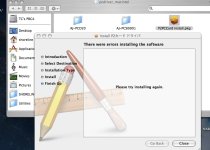
Tried installing it myself and got this error. Not sure what's going on. Hope it's not an OS 10.4.10 issue. Any takers?
Attachments
shorelinedigital
Active member
The installer for the 16gb cards for PPC macs is included in the DVD for the HPX500. The MacIntel installer from the site DID NOT work on my powerbook but the installer from the CD did. If anyone needs it immediately please PM me or email me and I'll get it right out.
Good luck!
Tom
Good luck!
Tom