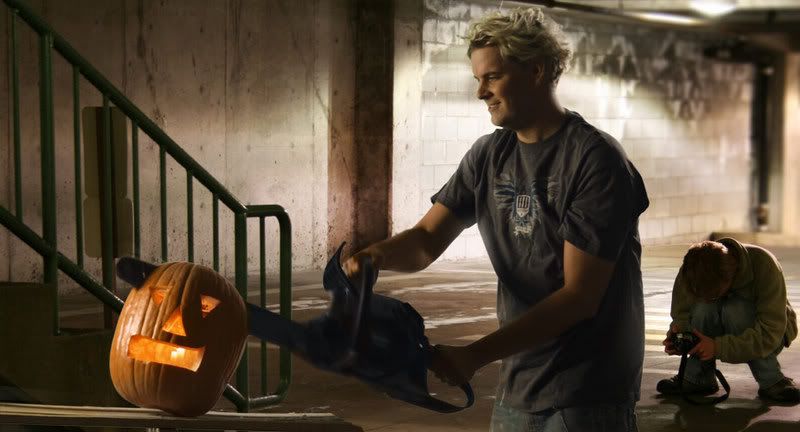
First Green screen image from Mysterium.

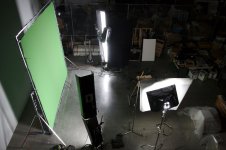
Photo of set-ups, I dig it. Thanks Jarred. Can't download footage til tomorrow. REALLY looking forward to it.
 
Last edited:
Okay I just pulled a test key in discreet Inferno - one of the best (if not the best), easiest keys I have ever pulled - in any format, on any film stock, from ntsc to 4K IMAX scans. No holes, lovely soft detail in the hair, and no messing with the settings - a one button key.

The only problem - although "Modular keyer" worked fine, I had to scale down the clip to use "Master keyer" cause it couldn't handle the file size - on a Onyx350.

Getting excited now....
 
Jarred awesome pic of the set up is that a wooden camera I see?? I'm downloading now and can't wait to see what shake can do. Also can't wait to see how the FCP keyer dose. Oh wait I'll have to scale the image down.I'll still give it a try.
 
2.jpg


Done in VEGAS.
Very neat, thanks for uploading!
 
I agree with the previous poster. I experimented with several different keying methods, and none of them really gave me a bad result. Shake was happy, Combustion was happy. I did notice some interesting artifacts in the sensor's image though. There would be off luma pixels in perfect diagonal rows. These would usually come in a group of several rows offset by about 5 pixels. Did anyone else notice that?

Oh yeah... somewhere in my testing I happened to actually put an image in the background.

Composite_test.jpg


Sorry about the bystander, it was the only photo in my mydocuments I had handy at that high of resolution. Made choosing a background much easier :)

Something else I was really impressed with was the level of noise/grain. Normally when I composite I'm always sure to do a degrain/denoise pass however in this case I actually skipped it to improve performance a bit and the key was still pretty clean. I did this composite in combustion since I haven't done any 4k in combustion before. I usually would rather do my heavy compositing in shake and I remembered why, DODs. It was pretty painful working on a full 4k image in combustion, it was taking up 970MBs of RAM for the single frame.

I really look forward to a project where I can spend the time and properly key some RED footage, it shouldn't be a problem at all. After trying about 4 different methods, I have decided that at least for my uses, shooting the material in 4k, Compositing in 4k and rendering in HD seems to be the best workflow for green screen material. Also was it just me or did the image over saturate slightly in the motion blurred areas?
 
Last edited:
JArred, I hope you took this singular chance to do the leatherface dance.


** I am seeding. Keep it shared after you download, people! Share a little love.
 
Nice one im.thatoneguy. Great color match!

Agreed there are some small problems (like vertical bands of noise in the blacks...) but I'm really too blown away to complain.

I wonder how one could address these (tiny, teeny) things without seeming like a nitpicky prick. I almost want to start a thread titled:

"You're the most exquisite creature I've ever seen - but your earlobes are asymmetrical and you have 3 freckles too many".
 
Even super models need a little makeup. :)

And thanks you, the fact that I could get even a mildly refined composite that quickly really is telling of the quality of the RED sensor.

Agreed though across the board this thing is crazy good. My guess is a lot of the little artifacts we're seeing are a result of the fact we're seeing unmanipulated data almost straight off the sensor. For instance the fact that the luminance artifacts were in such perfect little rows would be by my guess a result of the de-mosaic process. Not a problem maybe with the sensor so much as, they haven't been able to do all the bug fixing they might like. I didn't notice much banding in the blacks, I had thought it was just another motion blur artifact, of course we'll need more images to make any sort of analysis... and of course we shouldn't be doing any sort of analysis.

Haha I remember while working in combustion I had switched over to a 1k proxy and then forgotten. I was still impressed with the quality of the image and had to remind myself to go back up to the full 4k when a matte was looking too aliased and I couldn't figure out why.

To Jim: :dankk2:your camera rocks.

P.S. Boothba where do you have access to an inferno station at this time of night? Or are you somewhere in Europe/Asia/Australia/not North America?
 
Last edited:
Guys, I'm confused... I'm looking to the gallery web page of Red site and I cannot see the greens screen picture of the pumpkin!?!

Is there anybody hosting it?
 
I don't think anybody is seeding the picture, so I don't think you can get access to it, since it is only accessible though the torrent.
 
Oops, i restarded the pc without restarting bittorrent. Sorry, now seeding again, hope it helps.
The key was a bit difficult for me since i didnt want to loose the pumkin spillage from the head of the chain. I used three keylight (yes, i'm on AE7) but at the end i had to enlarge the garbage because the background was not very clean.
This frame is giant, i look forward to work with some compressed footage and see what happens(redcine?, Cineform?)

1160480116.jpg
 
im.thatoneguy said:
Even super models need a little makeup. :)

P.S. Boothba where do you have access to an inferno station at this time of night? Or are you somewhere in Europe/Asia/Australia/not North America?

Toronto. It's my day job / night job / around the clock job / statutory holiday job - example, yesterday was Canadian Thankgiving. But at least I grabbed a couple hours ZZZs on the couch. Gives me the chance to see a LOT of bad green screen / footage.
 
Schmovies production said:
Oops, i restarded the pc without restarting bittorrent. Sorry, now seeding again, hope it helps.
The key was a bit difficult for me since i didnt want to loose the pumkin spillage from the head of the chain. I used three keylight (yes, i'm on AE7) but at the end i had to enlarge the garbage because the background was not very clean.
This frame is giant, i look forward to work with some compressed footage and see what happens(redcine?, Cineform?)

1160480116.jpg

Very impressive work!

Jay
 
Thanks guys for the replies on bittorrent. I think anyway the firewall of my job seems not to like bittorent. I will try later... at home.

Personnaly, for keying, I'm using Shake 3.5 (running on a PC under Fedora :-) and I rarely use Keylight or Primatte. Instead I use a color difference key build as a macro inside of Shake. Most of the time, you get better and really quicker result than Keylight or Primatte, (which, I think, is a particulary slow process).
Schmovies Production, I think it is a good think that in AE7 you can create differente key for the same image. I am pretty sure this option was already in NothingReal Shake 1...
If you haven't yet bought your AE licence, and if you using a MacIntel, you might think to switch to Apple Shake 4.1, which I think is selling for the incredible price of 500 US dollars, as it will be the last update of Shake.
 
Back
Top