Confirmed - 720p25 support in FCP 5.1.2

David S. said:
Anders:

1. When you speak of "window" what do you mean? Is it the p2 import dialog box?

2. When you speak of "rewrap" are you saying that you can drag the mxf file from the modal dialogue box directly into the bin or sequence?

3. By "rewrap" do you mean "unwrap?"

4. Does the modal import box basically function like p2 log so you can log and "capture" using it directly from a p2 card?


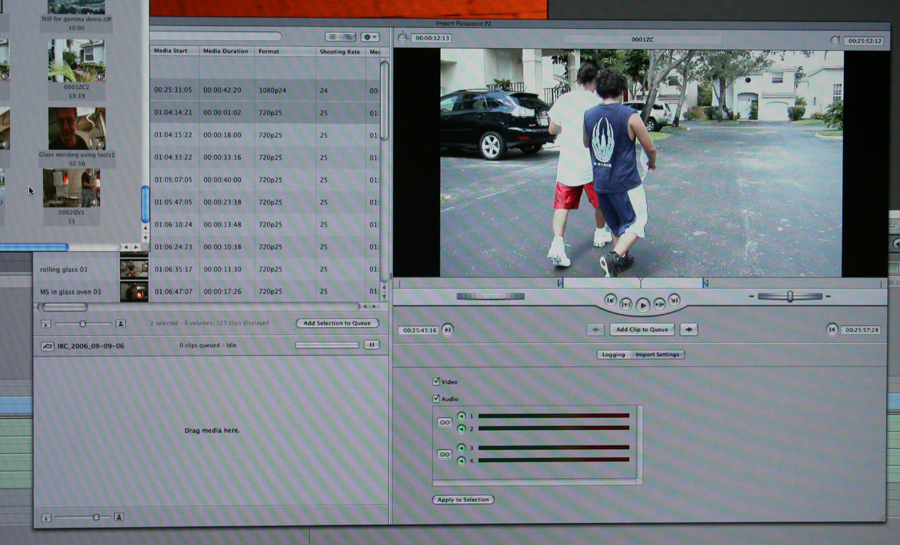
1. I'm talking about the "Import Panasonic P2" window. All the features I mention is now included in the totally redisigned window.

2. The window in 5.1.1 is modal. That means when you enter the window you cannot do anything else before you either dismiss it or click import.

In 5.1.2 it is non-modal, meaning that you can go back and forth between the window and every other feature of FCP, just like the viewer, browser and the Canvas.

You can rewrap and import files by dragging them to the browser directly or clicking the import button or dragging them to a special batch dropzone in the bottom of the Window. Note that the Import window does not close when you start to import, it's open until you close it and the process is now done in the background.

3. Re-wrapping is the apple slang for the process that happens when the MXF files are put into a QT container.

4. Yes, all P2 log features seems to be present, and LOTS MORE. A full logging interface like in Log & capture is implemented.
 
Can you do file management like in p2 log? Like renaming and organizing your mxf files? I believe P2 log is good in that you can organize and add your comments to the original MXF files, PRIOR to rewrapping. Is this possible? can fcp do media management on the original MXF files?
 
Thanks much for that Barry. We are still looking at .mov wrappers though aye? There seems to be some discrepency on that from different sites.
Jason
 
Figured as much but the line "improved native p2 support" is somewhat perplexing. Maybe something was lost in translation there.
I really dig the whole vibe I am getting about fcs, but I just don't know if I want to abandon the real-time, native support world. You think that will be frustrating for me if that is what I have always used? Ah well. Just wait and see I guess.
Jason
 
SPZ said:
Can you do file management like in p2 log? Like renaming and organizing your mxf files? I believe P2 log is good in that you can organize and add your comments to the original MXF files, PRIOR to rewrapping. Is this possible? can fcp do media management on the original MXF files?

Fcp is using a different way to achive this. The basic problem with renaming and logging the MXF files are the clip spanning. How would you rename 3 mxf files that should be tied together?
In FCP the MXF's are treated like your negatives, and are translated to Mov's, which you can rename prior to rewrapping. The MXF's will still have the random name but the database will have the new name and this will survive when you choose to rewrap.

The good thing about going to Quicktime is that you can choose to only use video and audio 1+2, to save the space for 2 channels you dont use, or maybe just the video if you are using a an audio field recorder. And there is no filesize limit so the auto joined clips will be rewrapped into any size you can think of...

I didn't spend enough time to see how the internal database is stored or how it will treat clips that become offline, but I would guess that it maybe uses some kind of sidecar file in the MXF folders.

And just to make sure you all know, it cannopt use mxf's natively.
I believe the quote is because all metadata is supported, auto joining is supported and you can now playback MXF's prior to the rewrap.
 
Thanks, Anders, for such detailed Lowdown :)

Barry (And Mikko), just saw yuour photo with the modes. It says 720p25, which is great, but it doesn't say anything about 720p50! What does this mean?
 
SPZ said:
Thanks, Anders, for such detailed Lowdown :)

Barry (And Mikko), just saw yuour photo with the modes. It says 720p25, which is great, but it doesn't say anything about 720p50! What does this mean?

This could mean anything. What was shown was a late beta. It would be crazy to implement only 720p25 as the codec is exactly the same for all the 200E framerates.
So with this codec it would support all source framdrates, but the missing thing would be the 50 fps framerate in the sequence settings dialog.
I have just returned to Denmark, but maybe there is someone on the floor that could try and open a new empty sequence and select "sequence>settings..." and see if 50 is available from the editing timebase popup.
I think it's just a missing sequence profile, yet to be implemented.
 
I was asking about 720p50 on another list and a guy at the show said an Apple rep on the stand told him there was no 720p50 support yet and that it was "harder to implement than 720p60".

I find this a bit hard to swallow as the real reason, but for sure its not there for now.
 
Sorry guys...I need some help here.
I'm about to buy either JVC GY 100 or Pana HVX
Now that FCP will be editing 24&25P HDV natively why should I prefer HVX?
I'm leaning to HVX because of the codec, and the color sampling compression....but on the other hand many people say that you can hardly notice the difference when you see a monitor and also that GY100 has better resolution....so what would you say? this is really confussing...I was a big fan of the HVX and I had dropped the idea of the JVC but, as a FCP user, now that there are no editing differences (are there?)....what sohoul I do? Also is it real HDV? not a down conversion? Too many issues to consider, and I'm about to stick to totally different ways for at least some years so...
well thanks in advance...I'm just hours away from my final decision, that includes whether or not to buy Firestores, p2 cards, etc...my major concern is the best film look and best image quality over costs...thanks!
 
Only thing about having to convert to mov, is that if you are going to have the mxf and a mov version, you are taking up twice the space yeah? at a gig a minute, that is already a lot of space. Or am I not seeing something right here?
Jason
 
mark.burton said:
I was asking about 720p50 on another list and a guy at the show said an Apple rep on the stand told him there was no 720p50 support yet and that it was "harder to implement than 720p60".

I find this a bit hard to swallow as the real reason, but for sure its not there for now.

Oh my god !
GUTTED !!

720p50 is the most useful format of the camera for gods sake.
nfm-:Drogar-Angry(DBG):

PS Denada. if you want a film look go hire a film camera and stop hijacking threads.
 
I would wait and see when the update comes out if 720p50 is supported before I blow.

I think this is really a misunderstanding. There are two steps to support 720p50: One is the acquisition format (like shooting 720/25pn at 50fps) and the other is the ability to edit at 50 fps.

The first step I believe is now in FCP 5.1.2 by simply adding the extra codec.

But implementing the 50 fps framerate into the system is much harder as you have never been able to edit at 50 fps inside FCP. So it would mean adding a new timebase throughout the system. in every component.

So my understanding is that yes you can import 720p50 material, but you cannot edit at 50 fps (you'll have to conform to 25) or capture the stream in log & capture
 
GUTTED !!

720p50 is the most useful format of the camera for gods sake.
nfm-:Drogar-Angry(DBG):
 
You really think 720p50 is the most usefull format? 90% of what I do on it is either 1080/25p or 720/25pn. The rest is 720/25pn at overcrank or undercrank.
 
HOWEVER the people at the apple sbooth said to me that there was no 720/50p in the pipe line (and also not in the future since that would be a major software change) and they said if you really want this FCP is not the right NLE software for you and to my surprise they send me to EDIUS booth.

mark.burton said:
A posting on the LAFCPUG from an Apple Pro Apps employee confirms that in a month, v5.1.2 will indeed have 720p25 P2 support. Here is the full posting taken from here:
 
No you can not drop MXF files on the timeline, still QT wrapper at least that was what the person at the booth told me. When I asked why they didn't change it he said that apple was QT based.

Ramjet1979 said:
"improved native p2 support"
That's what it says on hdforindies. Can somebody verify native p2 support. That line is just a little weird. you can't have improved native support if you didn't have native support.
This is potentially very exciting. Can someone please give a definite verify that 5.1.2 will have native p2 support? No converting, meaning I will be able to drop mxf files on the timeline?
Jason
 
Mikko has posted a still of the new dialog:
FCP_P2_Capture.jpg


Notice that the dialog is in the background and you can actually edit while it's open
 
Last edited:
Back
Top