
Navigation
Install the app
How to install the app on iOS
Follow along with the video below to see how to install our site as a web app on your home screen.
Note: This feature may not be available in some browsers.
More options
You are using an out of date browser. It may not display this or other websites correctly.
You should upgrade or use an alternative browser.
You should upgrade or use an alternative browser.
Zooming in Post?
- Thread starter Cinephile
- Start date

Zooming doesn't just make things look bigger and smaller. Changing the focal length on your lens changes the characteristics of the shot, as does your distance from the subject. You can keyframe the scale and position, but it will look cheap if you use any method other than moving the camera or changing the lens. On small enough scenes it might be passable. Although I'm not sure I've ever seen a zoom during a take that looked good anyway, other than comical effect. So I'm not sure why you would want that.
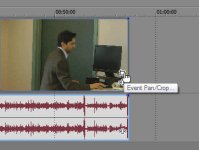
I'm still not getting the hang of Event Crop/Pan!
Simply add key frames to set the different sizes/positions of the video stage as your video plays...
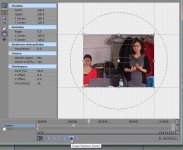
You can also use "Track Motion"/located at very left/a button on the track controls to achieve the same effect. (Hover over the buttons to find it.)
Pull out a corner to zoom in/drag in to zoom the image out. Drag left and right to move left and right, This can also be animated/key frames. Note that this is a track effect/not a clip effect and will affect the whole track...but you could actually set it to go back to normal size at a point in the time line if you don't want to change all clips.
Pull out a corner to zoom in/drag in to zoom the image out. Drag left and right to move left and right, This can also be animated/key frames. Note that this is a track effect/not a clip effect and will affect the whole track...but you could actually set it to go back to normal size at a point in the time line if you don't want to change all clips.

I wouldn't use track motion for that, for a couple of reasons.
It's only one clip; you don't need to affect an entire track for it; you only need to do it to the clip you want to zoom in on. If you do it to the track, then you have to go back to normal zoom immediately when you get to the next clip, and that's another keyframe. And if you want to move the clip, then you have to move the track motion keyframes with it, which can get messy. Doing it in pan/crop keeps it contained to the clip, no muss, no fuss, only two keyframes which don't change if you move the clip.
Also, pan/crop's image scalers are better, so you'll have a higher-quality image once you zoom in.
It's only one clip; you don't need to affect an entire track for it; you only need to do it to the clip you want to zoom in on. If you do it to the track, then you have to go back to normal zoom immediately when you get to the next clip, and that's another keyframe. And if you want to move the clip, then you have to move the track motion keyframes with it, which can get messy. Doing it in pan/crop keeps it contained to the clip, no muss, no fuss, only two keyframes which don't change if you move the clip.
Also, pan/crop's image scalers are better, so you'll have a higher-quality image once you zoom in.
I wouldn't use track motion for that, for a couple of reasons.
It's only one clip; you don't need to affect an entire track for it; you only need to do it to the clip you want to zoom in on. If you do it to the track, then you have to go back to normal zoom immediately when you get to the next clip, and that's another keyframe. And if you want to move the clip, then you have to move the track motion keyframes with it, which can get messy. Doing it in pan/crop keeps it contained to the clip, no muss, no fuss, only two keyframes which don't change if you move the clip.
Also, pan/crop's image scalers are better, so you'll have a higher-quality image once you zoom in.
In the event OP finds Track Motion easier, the clip could go on its own track.
If track space is an issue, it could be put it in a track group with others.
I actually use pan/crop for these kind of things.
I was just offering another option as OP seemed to be having difficulty with the suggested method.

clang
Veteran
...Also, pan/crop's image scalers are better, so you'll have a higher-quality image once you zoom in.
Interesting to know - I'd assumed both methods used the same underlying scaler logic.
Track Motion is certainly worth knowing about - even though it and Pan/Crop overlap in their possible results, one or the other is usually easier for any particular effect.
In the event OP finds Track Motion easier, the clip could go on its own track.
If track space is an issue, it could be put it in a track group with others.
But that's needlessly complicated. Might as well learn and use the more efficient method.
I was just offering another option as OP seemed to be having difficulty with the suggested method.
That's fine, but he should also know it's not the better way to do it.
Interesting to know - I'd assumed both methods used the same underlying scaler logic.
Track Motion is certainly worth knowing about - even though it and Pan/Crop overlap in their possible results, one or the other is usually easier for any particular effect.
Yeah, there are things you really NEED to use Track Motion for, which pan/crop can't do.