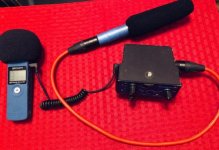
Zoom H1N with Rode Videomicro / Blue Yeti?

dylansmith

Well-known member
Hi guys,

I currently use a Zoom H1N for my Zoom meetings / podcasts. Was just wondering:

1. How much will SQ improve if I add on the VideoMicro to my H1N?
2. How will this Combination compare against the Blue Yeti, and why is the Yeti so popular?
3. Any alternative to recommend for the BEST (clear-sounding) sound quality under $300?
4. If I'm connecting the VideoMicro DIRECT to PC, how do I monitor and adjust the input levels?

Thanks in advance for your help!
 
1. A decent amount, but you'll have to talk right into it, inches away. (Although there are much better microphones for just a little more money.)

Don't you get a lot of popping with the built-in H1N microphones?

2. Because it's cheap and a good microphone for the price. And it's also a YouTube icon that has had many years of recommendations.

3. Keep recording into the recorder, but just get a better microphone like a NTG2 (or something more dedicated for podcasts or dialogue). Or something for a bit more money that sounds really good like the Shure SM7B. There are a variety of options.

4. You'll need some kind of interface in-between to do it manually with your hands (or software on the computer).
 
1. A decent amount, but you'll have to talk right into it, inches away. (Although there are much better microphones for just a little more money.)

Don't you get a lot of popping with the built-in H1N microphones?

2. Because it's cheap and a good microphone for the price. And it's also a YouTube icon that has had many years of recommendations.

3. Keep recording into the recorder, but just get a better microphone like a NTG2 (or something more dedicated for podcasts or dialogue). Or something for a bit more money that sounds really good like the Shure SM7B. There are a variety of options.

4. You'll need some kind of interface in-between to do it manually with your hands (or software on the computer).

Thanks for the prompt response!

1. Do you mind sharing some examples of "better mics for just a little more $"? and better in what sense?

I was thinking of the Videomic NTG but after checking out some youtube videos, I couldn't tell much difference between the two, other than the much lower noise floor of the NTG. Must we have very good speakers to hear the difference?

3. The SM7B is 5x more expensive than the VideoMicro.. 😅

4. What's the best software for it? Don't mind paying for a good one.
 
P.S. The reason I'm recommending a better shotgun is because it may also be a better investment for you (since you asked about the VideoMicro).

For me, personally...anytime I would have to record VOs - or do some other similar audio work - I would use the shotgun I had at the time because no one would ever notice a difference for my level of work, and I could also use the same microphone for general video production vs. only being able to use a more traditional studio mic (that's better for podcasts) for close recording while sitting down.

And better for me sounds richer. You can manipulate a lot in post these days, but a better microphone usually sounds fuller if you will, has some bass to it. Not cheap and thin.

If you think the VideoMicro sounds pretty good, you'd probably love the NTG2 in post #5. For the price, it's one of the most popular microphones in audio history (and the NTG3). Sennheiser also has the MKE 600, which I love.
 
One more possibility for you...adding a preamp for the VideoMicro (if you do go with that one).

[Coincidentally, I just put up the Beachtek for sale today (that's not why I'm showing you).]

Rudimentary stuff here, but this is my old audio set-up that sounded just as good as much more expensive ones. It enabled me to keep the levels in the H1 around 40-45 and pump it with clean gain from the DXA-MICRO-PRO. The microphone was the Audio-Technica AT875R.

Besides the Zoom (and cables and batteries), here are the other two:

https://www.bhphotovideo.com/c/prod...ica_AT875R_AT875_Short_Condenser_Shotgun.html

https://www.bhphotovideo.com/c/prod...cro_pro_dxa_micro_pro_active_xlr_compact.html

Simple Audio Setup.jpg
 
Hi guys,

I currently use a Zoom H1N for my Zoom meetings / podcasts. Was just wondering:

1. How much will SQ improve if I add on the VideoMicro to my H1N?
2. How will this Combination compare against the Blue Yeti, and why is the Yeti so popular?
3. Any alternative to recommend for the BEST (clear-sounding) sound quality under $300?
4. If I'm connecting the VideoMicro DIRECT to PC, how do I monitor and adjust the input levels?

Thanks in advance for your help!


1. Not very much. It will be mono instead of stereo as you hopefully know, but maybe there will be some ergonomic improvements because the VideoMicro may be easier to position and monitor (assuming you monitored levels on the H1n screen previously). Zoom meetings has pretty basic sound quality in the first place, so I doubt anything will give noticeable improvements over the build in mics of the H1n. Placement is probably more important.
2. Have not tried it.
3. Can't be answered. It depends on the sound treatment of your room and what kind of preamps you have available etc.
4. The VideoMicro comes with a short TRS cable. If you have TRS mic input on your PC and if the PC provides Plug in power (required by VideoMicro), you can just plug it in and control microphone levels from Settings in Zoom, or your audio software.
You can alternatively use your H1n as an audio interface by connecting the VideoMicro to the Mic in jack and connecting the H1n to your PC via USB. Using the H1n as audio interface may well provide better sound than connecting the microphone directly.
 
Last edited:
Most audio software can do the job. Sound Forge is an audio editing app and has been around since the 90's, The current version, Sound Forge-14 includes iZotope's RX Elements audio restoration tools as well as EQs, dynamics processors and effects plug-ins. Surgical editing, redrawing the waveform and such be done down to the sample level. SF is a multi-channel editing app and work with up to 32 channels. It also can author and burn CDs (whatever that is).
btw, Multi-channel is not to be confused with multi-track, which is usually associated with music productions. PTs Audition, Audacity, ect., are multi-track applications. I have been a Sound Forge Pro user since version 3.
In any case always record and save files in the PCM format. If an end-user MP3 is needed, that can be encoded from the PCM master. Most PCM files use the <.wav> or sometimes the <.aif> extension in the Mac world.
 
OK a few other things to chew on regarding mic choices since you might be willing to pay a bit for some improvements:

Would you prefer to have the mic hidden?
If so, you might consider a lavaliere type mic. A decent one would pair well with your H1n and also could allow you some freedom of movement.
Another way to hide your mic is to use a stand with a boom to position your mic. Using a stand with boom can help get your mic in a good position but out of screen. Mic position is at least as important as mic quality. Options would open up such as shotguns and small cardioids.

If you just want to get a modestly priced mic on a gooseneck stand in front of you, you might consider a SM57 for $100 + a $20 desk mount. It's good enough for presidential speeches.
If you want a modestly priced versatile shotgun, you might consider a AT-875 for $170. A very versatile mic that hits above its weight.
There are loads of economy large diaphragm condenser types which sound great if you don't mind a larger mic.
There are loads of economy small diaphragm condensers which sound great if you want compact. Ditto for lavs.

Any of these choices would be a nice improvement over the VideoMicro which I have, along with the others I mentioned. IMHO, a tin can with string would be better that a VM. The VM is really something you hang on top of a DSLR to improve the built in camera sound somewhat and have the option to add a fuzzy for wind protection. But again, I would make my choice on your room and circumstances. There are plenty of threads here and or on Y-Tube regarding mic choices. Mic choice maybe somewhat dependent on the strength of the pre-amps in your recorder. I don't own one, but the small "older" Zooms aren't known for having strong pre-amps. Weak output mic + weak pre-amps is as bad combo regardless of mic quality.

G
 
OK a few other things to chew on regarding mic choices since you might be willing to pay a bit for some improvements:

Would you prefer to have the mic hidden?
If so, you might consider a lavaliere type mic. A decent one would pair well with your H1n and also could allow you some freedom of movement.
Another way to hide your mic is to use a stand with a boom to position your mic. Using a stand with boom can help get your mic in a good position but out of screen. Mic position is at least as important as mic quality. Options would open up such as shotguns and small cardioids.

If you just want to get a modestly priced mic on a gooseneck stand in front of you, you might consider a SM57 for $100 + a $20 desk mount. It's good enough for presidential speeches.
If you want a modestly priced versatile shotgun, you might consider a AT-875 for $170. A very versatile mic that hits above its weight.
There are loads of economy large diaphragm condenser types which sound great if you don't mind a larger mic.
There are loads of economy small diaphragm condensers which sound great if you want compact. Ditto for lavs.

Any of these choices would be a nice improvement over the VideoMicro which I have, along with the others I mentioned. IMHO, a tin can with string would be better that a VM. The VM is really something you hang on top of a DSLR to improve the built in camera sound somewhat and have the option to add a fuzzy for wind protection. But again, I would make my choice on your room and circumstances. There are plenty of threads here and or on Y-Tube regarding mic choices. Mic choice maybe somewhat dependent on the strength of the pre-amps in your recorder. I don't own one, but the small "older" Zooms aren't known for having strong pre-amps. Weak output mic + weak pre-amps is as bad combo regardless of mic quality.

G

Will you consider the H1N having a weak pre-amp?

Also, is it true that dynamic mics (such as the SM57) can last a lifetime since there are no "electronics" in it? I don't mind a big one since it will most often be used for Zoom meetings, recording my voice for tutorials etc. Will also prefer one with maximum rejection and narrow sound field which is super durable, as my frequency of usage is very low (maybe 3x a month).
 
4. The VideoMicro comes with a short TRS cable. If you have TRS mic input on your PC and if the PC provides Plug in power (required by VideoMicro), you can just plug it in and control microphone levels from Settings in Zoom, or your audio software.
You can alternatively use your H1n as an audio interface by connecting the VideoMicro to the Mic in jack and connecting the H1n to your PC via USB. Using the H1n as audio interface may well provide better sound than connecting the microphone directly.

ah! How do I check whether my PC provides plug-in power? My motherboard is MSI Z170A Gaming M5, as well as a B450 Tomahawk Max.

Separately, does anyone know where I can get a long (preferably >1.5-2M) TRS to TRRS cable? Tried using an adapter + extension previously but it drastically reduces the input levels. No idea why..
 
The H1N has a very weak preamp. That's why you need gain to lower the noise floor ("hiss").

When you do that and also lower your level inside the H1N to 35-45, you have immediately improved your audio quality. The microphone choice then becomes less important (for your particular purpose) as 99% of people wouldn't notice a difference anyway.
 
Will you consider the H1N having a weak pre-amp?

Also, is it true that dynamic mics (such as the SM57) can last a lifetime since there are no "electronics" in it? I don't mind a big one since it will most often be used for Zoom meetings, recording my voice for tutorials etc. Will also prefer one with maximum rejection and narrow sound field which is super durable, as my frequency of usage is very low (maybe 3x a month).

Most any decent quality mic previously mentioned will be plenty durable for your needs, especially what might be considered location mics like lavs, small condensers and shotguns. Large condensers while sounding great, are less rugged and would be a poor choice for anything where the mic might be moving. For sure, there are mics that are considered extremely durable and the Share dynamics like the SM57 and 58 are amongst them, but I wouldn't give this top priority unless you are abusing things.

You will get much better mic suggestions if you describe the acoustics of you recording space, do you ever record in the field using a video cam? No one mic is best for everything, some are one trick ponies, and others are more versatile. For example, while shotguns are directional and can help exclude noise from the side, they are generally a poor choice for interiors that are untreated acoustically. Much better to go with a small condenser or a dynamic for that type of room. Dynamics are good for rejection at the cost of needing very close placement, so will of necessity be in screen usually. And, I will repeat this, placement of your mic is the MOST important thing of all. It mitigates weak preamps and helps to reduce background noise. The best mics on Earth don't sound good when poorly placed.

G
 
Last edited:
Most any decent quality mic previously mentioned will be plenty durable for your needs, especially what might be considered location mics like lavs, small condensers and shotguns. Large condensers while sounding great, are less rugged and would be a poor choice for anything where the mic might be moving. For sure, there are mics that are considered extremely durable and the Share dynamics like the SM57 and 58 are amongst them, but I wouldn't give this top priority unless you are abusing things.

You will get much better mic suggestions if you describe the acoustics of you recording space, do you ever record in the field using a video cam? No one mic is best for everything, some are one trick ponies, and others are more versatile. For example, while shotguns are directional and can help exclude noise from the side, they are generally a poor choice for interiors that are untreated acoustically. Much better to go with a small condenser or a dynamic for that type of room. Dynamics are good for rejection at the cost of needing very close placement, so will of necessity be in screen usually. And, I will repeat this, placement of your mic is the MOST important thing of all. It mitigates weak preamps and helps to reduce background noise. The best mics on Earth don't sound good when poorly placed.

G

Hello,

This mic will be stationary in an untreated room, with occasional traffic/rail noise outdoors and me talking directly into mic 6" away. is there an "all-in-one" solution that doesn't require pre-amp, low noise floor, won't distort easily?

What would be an E.g. of a large condenser?
 
I'm sure some of the really experienced sound guys might chime in here as well.

If you have an untreated room that has a lot of reverberation, then avoid most shotguns.

If you have off axis noise you can't control, then a hyper or super cardioid pattern will help.

A small diaphragm condenser (SDC) type in a tight pattern would work well. They require phantom power, so are usually a little hotter than a dynamic so will help reduce preamp load. There are many under $100. Good ones are a lot more, but decent quality has arrived in economy micing.

A dynamic like a SM57, or better if you can afford it, an ElectroVoice RE20 would be particularly good, though large. Both will give you good isolation if properly placed. Since dynamics aren't phantom powered, they tend to be not as hot, so your preamp situation may preclude this choice.

There are probably a bunch of other selection reasons, but there is a start.

Edit: I might ad that doing some room treatment will be some of the best audio investment you can make. Carpet, drapes, book cases, furniture all help. Surrounding yourself with furniture pads is really effective. This is one of those easy to do things that can have a huge impact.
 
Last edited:
I'm sure some of the really experienced sound guys might chime in here as well.

If you have an untreated room that has a lot of reverberation, then avoid most shotguns.

If you have off axis noise you can't control, then a hyper or super cardioid pattern will help.

A small diaphragm condenser (SDC) type in a tight pattern would work well. They require phantom power, so are usually a little hotter than a dynamic so will help reduce preamp load. There are many under $100. Good ones are a lot more, but decent quality has arrived in economy micing.

A dynamic like a SM57, or better if you can afford it, an ElectroVoice RE20 would be particularly good, though large. Both will give you good isolation if properly placed. Since dynamics aren't phantom powered, they tend to be not as hot, so your preamp situation may preclude this choice.

There are probably a bunch of other selection reasons, but there is a start.

Edit: I might ad that doing some room treatment will be some of the best audio investment you can make. Carpet, drapes, book cases, furniture all help. Surrounding yourself with furniture pads is really effective. This is one of those easy to do things that can have a huge impact.

I have learned so much from this one post alone!

Please pardon me but I have some newbie questions on audio -

is a DAC different from a pre-amp? I am looking for a decent USB DAC to improve my PC speakers audio quality. Will it also help if my mic is connected via the USB DAC? Quite a few recommended the Topping D10 or Fulla 3, but doesn't look like there's a mic input. Which affordable & inconspicuous USB DAC/pre-amp under $100 will you recommend?

Also, I checked out the SM57 and looks like it needs a XLR input, which means I'll need another "relay box" right? Is there any dynamic which doesn't require that? E.g. direct USB-c connection? trying to minimize the amount of equipment I need to connect & switch on every time I need it..
 
I don't deal with any of the stuff you mentioned; is some of it gaming gear? Gaming gear might serve you if carefully chosen, but for the most part, pro audio folks stay away from it. There are plenty of USB direct input mics, but most pros don't use them either. So if you want to record audio direct to computer using more professional mics, most people would use an audio interface of which there are plenty. Pricing starts around $100 depending on the quality of the preamps, number of inputs, and the interface itself such as USB, Firewaire, or Thunderbolt. I don't know the bottom end of the market but hear folks praise Focusrite as good for the money. Solid State Logic has a new economy interface which is highly regarded as well. I have had a Motu interface for some time which is also good. Any of the interfaces I mentioned will have XLR type inputs and have switchable 48v phantom power available for condenser type mics.

Another great AI choice would be a Sound Devices MixPre-D. This is a small professional quality field mixer that has a USB interface. It has outstanding preamps which can handle any mic you will ever use; we're talking studio quality in a really small package. Used ones are coming down in price and might be in your budget. Make sure you are looking at the "D" version as the original didn't have the USB digital output.

Any of the devices I've mentioned will be a stand alone solution. Plug in mic of your choice and plug into computer, add software and you are good to go.

And virtually any mic worth anything will have XLR connections. Your VidepMicro has 1/8 plug and anything like that is pretty much consumer junk with the exception of some lavalieres intended for wireless.

Some interfaces can handle your monitor output as well, my Motu Traveler does that via firewire, but I think most people use a separate controller or mixer to handle output. There are sound cards available with breakout cables. You could then use an economy gig mixer like a small Mackie. I did that for quite a while. Trying to control your monitors directly from your CPU will be a frustration. In my workstation, I use a Presonus controller which has input flexibility, output flexibility, headphone outputs, and a lot more. I think they are about $300. They go up from there. I don't know much about the PC world but using either usb or optical output would be very preferable to using any 1/8 plug output from your CPU. Again, not very familiar with PC sound cards or outputs.
 
hmm getting confused here. Using the example you gave (E.g. https://focusrite.com/en/usb-audio-interface/scarlett/scarlett-solo), I'm buying this purely so that I can use dynamic mics like the SM57 right? What If I bought the VideoMic NTG instead? How different will it be if I plugged the NTG direct to PC vs SM57 ► FocusRite ► PC?

Also, I notice the interface doesn't have optical. Is there one that has it, so that I can connect my SWAN monitors to it and improve the SQ?
 
"I'm buying this purely so that I can use dynamic mics like the SM57 right? "

Yes, and also if you choose a mic that needs phantom power. Most AI devices have multiple mic preamps-inputs if that matters.

"What If I bought the VideoMic NTG instead?"

You can do that. It might sound great. It might not; I haven't a clue. Most USB mics are in the economy class, so not widely used professionally except for blogging or similar uses. That is you, so might be fine.

"How different will it be if I plugged the NTG direct to PC vs SM57 ► FocusRite ► PC? "

Mics by nature are analogue and that needs to be converted to digital before it gets to your computer. You can do it with an interface device or within the mic. Not very many pros are going to use a USB mic since it is a one trick pony. Most video is recorded in the field and loaded into an editing workstation from some type of portable memory. My point is, probably not many users here will be familiar with the comparison you ask about. I suspect that even an economy classed AI will have better preamps than the internal one in a USB mic.

"Also, I notice the interface doesn't have optical. Is there one that has it, so that I can connect my SWAN monitors to it and improve the SQ?"

Optical and thunderbolt are options arrive on more expensive gear than your original budget. On my mac, I have used USB, optical, firewire and thunderbolt, and to tell the truth, didn't notice much if any difference in audio output quality. Your audio quality will be more dependent on the capability of your CPU or sound card. The interface type isn't as important IMHO.

A basic AI and a SM57 will put you miles ahead of where you are for well under your budget. And if you decide to improve your kit later, you can add any mic of your choice to a decent AI.

Grant
 
Last edited:
Back
Top