Your solution?

hermmermferm

Well-known member
I have a simple (hopefully?) concept I've done some development on and without giving the show away took a picture that helps demonstrate what I'm hoping to achieve.. was wondering if any of you wizards could share the workflow you'd use in the process of animating a face on colored paper. I've figured out how to animate the eyes in a satisfying way, but am struggling with a solution for the lips. Match-moving a bulge effect provides some flexibility, but not much. Different match-moved clean plates using mocha remove also work, but I'm not digging jumpy nature of the effect. I don't need 'Jim Carrey' expressions; subtle but readable lips synch should work well. Preferably, I'd like to work with the face already drawn onto the surface as opposed to having to match-move/light something created in post.. Also, no shots would be as close-up as pictured below.. Any ideas? Thanks for any thoughts!
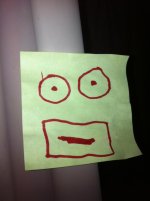
photo (1).jpg


Josh
 
In theory you just need a pile of replacement mouths drawn in the dozen-ish phoneme shapes needed for speech - any good book on hand-drawn animation will have examples. The hard part is of course getting those mouth shapes to match the speech - you'll need a NLE or other tool which lets you copy and shuffle the individual mouth stills, plus lots of patience :)

Or if you have some spare cash, something like Crazy Talk http://www.reallusion.com/crazytalk/ would be even easier, it can make any still photo or drawing 'talk'.
 
Thanks for the advice, sincerely appreciated.. That Crazy Talk program looks pretty cool, do you know if there is anyway to track that effect to video?

edit: Actually, that CrazyTalk program looks pretty much perfect, similar to the tracked bulge effect but with more manipulation controls that I think would do the job without it looking too distorted. But like I said, I need it tracking to the moving paper in the footage (example: imagine the post-it note face attached to a box someone is mailing). Is there a plugin or program that I could possibly build a similar rig with? I'm open to any suggestions. And no, this isn't for a post-it spec commercial ;) Thanks again!

best,
josh
 
Last edited:
I don't know anything about the program but you could always import a solid blue or green photo and apply it as your background and then key the color out in you editor. that would allow you to superimpose your animation over you video. But you would have to animate and key your "animation" video to move where you want around your background video.
 
I think you need to break this into two steps: 1) creating video of the unmoving talking box, and 2) attaching that generated video footage (surrounded by a transparent alpha channel or greenscreen background) to the live footage of the actual box, to replace the actual box.

If the shots are brief, it shouldn't be difficult to manually track the talking box footage video onto the live footage, even if you have to do it frame by frame - so long as the box keeps roughly the same angle to screen through any individual shot. Even easier if the box stays still during a shot. (But trying to do this if the box is bouncing around everywhere will be almost impossible, short of doing a whole lot of 3D match moving in a separate program - that's how a big Hollywood production would do it, but I'm guessing you're not wanting to spend buckets of money.) If it was me, I'd plan my shots around the talking effect, keeping the box still or moving evenly as much as possible.
 
Thanks for all the feedback guys! Really helpful! I think I've found a workflow that'll make this manageable, but am wondering if any of you know how to link Mocha tracking data to an AE effect (much like "track effect point control") Is that possible?

edit: I'm actually trying to link Mocha tracking data to the Liquify Distortion Mesh Offset. Any ideas?

Big thanks again for your time and consideration!
 
Back
Top