
I thought this might be useful for those who may be considering the purchase of an F4 - it collects together some of my findings and discoveries that have been spread across various threads and websites. Thanks to Jens Mathias on Facebook for working with me to get the answer. I don't mean for it to put anyone off buying an F4 - but just to clarify what seems to me to be an important design flaw that may or may not bother you.
Firstly, I really like the F4 - but it doesn't work as a field mixer that feeds analogue line level into a professional camera. There will be some people that are using it as such, but read on and I'll try and explain as briefly as I can why it's a flawed approach.
The F4 is a digital unit, feeding a DAC with analogue XLR outputs. Most people (me included) will interpret that physical XLR spec as "professional line-level +4dBU balanced outputs."
But they're not. They're -10 dBV domestic line level outputs, the same level you normally get on, say, a CD player with RCA outputs, masquerading as professional XLR outputs.
So, if you try and line up the mixer at unity gain to a professional camera XLR line in, you'll end up cranking the camera input pre-amps right up to 10.
I've read various comments saying, "just push the F4 master output gain up." I did, and various listening tests suggested it was a workable solution - but only because I was letting things peak on the F4 around -12 dBFS.
Have a look at the recorded waveform on the camera files, and you'll see that all this actually achieves is bringing the clipping ceiling down. In other words, you can crank the digital gain higher, but the DAC is natively designed to output at -10dBV. Think of it like a guitar fuzz pedal - you're cranking the gain up, but it's ultimately restricted by the final output stage, and the result is distortion/clipping.
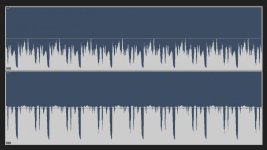
The waveform I created below demonstrates the effect of cranking up the F4 master output to +12dBFS, and bringing the camera preamps down to calibrate unity gain. Channel 1 was set to allow signal peaking just under -12 on the F4 meters. Channel 2 was allowed to go hotter, peaking higher up around -3 on the F4 meters. The result? Anything that went above -12dBFS on the F4 meters is horribly clipped/compressed on the camera at -12dBFS, losing you a fat chunk of dynamic range. Look at it below, and you'll see what I mean.
So what's the solution? In my case, I've accepted that it's not a line level mixer. I use a Tentacle Sync on my FS7 and feed timecode from the F4 at the beginning of the day. I then take a radio hop of the F4 master outputs into the FS7, for monitoring and guide purposes. Tentacle Sync Studio then very effectively syncs it all up afterwards and re-wraps the MXFs as MOVs, keeping the essence intact, ditching the audio timecode and adding in all of the F4 recorded tracks.
One other potential option is to reduce the F4 master outs and treat them as a "hot mic" output, feeding mic level to your camera. I haven't tested that option - but only because I'm not a fan of feeding mic level from a mixer to camera, and freeing up my sound recordist partner with a radio hop has other benefits.
Either way, bear in mind that the F4 slate tone is post fader - so it's independent of the master out level. If you want to reduce the master out level to hot mic, you'll need to record some tone (you can set the level in the slate tone menu at -20 or -18 for example) and play that back, so you can calibrate for unity gain.
I hope this is helpful - it's not meant in any kind of trolling way. I love the F4, and what it offers at the price point, but hopefully this might be useful feedback to Zoom for their next iteration - and if there's anything they can do about that output DAC (I suspect not, as it looks to be hardware limited), that would be utterly fab. I'm happy to edit this post, in light of any developments/workarounds.
Ben.
Firstly, I really like the F4 - but it doesn't work as a field mixer that feeds analogue line level into a professional camera. There will be some people that are using it as such, but read on and I'll try and explain as briefly as I can why it's a flawed approach.
The F4 is a digital unit, feeding a DAC with analogue XLR outputs. Most people (me included) will interpret that physical XLR spec as "professional line-level +4dBU balanced outputs."
But they're not. They're -10 dBV domestic line level outputs, the same level you normally get on, say, a CD player with RCA outputs, masquerading as professional XLR outputs.
So, if you try and line up the mixer at unity gain to a professional camera XLR line in, you'll end up cranking the camera input pre-amps right up to 10.
I've read various comments saying, "just push the F4 master output gain up." I did, and various listening tests suggested it was a workable solution - but only because I was letting things peak on the F4 around -12 dBFS.
Have a look at the recorded waveform on the camera files, and you'll see that all this actually achieves is bringing the clipping ceiling down. In other words, you can crank the digital gain higher, but the DAC is natively designed to output at -10dBV. Think of it like a guitar fuzz pedal - you're cranking the gain up, but it's ultimately restricted by the final output stage, and the result is distortion/clipping.
The waveform I created below demonstrates the effect of cranking up the F4 master output to +12dBFS, and bringing the camera preamps down to calibrate unity gain. Channel 1 was set to allow signal peaking just under -12 on the F4 meters. Channel 2 was allowed to go hotter, peaking higher up around -3 on the F4 meters. The result? Anything that went above -12dBFS on the F4 meters is horribly clipped/compressed on the camera at -12dBFS, losing you a fat chunk of dynamic range. Look at it below, and you'll see what I mean.
So what's the solution? In my case, I've accepted that it's not a line level mixer. I use a Tentacle Sync on my FS7 and feed timecode from the F4 at the beginning of the day. I then take a radio hop of the F4 master outputs into the FS7, for monitoring and guide purposes. Tentacle Sync Studio then very effectively syncs it all up afterwards and re-wraps the MXFs as MOVs, keeping the essence intact, ditching the audio timecode and adding in all of the F4 recorded tracks.
One other potential option is to reduce the F4 master outs and treat them as a "hot mic" output, feeding mic level to your camera. I haven't tested that option - but only because I'm not a fan of feeding mic level from a mixer to camera, and freeing up my sound recordist partner with a radio hop has other benefits.
Either way, bear in mind that the F4 slate tone is post fader - so it's independent of the master out level. If you want to reduce the master out level to hot mic, you'll need to record some tone (you can set the level in the slate tone menu at -20 or -18 for example) and play that back, so you can calibrate for unity gain.
I hope this is helpful - it's not meant in any kind of trolling way. I love the F4, and what it offers at the price point, but hopefully this might be useful feedback to Zoom for their next iteration - and if there's anything they can do about that output DAC (I suspect not, as it looks to be hardware limited), that would be utterly fab. I'm happy to edit this post, in light of any developments/workarounds.
Ben.


