Where's the bottleneck? PhenomII X6, 16gb RAM, Geforce

mentatDUKE

Veteran
Hi all.

I'm editing hacked GH2, non-transcoded, AVCHD footage in Premiere Pro CS6. I have CUDA enabled using my GeForce GT 240. My processor is a 6 core AMD PhenomII X6 overclocked to 4.16GHz. 16 gigs of RAM. OS drive is an SSD and media drives are two RAIDed SSDs.

I want to be able to play stretched anamorphic (3840x1080) video with Colorista adjustments in realtime without having to render the sequence.
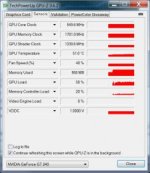
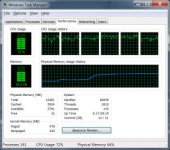
When I attempt this, the video stutters a bit, but neither my CPU, RAM, or video card appear to be maxed out.

Where's the bottleneck?

Screenshots attached.

Thanks for listening.
 

Attachments

  • CPU Usage.jpg
    CPU Usage.jpg
    20.2 KB · Views: 0
  • GPU-Z.jpg
    GPU-Z.jpg
    14.9 KB · Views: 0
Colorista runs using OpenGL on the GPU. Even with a modern nVidia 680, you probably won't get flawless realtime performance at that resolution.
 
Any time you get up to 70% usage you are, in some ways, maxed out (on your CPU), or at least incurring a high overhead.

The situation is somewhat the same on the GPU at 40%+, but not as bad.

In any system, there is a lot of overhead. As soon as utilization hits a certain threshold, the overhead required to swap things in and out of buffers, etc. starts to overtake the productive work that you are doing.

On Ethernet, for example, that threashold can be pretty low, like 35%+, because of Collision Detect. Each "speaker" backs off and waits a random amount of time to rebroadcast.

On a CPU, if data is queued and available it completes 1 "useful" instruction, then the next, then the next (an "add", for example.)

If the correct data is not in the buffer, it will swap to a different process that does have data available, load that in the biffer, swap processes again, go and get that data that is now ready for process 1, etc. You get a lot of "churning", and non-productive effort as you try to keep the CPU busy.

The same is true for the GPU.

It all depends, of course, on how a process is coded, broken apart by the system, multi-threaded, reassembled, etc.

I do know that AMD processors are not able to make use of hyper-threading with Adobe software, only Intel i7 are. I don't know how much that affects the run time architecture and system utilization achievable.

This is somewhat basic concepts of system architecture and OS design, and somewhat conjecture. There is always another, deeper level of detail that chip/system engineers could explain better.

Just my best "FYI."

Good luck!

Michael
 
Thanks for the detailed hypothesis. Let's see if we can get some anecdotal data. Anyone using Premiere out there w/ a CUDA card willing to post screenshots?
 
the bottleneck is colorista. It's not optimised for real-time playback unless you turn your preview res way down or render the timeline. The three wheel color wheel is similar but is cuda enabled and provides real-time playback.
 
This leads me to believe that maybe my GT 240 is the problem. I'll get a 570 and see if that makes a difference.

Thanks!

With a plugin on footage, what does your processor utilization typically go to?
 
With a plugin on footage, what does your processor utilization typically go to?

Depends on the plug-in. I just did a quick test so for example on 1080p fs100 footage at full preview res:
no effects: cpu averages around 16%
colorista: averages 50%
threeway color corrector: averages 16-18%
looks: 50%
film convert pro: 98%

Something that I found out in this test is looks plays back a lot smoother than colorista even with a more intense grade (i chose blockbuster preset for this test). The only thing that plays back without dropping frames is the native three way and every other mercury accelerated plug-in (curves, levels). You can even do realtime adjustments whilst playing the footage back in a loop without dropping frames.
 
Awesome. Thanks for doing the experiments. I plan on integrating FilmConvert into my finishing process permanently, so I wonder if it will even be worth it to upgrade the vid card since it seems your cpu maxes out with it also. Much to ponder....
 
Im hoping the version with 2gb of video RAM will make things copacetic at higher resolutions. I'll report back once I get the card.
 
Back
Top