What nVidia Card Is Best For Hackintosh? I Need Faster Encoding Times!

Faymus Media

Well-known member
I currently have a 8800GT running mountain lion 10.8.2. I have premiere pro cs6 and use media encoder. For me to encode a 100 minute h.264 file to DVD mpeg 2 takes over 4 hours!

Here is my specs:

core i7 920 3.5 ghz
15 GB DDR3 1700 mhz
gigabyte ud5
mountain lion from unibeast and multibeast

I was thinking about the nvidia 285GTX or maybe a 480GTX. The cost is way cheaper for a 285GTX tho! I found a few for 80 bucks! I dont think mac supports SLI yet tho does it? nVidia now supports the hackintosh community as their drivers are now available for every card for osx!

Any thoughts? Thanks!
 
As you said - under mountain lion all NVidia cards are supported meaning you can put basically anything in it. Get the best you can afford for the work you're doing. No SLE but you can run dual graphics cards in a mac pro - not sure how that works in a hackintosh - one is basically GUI and the other for processing.
 
So if i use a SLI bridge to run 2 285GTX's one will be used as processing for any video in premiere or final cut? I am unsure if there is a way in mac tho to turn SLI on or off just like in windows!
 
I currently have a 8800GT running mountain lion 10.8.2. I have premiere pro cs6 and use media encoder. For me to encode a 100 minute h.264 file to DVD mpeg 2 takes over 4 hours!

Here is my specs:

core i7 920 3.5 ghz
15 GB DDR3 1700 mhz
gigabyte ud5
mountain lion from unibeast and multibeast

I was thinking about the nvidia 285GTX or maybe a 480GTX. The cost is way cheaper for a 285GTX tho! I found a few for 80 bucks! I dont think mac supports SLI yet tho does it? nVidia now supports the hackintosh community as their drivers are now available for every card for osx!

Any thoughts? Thanks!

Yes. I have some thoughts.

First though I feel your pain on the encode time length.

While you may benefit from a different and more up-to-date graphics card, encoding video is not a GPU function. It is a CPU function. Do you have desktop monitors ( gadgets) to monitor your encoding usage of CPU and RAM? Only some things in an encode are GPU tasks and as far as I know those are encodes originating in Pre-Pro only. Also I'd suggest you download EVGA-precision monitor. I have used it since the get go on my workstation to see what if anything my QuadroFX card is doing. Which typically is nothing.

The first thing I'd recommend is to get some 'gadgets' to monitor your workstations usage and then research the Adobe forum/blog to see what you may be able to adjust.

Check this page: http://blogs.adobe.com/premiereprot...ocessing-and-the-mercury-playback-engine.html
 
Okay, eating my hat right about now. Using this benchmark: http://ppbm5.com/Instructions.html and presently rendering it I can see where AME is using my Quadro FX card to accelerate some of the encodes. Nice to actually see it do some work. I don't tend to work in Premiere-Pro choosing AE most all the time...so this acceleration is new to me...."I" need to find a way to get myself and my editing into PP more often if this acceleration is going to be there.
 
So if i use a SLI bridge to run 2 285GTX's one will be used as processing for any video in premiere or final cut?

Just to be clear, SLI solely gives benefit to gaming (unless you're also running some high end post package I'm not familiar with that utilizes it). Premiere, even under Windows, will still only use one of the cards. So unless you need SLI for gaming or 3D modelling or some productivity app that explicitly supports SLI, you're wasting money buying two cards for that purpose.
 
Okay, eating my hat right about now. Using this benchmark: http://ppbm5.com/Instructions.html and presently rendering it I can see where AME is using my Quadro FX card to accelerate some of the encodes. Nice to actually see it do some work. I don't tend to work in Premiere-Pro choosing AE most all the time...so this acceleration is new to me...."I" need to find a way to get myself and my editing into PP more often if this acceleration is going to be there.


Its because of the CUDA engine and PP is the only NLE that supports it. FCPX doesnt i am pretty sure.
 
SLI is not recognised by MAC OS.

There are a number of programs out there, PP, Resolve and AE in CS6 all use CUDA.

I put a GTX570 in my mac pro works well. If your on a Hackintosh - Id be going straight to a GTX680 if youve got the beans.

For mac pro I'd say the 570 is the best bet right now. Cheaper than the 580 which only gives a very slight performance increase. The 570 can plug straight into your board without requiring additional powering measures (680 requires) so, its the simplest solution.

You can pretty much use any brand of GTX570 even non mac EFI versions though you will not have a boot screen. THats important to remember as there maybe a time when you crash and need to access the boot to do some diagnostics so, keep your old card handy. But for me it was plug in one of the 6 pin PCI power cables, add a 6pin to 8 pin adapter to the other, plug in and go. Need to load card and cuda drivers before installing card.
 
SLI is not recognised by MAC OS.

There are a number of programs out there, PP, Resolve and AE in CS6 all use CUDA.

I put a GTX570 in my mac pro works well. If your on a Hackintosh - Id be going straight to a GTX680 if youve got the beans.

For mac pro I'd say the 570 is the best bet right now. Cheaper than the 580 which only gives a very slight performance increase. The 570 can plug straight into your board without requiring additional powering measures (680 requires) so, its the simplest solution.

You can pretty much use any brand of GTX570 even non mac EFI versions though you will not have a boot screen. THats important to remember as there maybe a time when you crash and need to access the boot to do some diagnostics so, keep your old card handy. But for me it was plug in one of the 6 pin PCI power cables, add a 6pin to 8 pin adapter to the other, plug in and go. Need to load card and cuda drivers before installing card.


Which 570/580 and 680 have EFI for mac? Also, will they run open CL for FCPX?
 
Picked up a 480GTX for 160 new in open box!

I picked up a evga 480gtx 1.5GB DDR5 video card open box for 160. Couldnt pass it up. I installed newest cuda driver, then i installed the quadro 4000 mac mountain lion driver ODE i believe.

Then i deleted smbfs.kext from the library. I heard it messes things up?

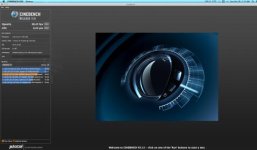
Here is my cinebech results, is my graphics card working at the acceleration it should be?


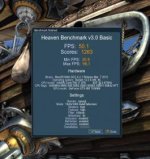
The reason i ask is the my "Xbench" results were the same as my 8800GT results??? I also enabled CUDA and OPENCL via the text files in premiere pro cs6, and i can select which ever i want CUDA or OPENCL in the project settings but it doesnt encode video any faster whatsoever than my 8800GT

11 seconds of video, with heavy effects takes 30 seconds. Anyway is this normal? Here is my benchmark results from 2 different programs on mac with open CL support.


EDIT: on the "Galaxies" benchmark my 8800GT got 160 gigaflops and the 480GTX got 588 gigaflops.


Attachments

  • Screen Shot 2012-10-28 at 3.12.07 AM.jpg
    Screen Shot 2012-10-28 at 3.12.07 AM.jpg
    14.9 KB · Views: 0
  • Screen Shot 2012-10-28 at 3.43.29 AM.jpg
    Screen Shot 2012-10-28 at 3.43.29 AM.jpg
    16.5 KB · Views: 0
Back
Top