
Navigation
Install the app
How to install the app on iOS
Follow along with the video below to see how to install our site as a web app on your home screen.
Note: This feature may not be available in some browsers.
More options
You are using an out of date browser. It may not display this or other websites correctly.
You should upgrade or use an alternative browser.
You should upgrade or use an alternative browser.
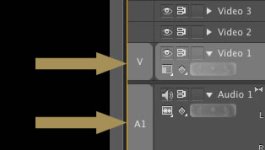
what are the "V" and "A1" symbols in the timeline?
- Thread starter tarr
- Start date
 rogar-BigGrin(DBG)
tarr
Active member
V= Video
A=Audio
Thanks for your brillant answer (joking)! Still I don't understand what are the for, since you can move those selectors...
Thanks for your brillant answer (joking)! Still I don't understand what are the for, since you can move those selectors...
Glad you saw fit to be snarky.

David W. Jones
Veteran
Audio and video track targets.
tarr
Active member
It's so you can select which track you can copy and paste footage into or insert footage to from the source window using , or . shortcut keys
thanks, I suspected it was so, but somehow it's like it doesn't work good...
thanks, I suspected it was so, but somehow it's like it doesn't work good...
Can you be more specific? I never have a problem.

kenkyusha
Member
(I've only been on Premiere for a bit over a year, but) me either...Can you be more specific? I never have a problem.

tarr
Active member
FWIW - I never use the V and A buttons specifically. I tend to target via the Video and Audio TAB
Me neither, if i edit in and out point from the source monitor and want to insetrt or overlay the clip on the timeline I just select the track tab. I do the same for cut and paste stuff.
Never really understood what the draggable V and A selectors are for... They appeared in CS4. Before they don't even existed...
