weird video capture problem

planet9

New member
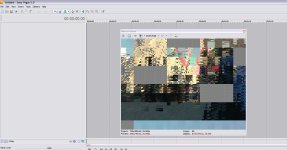
About 20% of the time the vegas capture program will incorrectly flag my footage as 25fps (shot in reg ntsc 29.970), and it comes out all garbled looking like this.
attachment.php


Clips captured before and after are fine. This happens after using multiple playback devices and a few re-installs. Tia for any help or insight.
 

Attachments

  • garbled.jpg
    garbled.jpg
    108.2 KB · Views: 0
Your project settings are 25fps, but are you sure the footage is captured that way?

I don't think there's any way VidCap can change the framerate -- it just does a straight transfer of of the 1s and 0s on the tape. There aren't any framerate settings if you're capturing digital.
 
Last edited:
I havn't seen this problem pop up for a while, not since about V5. Basically what is happening is there is a frame or 2 that have been grabled and lost and Vegas is incorrectly viewing that frame as a PAL frame. I have seen this happen usually at the beginning of tapes when recording was done right from the very first frame of the tape. The way to bypass this is to fast forward a couple seconds past the first couple of frames of that clip, then start capturing as normal. It should capture the footage normally. If not, then it could be a different problem than what I am explaining.
 
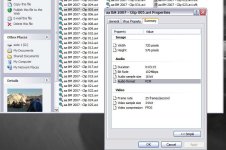
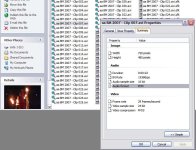
The properties in Windows show that the bad clips are @ 25fps, sitting right next to good clips capped seconds later.
attachment.php


attachment.php


That 25fps clip is what is shown in my orig post...
 

Attachments

  • 25fps.jpg
    25fps.jpg
    63.8 KB · Views: 0
  • 29 fps.jpg
    29 fps.jpg
    70.7 KB · Views: 0
Ding! I forgot to change my shortcut to vidcap6.0 when I installed Vegas 6 way back (Vegas 5 in the screencap b/c I just called it up not thinking to make that screencap).

Thx for the replies. The footage in question is from Burning Man a couple months ago, I'll post a highlight reel when I throw it together.
 
Back
Top