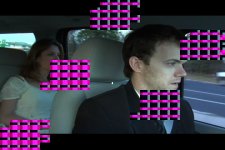
I'm having strange distortion show up in my FCP project. Kind of looks like a capture problem, BUT I doubt that for the following reasons. 1. it's on ALL the footage at random intervals. 2. it's on footage that was previously problem-free (in other words, I captured a couple of weeks ago, worked with the footage a while, then these problems started showing up across all footage).
here's a link to a video sample:
http://homepage.mac.com/nakris/CD/iMovieTheater21.html
or see the jpg attached, though it only begins to give you an idea of the problem.
I don't even know how to describe this intelligently.
I'm using FCP 5.1.4
OSX 10.4.9
17" Powerbook G4 1.67, 1.5 GB ram
Capturing from a DVX100B using the DV-NTSC 24p (23.98) Advanced Pulldown setup in FCP.
Capturing to a 200 GB Seagate drive installed in a FW800 case (formated Mac OS Extended).
Again, the first bits of footage I captured were fine. I grabbed a tape or two and started putting together a rough edit. Then stopped for a week or so, went back to capturing (10 more tapes) and these problems were everywhere.
When I started my second round of capturing, I began by trying the demo of Live Capture Plus 2.x(beta). So at this point, I thought the problem was only within this app. I deleted the 2.xbeta version, wen't back to the 1.0.5 version, but no change.
I abandoned Live Capture (which I do not belive caused the problem), then found that all my footage was suffering from the same problem, even the first stuff I'd captured. I then suspected that Live Capture had somehow corrupted something (quicktime, perhaps). But, it wasn't even a package installer, just a drag and drop app.
So, now I'm wondering if OSX, quicktime, or FCP is freaky. I believe all have been updated recently, and I've accepted all new updates. The only thing there is that I'm sure the net would be swarming with people having the same problem I'm having, and I don't see that happening.
I've tried deleting quicktime prefs, FCP prefs, and re-installing each. No luck.
Any help would be greatly appreciated!
TIA,
Nathan
here's a link to a video sample:
http://homepage.mac.com/nakris/CD/iMovieTheater21.html
or see the jpg attached, though it only begins to give you an idea of the problem.
I don't even know how to describe this intelligently.
I'm using FCP 5.1.4
OSX 10.4.9
17" Powerbook G4 1.67, 1.5 GB ram
Capturing from a DVX100B using the DV-NTSC 24p (23.98) Advanced Pulldown setup in FCP.
Capturing to a 200 GB Seagate drive installed in a FW800 case (formated Mac OS Extended).
Again, the first bits of footage I captured were fine. I grabbed a tape or two and started putting together a rough edit. Then stopped for a week or so, went back to capturing (10 more tapes) and these problems were everywhere.
When I started my second round of capturing, I began by trying the demo of Live Capture Plus 2.x(beta). So at this point, I thought the problem was only within this app. I deleted the 2.xbeta version, wen't back to the 1.0.5 version, but no change.
I abandoned Live Capture (which I do not belive caused the problem), then found that all my footage was suffering from the same problem, even the first stuff I'd captured. I then suspected that Live Capture had somehow corrupted something (quicktime, perhaps). But, it wasn't even a package installer, just a drag and drop app.
So, now I'm wondering if OSX, quicktime, or FCP is freaky. I believe all have been updated recently, and I've accepted all new updates. The only thing there is that I'm sure the net would be swarming with people having the same problem I'm having, and I don't see that happening.
I've tried deleting quicktime prefs, FCP prefs, and re-installing each. No luck.
Any help would be greatly appreciated!
TIA,
Nathan