
This is my first time joining this forum as a poster although I've lurked in the past and many of the threads and tutorials have helped me create this video of the proposal to my wife:
http://www.youtube.com/watch?v=W9TfwKOFfPA
Nothing special but not bad for literally picking up Premiere CS3 from no experience.
Anyway, now I'm working on a series of videos for our wedding reception and what I've learned here and what I've learned here and other places has brought me very far but I've hit a brick wall and need some advice/guidance. I apologize in advance if I'm being selfish by asking so many questions or if it goes against forum rules/regulations.
Here is what I have available for use:
Illustrator CS4
Premiere Pro CS3
Photoshop CS2
After Effects CS4
I have literally no experience with Illustrator or CS4. I've seen amazing things done with AE but I have no idea how to bring those projects into Premiere OR if that's even possible. These 4 questions are all related to ONE project I have begun in Premiere.
These are my questions:
1. I have two GIF files I created in PS that are 200x10 inches at 72 pixels per inch.
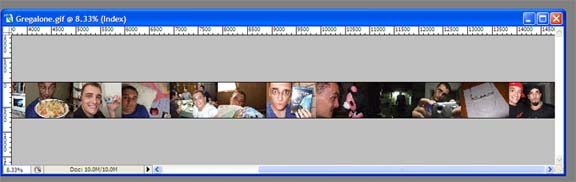
Kind of like that.
The two files begin from opposite sides of the screen and pass by one another, scaling up and down in turn, for approximately 7-10 seconds (I forget the exact length). The 'problem', is that when I render (Microsoft AVI, Compressor: None -> Virtual Dub, Compressor: Xvid) the images are 'blurry'.
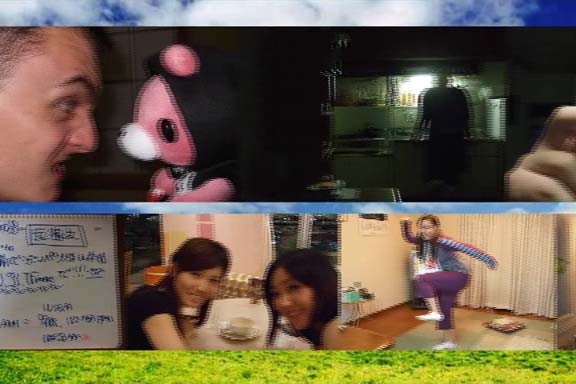
Is there any way to 'fix' that? I imagine it's not simply a matter of switching a few values and it may disrupt my entire project in which case I'll just live with it but if there is a workaround that would really be great. I am also a complete newb at this thing so if you have some advice or questions about rendering, frame-rate, etc. please think of me as a toddler playing with a fusion engine.
2. Any work-arounds to get a Lens-Flare on a transparent clip in AP CS3? I did some research, found a DECENT workaround that looks like this:
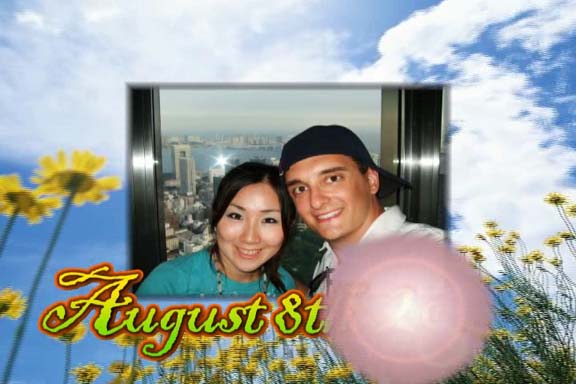
and even found that Adobe SAYS it's possible even though it apparently isn't but if you have any advice I'd love to hear it!
3. Regarding the 'wipe' (if that's what it is) seen in this video at about 18 seconds http://www.youtube.com/watch?v=ElIBC71O3GU
How in the hell do you do that!? It has to be some easy effect somewhere obvious but I can't manage to do anything other than a wipe with a flat unfeathered line that looks terrible. Is it a mask? I have NO idea how to effectively use masks and I imagine once I figure out how they work they'll open a lot of doors but for now whenever I try to make a mask I get a strange square that I didn't create that masks objects. Go figure.
4.
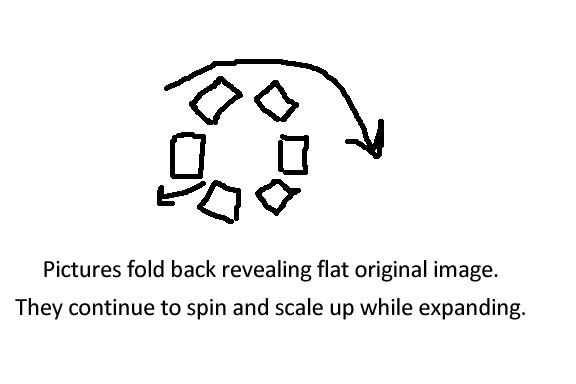
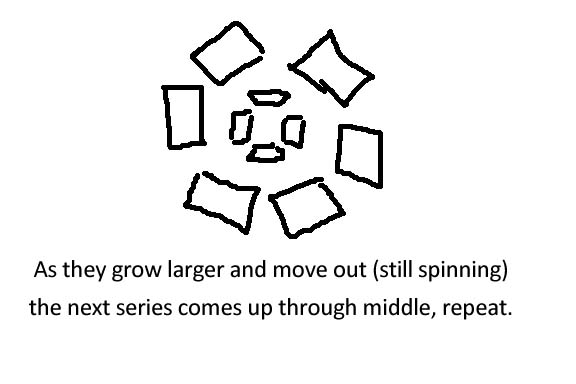
Sadly I don't have a screen cap or appropriate visual example so you'll have to follow my terrible 10-second sketches. The squares are individual pictures arranged in a ring that scale up while spinning and 'blooming' (ignore # of pix per ring but 5-10 would be great). The theme is basically like a rose opening. Is this possible with the programs I have and how would I approach something like this? I'm also concerned that the final project would look like crap if the pictures 'blur' as described above.
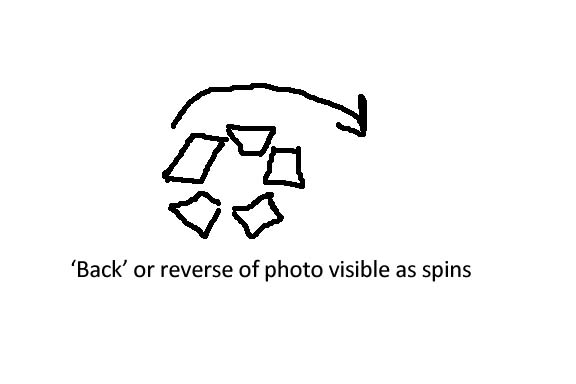
I apologize for just blurting out these questions but I've done a good deal of research and came up empty-handed and our wedding day isn't getting any closer. Thank you so much for your time!
http://www.youtube.com/watch?v=W9TfwKOFfPA
Nothing special but not bad for literally picking up Premiere CS3 from no experience.
Anyway, now I'm working on a series of videos for our wedding reception and what I've learned here and what I've learned here and other places has brought me very far but I've hit a brick wall and need some advice/guidance. I apologize in advance if I'm being selfish by asking so many questions or if it goes against forum rules/regulations.
Here is what I have available for use:
Illustrator CS4
Premiere Pro CS3
Photoshop CS2
After Effects CS4
I have literally no experience with Illustrator or CS4. I've seen amazing things done with AE but I have no idea how to bring those projects into Premiere OR if that's even possible. These 4 questions are all related to ONE project I have begun in Premiere.
These are my questions:
1. I have two GIF files I created in PS that are 200x10 inches at 72 pixels per inch.
Kind of like that.
The two files begin from opposite sides of the screen and pass by one another, scaling up and down in turn, for approximately 7-10 seconds (I forget the exact length). The 'problem', is that when I render (Microsoft AVI, Compressor: None -> Virtual Dub, Compressor: Xvid) the images are 'blurry'.
Is there any way to 'fix' that? I imagine it's not simply a matter of switching a few values and it may disrupt my entire project in which case I'll just live with it but if there is a workaround that would really be great. I am also a complete newb at this thing so if you have some advice or questions about rendering, frame-rate, etc. please think of me as a toddler playing with a fusion engine.
2. Any work-arounds to get a Lens-Flare on a transparent clip in AP CS3? I did some research, found a DECENT workaround that looks like this:
and even found that Adobe SAYS it's possible even though it apparently isn't but if you have any advice I'd love to hear it!
3. Regarding the 'wipe' (if that's what it is) seen in this video at about 18 seconds http://www.youtube.com/watch?v=ElIBC71O3GU
How in the hell do you do that!? It has to be some easy effect somewhere obvious but I can't manage to do anything other than a wipe with a flat unfeathered line that looks terrible. Is it a mask? I have NO idea how to effectively use masks and I imagine once I figure out how they work they'll open a lot of doors but for now whenever I try to make a mask I get a strange square that I didn't create that masks objects. Go figure.
4.
Sadly I don't have a screen cap or appropriate visual example so you'll have to follow my terrible 10-second sketches. The squares are individual pictures arranged in a ring that scale up while spinning and 'blooming' (ignore # of pix per ring but 5-10 would be great). The theme is basically like a rose opening. Is this possible with the programs I have and how would I approach something like this? I'm also concerned that the final project would look like crap if the pictures 'blur' as described above.
I apologize for just blurting out these questions but I've done a good deal of research and came up empty-handed and our wedding day isn't getting any closer. Thank you so much for your time!
