mcvideo
Well-known member
[FONT="]ok, i'm looking for feedback on best settings, method for implementing powerpoint documents into your video work (dvd) that will also be featured on clients web page.
here is what happened.. few months back i completed a business video for a client who wanted a video produced for dvd play back. We shot two video's. One for internal employees and a second for external clients. Both videos had powerpoint slides that were included in the video. As the speaker spoke on camera he spoke to data referenced on the powerpoint slides. The powerpoint slides where to be added into the video as inserts, in and out, each time roughly displayed for 6-10 seconds based on the speakers talking points. There was not a problem on the DVD's.
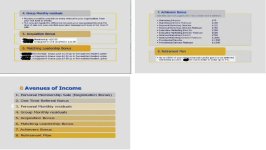
I was later asked if i could produce a WEB video of the same DVD product for clients web page. I provided the following. see screen shots. The text is not readable! Im not surprised and my guess is that the culprit is the amount of data on one powerpoint in addition to the size of the text as well. Am i right? I produced the video in the manner i was told in compliance with their legal dept review and instructions that nothing could be changed on the powerpoint slides and i mean the text font, size, splitting the powerpoint slides into 2 slides to make the words more readable. Again the DVD came out great, not a problem. But as you can see in the screen shots below the text is hard ot read.
I'd like to hear back from you guys on how you would approach this issue, is there a possible fix? How would you approach this next time around so that the text is readable when displayed on the web and with the amount of information your told you must have listed on one slide.
I need your feedback. Much appreciated!! [/FONT]
here is what happened.. few months back i completed a business video for a client who wanted a video produced for dvd play back. We shot two video's. One for internal employees and a second for external clients. Both videos had powerpoint slides that were included in the video. As the speaker spoke on camera he spoke to data referenced on the powerpoint slides. The powerpoint slides where to be added into the video as inserts, in and out, each time roughly displayed for 6-10 seconds based on the speakers talking points. There was not a problem on the DVD's.
I was later asked if i could produce a WEB video of the same DVD product for clients web page. I provided the following. see screen shots. The text is not readable! Im not surprised and my guess is that the culprit is the amount of data on one powerpoint in addition to the size of the text as well. Am i right? I produced the video in the manner i was told in compliance with their legal dept review and instructions that nothing could be changed on the powerpoint slides and i mean the text font, size, splitting the powerpoint slides into 2 slides to make the words more readable. Again the DVD came out great, not a problem. But as you can see in the screen shots below the text is hard ot read.
I'd like to hear back from you guys on how you would approach this issue, is there a possible fix? How would you approach this next time around so that the text is readable when displayed on the web and with the amount of information your told you must have listed on one slide.
I need your feedback. Much appreciated!! [/FONT]