Washed out video after exporting

digifruitella

Active member
What is it with these compressions. The video is fine in my NLE, but the moment I compress it, it loses all the color (gamma)

I export it to the Vimeo "preferred" H.264 and it just f&cking sucks. Not only that, but the video ain't even that crisp.

Any help?
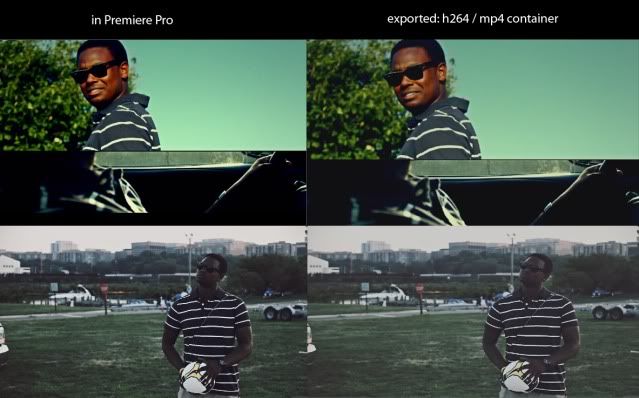
comparison.jpg
 
This a common problem with the h.264 quicktime codec, one solution would be to export the project as an uncompressed file in it's native format (uncompressed AVI for dv for example) open that file in a new project, knock the gamma down a touch and re-export it as h.264.
Another solution would be to export it as a wmv using the windows video 9 codec or the windows mpeg 4 codec, which in my experience are far more reliable than h.264 if exporting for the web, and vimeo will accept videos in these formats aswell.
With regards to sharpness make sure you export with the maximum bitrate you can afford to, the vimeo recommendations are only recommendations. The screenshots don't look to bad to be honest, you are always going to loose image quality (i.e data) during compression thats why it's called compression. it's just a balancing act between how good you want the footage to look and how large you are willing to let the file get
 
Last edited:
If you are exporing via the quicktime output module, you will get some form of gamma shift.

If you are exporting via the h.264 output module, there should be no gamma shift, however some applications aren't configured to view h.264 material at rec.709 gamma levels(16-235). Sometimes you have to configure those applications to view the correct gamma on your monitors which is different (0-255)
 
Back
Top