Warbling sound on audio. Cause and solution?

analog_addict

Well-known member
I'm editing a film with pretty badly recorded sound. Mainly low levels and noise which I'm getting rather good at fixing.

However on some clips there is a warbling effect happening where the level is dipping in and out. I know the audio gear on the shoot had issues but I havn't encountered this before.

Please listen to a sample here: https://instaud.io/gsE

What is this issue called and can it be fixed? I have Izotope RX and Audition CC.

Thanks!
 
It could be dropouts from weak RF signal levels "squelching" the receiver signal.
Or it could be low audio levels falling below some threshold and muting the microphone (???).
Its hard to tell with no additional clues.
The dialog is pretty sparse, so if that is as bad as it gets, there probably isn't anything practical you can do to improve it.
 
Only time I have heard something similar it was caused by a device not being able to write data fast enough. But that was doing multi track recording with a computer quite awhile ago. Actually I have heard something similar when a battery powered device was getting very low on batteries. If I remember correctly it was a consumer wireless set, but it might have been a mic.

As to fixing... Not very likely. It also sounds like it was recorded very low, though that may just be how he is delivering the line.
 
It was recorded with either a Zoom H4n or Tascam DR-100. Using an Audio Technica Shotgun. My guess is probably low batteries.

This happens a few times on different scenes. Rather than record the lines again, is my best option just try and draw attention away from it with atmos?
 
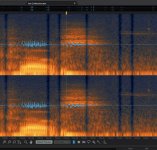
Just thought I would update this. I have been able to fix this very well using iZotope RX using the spectral repair tools. Basically there are clear drop-outs of milliseconds, I think caused by low batteries giving inconsistent voltage.

I have been able to fix around 90% of them. Ones over background noise are easy to fix. A single one in dialogue is easily fixed. 2 or more close together in dialogue are hard to fix completely but can be made better.

Here is what the drop-outs look like. I use Spectral Repair (Pattern) on most. More difficult ones I use Spectral Repair (Partials+Noise).

Dropouts.jpg

iZotope RX is very powerful. I've also been able to reduce handling noise underneath dialogue by finding it's pattern on the spectrogram through trial an error and then attenuating it without changing the level of the dialogue. Crazy!
 
Back
Top