

awelgraven
Well-known member
So this has been happening for a while now.
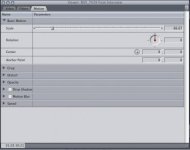
When I double click a clip in the timeline and go into the filter or motion tab, the interface gets cut off on the right side. Now if I click and drag the resize window button at the bottom right, it fixes itself by snapping the interface back into it's window... but I have do to this every time I go into the tab.
Any fixes for this? I do a lot of keyframing, and this obscures the keyframe buttons, so it's really annoying. I've gone through and deleted all my FCP preferences before, and that fixes it, but it also means I have to go thru and reset all my preferences, and that only lasts a week or two and then it does this again.
Different window layout presets have no effect either.
Any help would be appreciated, as this is driving me insane.
When I double click a clip in the timeline and go into the filter or motion tab, the interface gets cut off on the right side. Now if I click and drag the resize window button at the bottom right, it fixes itself by snapping the interface back into it's window... but I have do to this every time I go into the tab.
Any fixes for this? I do a lot of keyframing, and this obscures the keyframe buttons, so it's really annoying. I've gone through and deleted all my FCP preferences before, and that fixes it, but it also means I have to go thru and reset all my preferences, and that only lasts a week or two and then it does this again.
Different window layout presets have no effect either.
Any help would be appreciated, as this is driving me insane.