
Navigation
Install the app
How to install the app on iOS
Follow along with the video below to see how to install our site as a web app on your home screen.
Note: This feature may not be available in some browsers.
More options
You are using an out of date browser. It may not display this or other websites correctly.
You should upgrade or use an alternative browser.
You should upgrade or use an alternative browser.
Vegas over FCP?
- Thread starter NO CA$H
- Start date

Harshaw, indeed. A lot of people tend to think "Early," but that ain't it.
Never done a thing with subtitles, so I can't help you there.
Never done a thing with subtitles, so I can't help you there.

safarijoe
Well-known member
:thumbsup:
Frankly, yes I did buy Vegas because it was cheaper than the Adobe Suite (I never even considered FCP...I'm a PC man!). I had tried the trial version of Adobe and after a month of struggle I was hopelessly lost. When I bought my DVXa I heard that Vegas was the cheapest way to go if you wanted to edit 24p/pa. Since I have been using it, I have been impressed by it's ease of use, intuitive workflow and the excellent tutorials available. I have no wish to invest several thousand dollars and several weeks (months) leaning how to use my editing software nor do I want to buy a new computer, a new OS and all new software. Vegas suits my current needs and the needs of my clients. It is an excellent, professional level program and is widely recognized as such. It has done nothing but gotten better, faster and easier to use. I love Vegas and fully expect it to only get better.:laugh:NO CA$H said:Do you guys use vegas because you like it or do you use it because its a cheap alternative to FCP? I'm just wondering because I'm trying to decide which one to buy...

ullanta
Veteran
Hey Jubal, Hudson, I've hunted around a bit and haven't found any clear documentation on the Vegas features you mention (specifically, I guess, the timebase changing / different timebase in same timeline / remove puilldown as you go stuff). Is there a place to get pdf documentation, or an in-depth brochure or white paper that covers this? Sony's on-line materials (unless I'm missing something) are a little skimpy. well, on this issue at least.

J.R. Hudson
Spirit Animal
Do you have a PC (or just a MAC?). You can downlaod the DEMO if you do
http://www.sonymediasoftware.com/Products/ShowProduct.asp?PID=965&keycode=7777-4701
Also several White Papers (not sure of WHERE the exact documentation is)
http://www.sonymediasoftware.com/download/step1.asp?catid=16
http://www.sonymediasoftware.com/Products/ShowProduct.asp?PID=965&keycode=7777-4701
Also several White Papers (not sure of WHERE the exact documentation is)
http://www.sonymediasoftware.com/download/step1.asp?catid=16
Another reason why Vegas may not be too widespread yet - FCP supports After Effects plugins - and I think Premiere Pro does too (with PC AE plugins - I think PPro can open project files so I'd be suprised if it didn't)?
Afaik Vegas doesn't - while not terribly important most of the time, it definitely is a handy feature to have when you need it.
$.02
Afaik Vegas doesn't - while not terribly important most of the time, it definitely is a handy feature to have when you need it.
$.02
ullanta
Veteran
OK Jubal, John, anyone, tell me if that document John referred me to is out of date? It's full - really full! - of statements like:
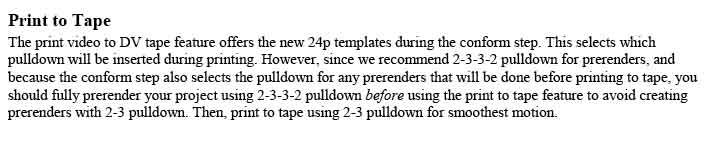
(Sorry for the images, , the pdf is copy protected)
And the procedure for mixing 24p and 60i on a timeline is:

Somehow, this doesn't seem as simple as you described, and certainly doesn't indicate a system where you "never think of pulldowns or rates". The document also has a lot of statements about the need to render to insure smooth playback and print to video - so, this doesn't seem very different to me? Can you explain?
(Sorry for the images, , the pdf is copy protected)
And the procedure for mixing 24p and 60i on a timeline is:
Somehow, this doesn't seem as simple as you described, and certainly doesn't indicate a system where you "never think of pulldowns or rates". The document also has a lot of statements about the need to render to insure smooth playback and print to video - so, this doesn't seem very different to me? Can you explain?
Yeah. That Whitepaper was written for Vegas 4, when 24p and 24pA had just been implemented in the camera world (Vegas 4 integrated 24p shortly after the release of the DVX and SDX900).
You should note that the print to tape paragraph mentions "the new 24p templates." Yes, "new," in 2003.
Vegas is on verison 6 now, and a lot of that stuff is out of date. You don't need to worry about disabling resample or setting your deinterlace method (though you can if you want to).
No one ever said you didn't need to prerender for smooth playback after adding effects.
You should note that the print to tape paragraph mentions "the new 24p templates." Yes, "new," in 2003.
Vegas is on verison 6 now, and a lot of that stuff is out of date. You don't need to worry about disabling resample or setting your deinterlace method (though you can if you want to).
No one ever said you didn't need to prerender for smooth playback after adding effects.
I never thought people could get all worked up over pulldown removal. To be honest, I'm not so wild about how Vegas does it (I'd rather have the pulldown ACTUALLY removed), nor how Final Cut Pro does it (great system, but one dropped frame or timecode error can cause major issues.) Ultimately, though, these are small technical complaints and nothing to form an entire argument around.
For me, the most important thing is interface, where there are major differences. Personally, I love Final Cut Pro's interface, although it's sometimes cluttered and demands a bit of screen real estate at times (still, you get two preview windows to Vegas's one little one, although I just use a dual monitor set up.) Final Cut Pro just feels like editing video to me, while Vegas feels like an odd mixture of iMovie and audio editing. Then again, if I started with Vegas, I'd probably call Final Cut Pro unintuitive and slow to work in. Both seem to get the job done, though.
For me, the most important thing is interface, where there are major differences. Personally, I love Final Cut Pro's interface, although it's sometimes cluttered and demands a bit of screen real estate at times (still, you get two preview windows to Vegas's one little one, although I just use a dual monitor set up.) Final Cut Pro just feels like editing video to me, while Vegas feels like an odd mixture of iMovie and audio editing. Then again, if I started with Vegas, I'd probably call Final Cut Pro unintuitive and slow to work in. Both seem to get the job done, though.
Policar said:(still, you get two preview windows to Vegas's one little one, although I just use a dual monitor set up.)
Just to clarify, Vegas's preview window is whatever size you want it to be (including full-size 1920x1080, if your monitor is big enough), and wherever on the screen you want it to be.
J.R. Hudson
Spirit Animal
Obviously Vegas is mentioned in the AUDIO breath alot; I love this aspect. IN fact, I do a alot of AUDIO layering without ever leaving Vegas (I have zero ideas how the other apps handle this).
Vegas kicks ass.
Vegas kicks ass.
John_Hudson said:Vegas kicks ass.
Yeah, but FCP just has....mojo:happy:
J.R. Hudson
Spirit Animal
No no no. The DVX has Mojo.
FCP just has MAC users. :cheesy: :beer: :laugh:
FCP just has MAC users. :cheesy: :beer: :laugh:

Walter_Graff
Carbonite Member
mmm said:Hey John, don't knock it 'til you've tried it!
Once you've had Mac, you'll never go back!
I'll second that!
The only 3d program I'll use (although I'm bad at it) is 3DS Max, which is PC only.
The only NLE I'll use for serious projects is Final Cut Pro (not that Vegas isn't "good enough," I just don't know it as well and like the interface less). FCP is Mac only, of course.
Clearly this presents a problem....
Oh well. I do prefer OSX to XP, but they're both pretty good. In fact, I use a PC as my main comptuer at home and a Mac as my main computer at school and I definitely prefer the PC because it has much better hardware.
My vegas preview window is 1600X1200, by the way! (Or it may be 1280X1024, I forget which. I picked up two 19'' flat screen CRTs for ten bucks each.) And, yeah, it's a great program, but there's just something about Final Cut Pro's interface that appeals to me. It's totally a matter of preference, but I just love it.
Also, the color corrector 3-way is nifty. I love that plug in.
The only NLE I'll use for serious projects is Final Cut Pro (not that Vegas isn't "good enough," I just don't know it as well and like the interface less). FCP is Mac only, of course.
Clearly this presents a problem....
Oh well. I do prefer OSX to XP, but they're both pretty good. In fact, I use a PC as my main comptuer at home and a Mac as my main computer at school and I definitely prefer the PC because it has much better hardware.
My vegas preview window is 1600X1200, by the way! (Or it may be 1280X1024, I forget which. I picked up two 19'' flat screen CRTs for ten bucks each.) And, yeah, it's a great program, but there's just something about Final Cut Pro's interface that appeals to me. It's totally a matter of preference, but I just love it.
Also, the color corrector 3-way is nifty. I love that plug in.
I used Macs all through college and law school (those labs were usually empty). I don't miss it.
That being said, as I mentioned above, if Vegas were Mac-only, I'd have a Mac.
That being said, as I mentioned above, if Vegas were Mac-only, I'd have a Mac.
Cinema4D is an awesome 3d program - really quite underrated. It's making heads turn now, but for a while it was really looked at like a bastardized Poser or something (it wasn't). It runs beautifully on OSX. I originally used 3dsmax back in the day (college - studied 3d art and animation) but switched (this was the only reason) after seeing how much faster the raytracing was over 3ds.
Give the demo a try sometime. http://www.maxon.net/index_e.html
Compared to Maya, Lightwave, Solidthinking, Softimage/XSI, etc, C4Ds interface is very similar to 3DS.
Give the demo a try sometime. http://www.maxon.net/index_e.html
Compared to Maya, Lightwave, Solidthinking, Softimage/XSI, etc, C4Ds interface is very similar to 3DS.