Vegas over FCP?

I disagree with you there, John. Like Barry says, sometimes the software is so good, it’s worth changing platforms.

I’ll say it again – if Vegas were Mac-only, a G5 would be sitting in my office with a Powerbook next to it.
 
I'm down with that David.

Regarding the MAC / PC issue? I hate that there's only two to choose from:

PC or MAC

What a scam.
 
John_Hudson said:
The real solution is that generally speaking, MAC and FCP users are pretentious biased assholes caught up in the hype. They tend to be attached emotionally to the product (ain't it cool?) and will defend thier software and hardware which I always thought kind of fanatical.

O, shoot, I hope they don't find out I use ProTools, too! Or maybe you only get flamed for that on audio forums...


But I'm curious, really, what the "native 24p" issue is vs. FCP... I use "native 24p" in FCP. Someone pointed out a post from someone who had a slow machine that forced him to use a different pulldown... but that's not a problem with FCP. Am I missing something? I capture 24pa directly into FCP, edit at 24p, output at 24p, burn a 24p DVD. Does Vegas do something different?
 
Try doing that with 24pN.

Try mixing 24p and 60i on the same timeline.

Try using the 24p files you capture on a 60i timeline . . . in any NLE, not just your own.

With Vegas, you capture and edit. 24pN, 24pA, 30p, 60i -- it doesn't matter. No special settings. No pulldown issues. Just drop the clip on the timeline. ANY timeline. Any framerate.
 
John_Hudson said:
MAC and FCP users are pretentious biased assholes caught up in the hype. They tend to be attached emotionally to the product (ain't it cool?) and will defend thier software and hardware which I always thought kind of fanatical.

Steady on John... I do love my Mac... true... but only because it is so much less hassle than all the PC NLEs I see falling down around me. I have no experience of Vegas though as few people seem to use it in England, I would certainly like to try it though.

Even if Vegas was great, I would still be very unlikely to move from FCP because I have spent years learning it. I think you get to a point if you edit enough where the NLE is an extention of your body (okay then I am pretentious!! LOL) and it simply edits your footage without needing to think about the technically aspect of things. That feeling and productivity is worthy of love IMO.

FCP does everything I need, with the occasional annoyance, but you learn to get around those. I don't use 24p (in PAL it isn't used much) and normally have separate sound designers using whatever dedicated systems they want - but it always integrates into FCP fine.
 
Jubal28 said:
Try doing that with 24pN.

What's 24pN? 2:3:2:3 pulldown? Is that a problem? Works for me...

Try mixing 24p and 60i on the same timeline.

Try using the 24p files you capture on a 60i timeline . . . in any NLE, not just your own.

With Vegas, you capture and edit. 24pN, 24pA, 30p, 60i -- it doesn't matter. No special settings. No pulldown issues. Just drop the clip on the timeline. ANY timeline. Any framerate.

That's cool... but what does it DO with all those things on the same timeline? And how much control over it do you have? I mean, I can drag all these things onto the same timeline. Sometimes needs rendering... is that the difference? Does Vegas play back better without rendering? Or just hold off on the rendering until final output or something?

Or, are the captures you're talking about all in 60i? I can capture all those things at 60i... it's the only format the DVX outputs; and throw 'em all in the same timeline.

But, having these all in the timeline, if you want to, say, output for a 24p DVD, what does it do with all the 60i and 30p? A usable conversion?
 
John_Hudson said:
Regarding the MAC / PC issue? I hate that there's only two to choose from:
PC or MAC

Hey, man, ain't there some Linux video editing software in a perpetual beta stage? I've met some people who actually even use it. And much cheaper (free) than the stuff all us pretentious commercial software using assholes use. And you get the source code, so the possibilities are unlimited. Wanna mix 24p and live RealPlayer streams in the same timeline? Just write it!
 
Vegas captures everything in 60i, but it knows what has pulldown. It seamlessly removes pulldown when you put the clip on a 24p timeline, so you’re editing in native 24p. It leaves pulldown in place when you edit on a 60i timeline. So the files are editable on ANY timeline, in any NLE.

And . . . you can switch the timeline properties at will and move between 24p and 60i any time you want, no matter what’s on the timeline.

(And if something doesn’t have pulldown, like a film telecine, you can STILL “remove” it manually.)

As for playback, it will play it all back smoothly, and like any NLE which doesn’t have background rendering, it will start to lag depending on how many effects you add, etc..

Output – yes. You can make a 24p DVD out of any footage. ANY footage. I know of no other NLE which will let you convert 30p or 60i to 24p from its timeline, and believe me, I researched the hell out of it.

You can also output to tape inserting either 2:3 or 2:3:3:2 pulldown – your choice.

Everything I’ve read, including many posts from Graeme, indicates to me that capturing standard 24p (not advanced) to edit in 24p and output to 24p DVD requires jumping through hoops and plugins, and has been described as “miserable.” In Vegas, there’s absolutely no difference between 24p and 24pA in terms of workflow. Or 60i and 30p, for that matter.

Like I said, capture, drop, edit. Those are the only three things you need to do. No special settings, no checkboxes, no hoops, no jumps.
 
John_Hudson said:
I'm down with that David.

Regarding the MAC / PC issue? I hate that there's only two to choose from:

PC or MAC

What a scam.

Sun (Ultra/Sparc) and SGI (MIPS) both make excellent CG & editing stations (not referring to their Dell-alike x86 line). Sun had some unbelievable realtime HD processing going on at my last Siggraph.

The scam really isn't PC vs Mac, the scam is about only have x86 as the last remaining easiy accessible contender.
 
Jubal28 said:
Output – yes. You can make a 24p DVD out of any footage. ANY footage. I know of no other NLE which will let you convert 30p or 60i to 24p from its timeline, and believe me, I researched the hell out of it.

Right - but is the conversion any good, is the question.

You can also output to tape inserting either 2:3 or 2:3:3:2 pulldown – your choice.

This is also doable in FCP.. it also has the crappy-but-efficient 2:2:2:4 pulldown, which was the subject of th post you mentioned.

Output – yes. You can make a 24p DVD out of any footage. ANY footage. I know of no other NLE which will let you convert 30p or 60i to 24p from its timeline, and believe me, I researched the hell out of it.

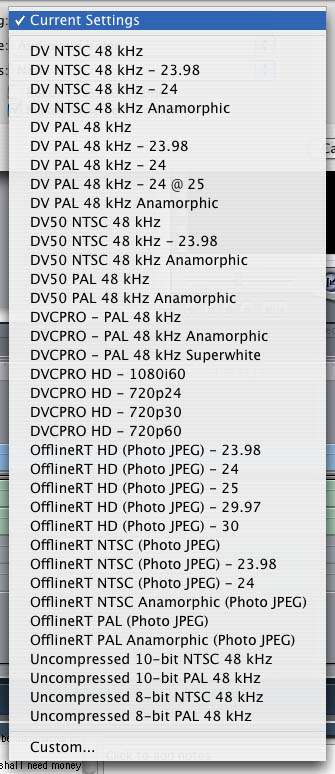
Look at my output options from a 29.97 Timeline in FCP: http://ullanta.com/outopt.jpg
outopt.jpg
... doesn't that cover it?


Anyway, yeah, some people may have problems, but "capture, drop, edit" is my experience with FCP... no jumping through hoops at all for 24p, 24pa, 30p, 60i, DVCPro50, DVCProHD...
 
Oh – sorry; didn’t answer the question. Yes, the conversion to 24p is excellent.

However, I don't see any pulldown schemes in your output options, and others say it (FCP) can't output with 2:3 pulldown. Is this correct? I mean, without a plugin?

And I'm sure you mention DVCPRO for a reason. It is true that Vegas currently doesn’t have the DVCPRO codec natively, so that’s a bona fide FCP advantage. It can be downloaded, though, and I expect an update of Vegas to include it natively before too long . . . if Sony is smart about it. And with Vegas, they’ve been very smart.

But . . . what DVCPRO-HD footage are you working with? Do you use a Varicam?
 
That 4.5?

Here's FCP5 w/ all of the new HDV goodness:

fcp4up.jpg


I don't do a lot of 24p work, but the few times I have I've had I've had 0 problems (24p timeline, 60i timeline, you name it).

Regarding pulldown options, when you choose your preset/template you get a settings dialog that allows you to finer control pull-down options.
 
OK, let me make sure I correctly understand what you’re saying . . .

My understanding is that FCP does pulldown removal during capture (which is only geared for 24pA), so the files saved are pure 24-frame (or, 23.976) Quicktimes. Is this not correct?

If it is correct, are you further saying that you can use these same files with no problem on a 60i timeline?

Walk me through the process.
 
Jubal28 said:
Oh – sorry; didn’t answer the question. Yes, the conversion to 24p is excellent.

However, I don't see any pulldown schemes in your output options, and others say it (FCP) can't output with 2:3 pulldown. Is this correct? I mean, without a plugin?

The pulldowns come in to play primarily for NTSC / DV playback from the timeline; FCP offers a number of options - 2:3, 2:3:3:2, 2:2:2:4, maybe others. Certainly, all us folks editing 24p natively in FCP are able to watch on our monitors. It would indeed suck if there was no pulldown... but there is; and you can tailor it to efficiency or quality.

I don't have it in front of me now, so I'm not sure about options for pulldown if exporting a 24p timeline at 60i. But why? Don't take offense, but it strikes me that what you describe as "native" 24p on Vegas is not native... it's 60i-encoded 24p, and takes up 20% more space and bandwidth than necessary. FCP can capture the same way and deal with it as 60i, but you lose a lot of the benefit. I like the space savings and lower bandwidth requirements that let me do more...
 
Jubal28 said:
OK, let me make sure I correctly understand what you’re saying . . .
My understanding is that FCP does pulldown removal during capture (which is only geared for 24pA), so the files saved are pure 24-frame (or, 23.976) Quicktimes. Is this not correct?
It is a choice you make at the time of capture. You can capture as 60i, as 24pa, or 24p(N? 2:3:2:3).

If it is correct, are you further saying that you can use these same files with no problem on a 60i timeline?
No, if pulldown is removed at capture, it's saved as a more efficient "native"/"true" 24p file... in 24pa, the extra frames are deleted, in 24p(N?), the proper fields are constructed into frames and the rest is discarded.

You can put it into a 60i timeline, but as for "no problem"... well, some rendering. But I don't see why you'd want to do this... if you want it at 60i, capture it as 60i.

Indeed, you can't change the timebase of a timeline on the fly... but I'm really not sure why you'd want to. You can export to other timebases. It seems to me perhaps a distinction of when the computer does the work, which may effect resources available for realtime effects and such.

But seriously, I really think that there is a perception that FCP is "easier" and "more stable" (I'm not saying it is), and that for that reason a lot more people with little experience are using it and generating questions and (non-)issues here. But in experienced hands it doesn't have the frustrations that you're responding to... the hoops and hurdles. It has a natural, efficient workflow and handles the things we need to handle. I have no doubt that Vegas does the same, and joking aside have no stance on which is better - I just want you to understand that FCP really is pretty good, and you shouldn't let a lot of the repeated posts make you think otherwise, any more than the old "what's that click in the lens" makes you think DVX build quality is low...
 
Don't take offense, but it strikes me that what you describe as "native" 24p on Vegas is not native... it's 60i-encoded 24p, and takes up 20% more space and bandwidth than necessary. FCP can capture the same way and deal with it as 60i, but you lose a lot of the benefit. I like the space savings and lower bandwidth requirements that let me do more...

It’s a limitation of the AVI format, not Vegas. There’s no such thing as a native 24p AVI. Vegas can edit a 24p Quicktime perfectly natively. But it’s very nice to have the option to edit the captured files in either 60i or 24p.

The filesize and bandwidth are hardly issues in these days of fast processors and large, fast hard drives, all mostly inexpensive.

If it IS an issue for you, then I’m thinking it’s either a hardware one, or you’ve got unnecessary processing going on.


You can put it into a 60i timeline, but as for "no problem"... well, some rendering. But I don't see why you'd want to do this... if you want it at 60i, capture it as 60i.

The point is, in Vegas, you don’t have to choose how to capture it, and your files will work in any NLE.


Indeed, you can't change the timebase of a timeline on the fly... but I'm really not sure why you'd want to.

It *really* comes in handy when, say, you’re preparing a presentation on the topic of converting 60i to 24p and showing the differences between the two. Everything you need from a single project.

And, as with many things, you can’t imagine “why you’d want to” until you have the option to do it. It’s a tool in the box. What you do with it is up to you.


I just want you to understand that FCP really is pretty good, and you shouldn't let a lot of the repeated posts make you think otherwise, any more than the old "what's that click in the lens" makes you think DVX build quality is low...

I’m not going by the questions; I’m going by the answers from guys like Graeme. When he says capturing and editing 24p (2:3) for a 24p DVD is a pain, or “miserable,” I tend to give it credibility, because he’s certainly one to know, and as pro-Mac as he is, he has no reason to exaggerate the problem.

Don’t get me wrong; FCP is by all accounts a fine editor; there are just things – and things very important to users of the DVX – that Vegas does a lot better . . . or, indeed, at all.

This is why I use Vegas.

FCP gets more “industry” respect right now, but it’s been around longer. There was a time when Avid was the only game in town and FCP was the little editor that could. Well, give Vegas a little more time.
 
Jubal28 said:
The filesize and bandwidth are hardly issues in these days of fast processors and large, fast hard drives, all mostly inexpensive.

Untrue! Especially if you're using a few streams at a time. There's a lot of heavy processing that's not unnecessary!

The point is, in Vegas, you don’t have to choose how to capture it, and your files will work in any NLE.
Well, no... they won't work as 24p in anything but Vegas (unless you do a pulldown removal first). They'll be 60i.

It *really* comes in handy when, say, you’re preparing a presentation on the topic of converting 60i to 24p and showing the differences between the two. Everything you need from a single project.
I could be cheeky and dismiss that as academic...

I’m not going by the questions; I’m going by the answers from guys like Graeme. When he says capturing and editing 24p (2:3) for a 24p DVD is a pain, or “miserable,” I tend to give it credibility, because he’s certainly one to know, and as pro-Mac as he is, he has no reason to exaggerate the problem.
(Except maybe to sell some software? Just kidding, Graeme!) But it's not such a pain, and furthermore makes no sense. Even if capturing 2:3 is a pain, then editing should be no different from 2:3:3:2... it's the same after pulldown removal. If there's a difference, capture's not a pain... it's just being done wrong. Anyway, where's that quote from? Can I see?
 
Anyway, it's been fun! I have to go home, so i won't be procrastinating here at DVXUser for at least a few hours. I've learned some about Vegas, but I'd still like to know how it handles things internally. But don't believe the hype (or do?)... FCP handles 24p just fine, and I'm pretty sure - albeit in a different idiom - can get done the same things Vegas can. They can both be reduced to Turing machines, I'm sure...
 
ullanta said:
Untrue! Especially if you're using a few streams at a time. There's a lot of heavy processing that's not unnecessary!

I haven't had any problems . . . but then, there's no way to make any direct comparisons.


Well, no... they won't work as 24p in anything but Vegas (unless you do a pulldown removal first). They'll be 60i.

And . . . they'll work as 60i, which every NLE can do, whereas 24p files? Won't work in any NLE which doesn't have a 24p timeline. I think all of the big boys do at this point, but there are quite a few out there which don't.


I could be cheeky and dismiss that as academic...

Why? It saved me tons of time. It's as real-world a use as any.


(Except maybe to sell some software? Just kidding, Graeme!) But it's not such a pain, and furthermore makes no sense. Even if capturing 2:3 is a pain, then editing should be no different from 2:3:3:2... it's the same after pulldown removal. If there's a difference, capture's not a pain... it's just being done wrong. Anyway, where's that quote from? Can I see?

Here's an interesting quote from Graeme, which is in the continuation of the thread I linked to above:

I fully understand. It's just a limitation on how FCP works, in that Apple only implemented addition of pulldown as a play-out effect.

If you have AE, drop the 23.98fps clip into a 23.98fps project. Now go to the export panel, and set the addition of 3:2 pulldown in the export. It's all outlined in the manual.

As something I alluded to before -- Vegas can, say, export to tape inserting either a standard or advanced pulldown scheme, and the scheme can then be removed by another NLE. I'm taking it from the thread that FCP can't. Is this correct?

I'm also taking it that FCP can't render a DV file as 60i with pulldown, for removal later? Is this also correct?

And those are honest questions.
 
Back
Top