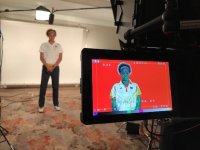
I have a chromakey green screen setup with kino lights, would like to add a white backdrop option for multi camera shoots. Screen needs to be 20 to 24 feet wide. Would the existing kino flo lights work well with a white vinyl background. I am guessing I would have to probably under light my subjects by 1 to 2 stops to be able to get a clean white. Would Vinyl work well for my setup, Any suggestions?

Navigation
Install the app
How to install the app on iOS
Follow along with the video below to see how to install our site as a web app on your home screen.
Note: This feature may not be available in some browsers.
More options
You are using an out of date browser. It may not display this or other websites correctly.
You should upgrade or use an alternative browser.
You should upgrade or use an alternative browser.
Using Vinyl for a white backdrop
- Thread starter Ken1212
- Start date

puredrifting
Major Contributor
Why vinyl? Vinyl would show sheen and have hot spots/reflections. If you need removable, you would use Muslin or canvas, not vinyl. The idea of a white backdrop is to slightly blow out the white so that seams, scuffs and wrinkles are not visible. The other question would be why don't you just shoot green screen and key it with white? Then it will look perfectly consistent, you would have no vignetting or falloff as your white would be digital rather than real. This (shooting green screen for white or black) is done far more often than many shooters realize.
Why vinyl? Vinyl would show sheen and have hot spots/reflections. If you need removable, you would use Muslin or canvas, not vinyl. The idea of a white backdrop is to slightly blow out the white so that seams, scuffs and wrinkles are not visible. The other question would be why don't you just shoot green screen and key it with white? Then it will look perfectly consistent, you would have no vignetting or falloff as your white would be digital rather than real. This (shooting green screen for white or black) is done far more often than many shooters realize.
The problem I have been facing is my keys are not perfect and with white you need a perfect key, the edges is where I usually have a problem. When I key against any colored image you don't notice the issue but if I go white I am not satisfied with the outcome. It is not bad at all but not perfect. My studio is small 200SF and my subject is about 8 feet away from screen and I do use backlight on the subject. I might want to experiment with some side lights to see if I can get perfect edges. But green screen makes a lot of sense because if I change my mind later on concerning white my options would still be very open.

Run&Gun
Veteran
I would also vote against vinyl, because of the hotspot/reflectivity issues. I used to always recommend doing green screen when someone wanted a white background so they could get it just the way they wanted it in post, especially if it was a series of shoots being done by different people all over the country. Consistency...
But, I have come around on shooting them practically. On single person set-ups, we light the background from the sides and as Dan says, you want to blow the white out slightly so that it has no detail and you get the infinite white abyss. Much like using a waveform when lighting a green screen, I've found false color to be a great way to check and makes sure the white is uniformly "blown out".
But, I have come around on shooting them practically. On single person set-ups, we light the background from the sides and as Dan says, you want to blow the white out slightly so that it has no detail and you get the infinite white abyss. Much like using a waveform when lighting a green screen, I've found false color to be a great way to check and makes sure the white is uniformly "blown out".
I just did this (albeit in a very non ideal way) using a white projection screen that was 10x30, hung like a seamless from a cross bar). We lit to 90-95% (I couldnt get it perfectly flat at 95), and even then I could still see the fold lines in the screen. I was recommended the 90-95 by a colleague so I dont knownif I should have lit even hotter or what, but I would recommend either a paper backdrop or something stretched taught on a frame or tied aggressively to the support stands to get rid of lines/wrinkles.
Run&Gun
Veteran
Seamless Paper does make it easy. That's what I usually use for white, but I'm not going as big as the OP, either.
I would take the exposure to at least 100% percent. I just pulled some stills up from the last one I did. With False Color on my smallHD, Red is 99%-100% and I was achieving solid red on the backdrop. It was probably well over 100% and into clipping, which makes it very easy to get rid of any detail(wrinkles, lines, etc.) and get it perfectly flat, but I don't have a shot of the waveform.
I would take the exposure to at least 100% percent. I just pulled some stills up from the last one I did. With False Color on my smallHD, Red is 99%-100% and I was achieving solid red on the backdrop. It was probably well over 100% and into clipping, which makes it very easy to get rid of any detail(wrinkles, lines, etc.) and get it perfectly flat, but I don't have a shot of the waveform.
Last edited:

starcentral
Veteran
I would just get yourself a roll of seamless paper. It's easy to blow white (1-2 stops over your subject) and when it gets kinked or dirty or torn, you cut it off and unroll some more.
If you're getting uneven issues, well obviously its because your lighting is sourcy. False color is a good idea to check the uniformity of your background and adjust with a 3rd or other lights.
White seamless is what I've been using for years and seems to work really well for me.
If you're getting uneven issues, well obviously its because your lighting is sourcy. False color is a good idea to check the uniformity of your background and adjust with a 3rd or other lights.
White seamless is what I've been using for years and seems to work really well for me.