Using OnLocation on location

Carlos_E._Martinez

Well-known member
Yesterday I installed OL CS4 on my Toshiba laptop, and linked my Sony Z1 to it, set for HDV.

Image quality and monitor adjustment looks good, and very much resembles setting up a pro monitor, like by using blue-screen.

What I didn't like was video fluidity. Image is "jumpy", as if it was just a few frames per second, instead of 25 or 30. What I wonder is how to solve it or what it's related to.

OS is 32-bit XP, and supposedly CS4 was designed for it.

Suspects are computer memory (2Gb), graphic board or graphic software (ATI) or plain program limitations.

This setup is replacing a Philips portable DVD I always use with this camera which I wanted to improve on. As things are it doesn't.

One thing I did like on the OL screen was the wfm screen.

Would things improve on newer OL versions, like CS5 or CS6? Problem is those demand 64-bit OS, with more memory, and this laptop should be a bottleneck.
 
I've used OL quite a bit with a Z1. I had 8 gigs of system RAM however. The video monitor had about a 1/2 second delay but otherwise was free of stutter.

If it's fluidity you're after try clicking the dropdown menu in the upper right corner of the monitor window. You'll find a HDV resolution option that could be reduced.

For me OL was really all about the scopes and simultaneous HDV ingest, with the on board miniDV as backup.
 
Yes, I think 1/2 second is the delay I'm talking about, which is something that I didn't expect. So it's not related with memory, it's inherent to the program. It's delay, and not stutter as I called it.

It's not reducing reslution that I'm after, but exactly the opposite. As it is, the Philips DVD player I'm presently using as monitor provides a much better quality, even if in SD, than the OL.

Can you tell me more about how you used the scopes, particularly the wfm?

Of course I'm also thinking of simultaneous HD recording, as a backup to tape.
 
So it's not related with memory, it's inherent to the program.
Actually, no, it's related to the camera. HDV's firewire output is delayed by a half second. HDV is a Long-GoP codec, and it compresses groups of frames at a time. So it has to buffer up 15 frames, and then compress them all at once, before it can send its data out the firewire port.

If you use OnLocation with a realtime transfer system you'll see that it's instantaneous. If your Z1 has a standard-def DV mode, try that -- you'll see there's no delay. Of course, that's strictly educational, not practical, because DV is standard-def and you want high-def, so ... it's only if you're curious as to the reason why.
 
That the image be delayed for 1/2 a second wouldn't be a problem. What it does is that it seems to play just one frame or so a second, and that's why I called the image jumpy.

Any way to solve that?

And yes, of course I want HD and not SD. Even if I went for SD output, in order to feed the monitor, the video wouldn't then be HD to record on the laptop.
 
Yes, go into the monitor menus and look for the HDV playback options. There's one for frame rate and one for frame resolution. When OL was introduced, computers really struggled with handling long-GoP codecs, so they made it only process a few frames per second by default. You have to change that if you want to see a smoother image. And your computer has to be fast enough to actually handle it.
 
Yes, go into the monitor menus and look for the HDV playback options. There's one for frame rate and one for frame resolution. When OL was introduced, computers really struggled with handling long-GoP codecs, so they made it only process a few frames per second by default. You have to change that if you want to see a smoother image. And your computer has to be fast enough to actually handle it.

There's no monitor menu on my OL to select for HDV or any other.

My version is 4.0.3, so I wonder if that came later on. AFAIK, OL was first introduced in CS3, so by CS4 there should be an HDV update.
 
OnLocation existed as "DV Rack" long before then; Adobe bought it and rechristened it "OnLocation". As DV Rack, they had an HDV PowerPack, so by the time OnLocation was put in CS3 it was already updated for HDV.

I deleted OL3 and OL4 when I installed OL5, so I can't look up the exact menu option for you, and maybe it didn't exist in OL4 anyway?

In OL5 you click the dropdown menu on the field monitor, and there's a menu for "HDV Live Monitoring". In that there's an option for Resolution and one for FrameRate, which (on CS5) offers "Full, "Medium", or "Low". You probably have it in Low.

Again, that's OL5, don't know what the equiv is in OL4 but it's probably similar.
 
It seems as if OL5 had improvements over OL4. There's no dropdown menu for the monitor, and in Preferences there's no option for HDV, resolution or frame rate.

Which would probably desqualify OL4 for my application, and I have no intention of using OL5 because I would need 64-bit, which I have no possibility or interest for.

I don't see any other way out.
 
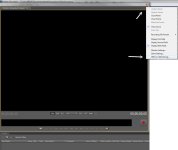
Yes, I did find those drop-down menus you talk about, on the upper right. But there's no HD or HDV option, be it for monitor or recording.

On monitor there's 4:3 and 16:9, and for recording there's only avi and Quicktime, when I think there should be m2t or mpeg for HDV.
 
olscreen.jpg

That's where the menu is. It kind of has to be there because I can testify that it was definitely there in OL3, and it is currently there in OL5, so it would make no sense for them to remove it from OL4...
 
Back
Top