This is culled from a post I put up at another forum but it was well received so I thought maybe DVXuser viewers might also find it interesting (assuming you haven't already seen it at the 'other' forum, that is!). . .
I'm sure this isn't news to many of you but I have only recently discovered how useful this plug-in is for simulating dramatic lighting effects. As it's not obvious from the name of the plug-in I thought it might be worth highlighting what it can do for any newcomers to the world of Vegas.
I used it widely on this work in progress music video: http://www.film-it.net/stuff/spaceship.wmv.
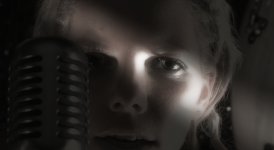
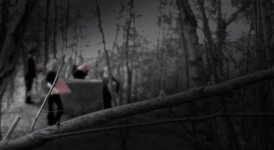
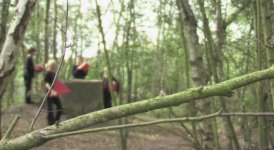
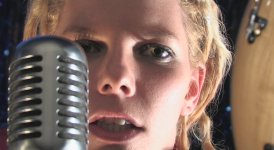
I've attached a couple of stills (from the video) that show some of the more dramatic uses (before and after).
Basically, it allows you (among other things) to simulate spotlights, omni and directional lights and while it isn't perfectly realistic in all situations, it can give some great results. So much so that I shot the 'as live' portions of this video with absolutely 'clean' lighting (ie I got the best picture I could) and then spent time in post tweaking and repositioning virtual lighting in Bump Map.
Bump Map allows you to focus the beam, adjust the amount of ambient 'spill', adjust the beam intensity and the source (in simulated 3d space) and focal point of the beam (depending on what type of light you are using). You'll need to reduce the Bump Height setting to zero, which (I think) negates the effect of the Bump Channel and White Is High settings.
Why is this so useful? Well, I only possess a very basic lighting kit (3 Ianiro non-focusing Lilliputs and a 750w (3 x 250W) halogen with softbox. It's my biggest area of weakness and I often struggle with getting decent atmospheric lighting. So, I thought I'd do it in post. I assumed I would have to use After Effects to achieve anything decent but I was delighted to see that I can stay right inside Vegas.
BTW, I'd welcome any critique of the video itself. It is in it's final stages of being tidied and there is a ton of colour work and other tweaking still to do, but this is pretty much the final structure. Cheers!
Ian . . .
I'm sure this isn't news to many of you but I have only recently discovered how useful this plug-in is for simulating dramatic lighting effects. As it's not obvious from the name of the plug-in I thought it might be worth highlighting what it can do for any newcomers to the world of Vegas.
I used it widely on this work in progress music video: http://www.film-it.net/stuff/spaceship.wmv.
I've attached a couple of stills (from the video) that show some of the more dramatic uses (before and after).
Basically, it allows you (among other things) to simulate spotlights, omni and directional lights and while it isn't perfectly realistic in all situations, it can give some great results. So much so that I shot the 'as live' portions of this video with absolutely 'clean' lighting (ie I got the best picture I could) and then spent time in post tweaking and repositioning virtual lighting in Bump Map.
Bump Map allows you to focus the beam, adjust the amount of ambient 'spill', adjust the beam intensity and the source (in simulated 3d space) and focal point of the beam (depending on what type of light you are using). You'll need to reduce the Bump Height setting to zero, which (I think) negates the effect of the Bump Channel and White Is High settings.
Why is this so useful? Well, I only possess a very basic lighting kit (3 Ianiro non-focusing Lilliputs and a 750w (3 x 250W) halogen with softbox. It's my biggest area of weakness and I often struggle with getting decent atmospheric lighting. So, I thought I'd do it in post. I assumed I would have to use After Effects to achieve anything decent but I was delighted to see that I can stay right inside Vegas.
BTW, I'd welcome any critique of the video itself. It is in it's final stages of being tidied and there is a ton of colour work and other tweaking still to do, but this is pretty much the final structure. Cheers!
Ian . . .